MCP Tools for Radar
ByteHide Radar exposes five tools through the MCP server that your AI coding agent can call directly. This page covers every tool, its parameters, and usage examples.
Setup Required
Before using these tools, connect your AI agent to ByteHide MCP. See the Setup & Connection guide for instructions on Claude, Cursor, VS Code, and other clients.
scan_code
Scan source code files for security vulnerabilities (SAST), hardcoded secrets, and code quality issues. Returns findings with severity, CWE references, exact line numbers, and fix recommendations.
Parameters
| Parameter | Type | Required | Description |
|---|---|---|---|
files | array | Yes | Files to scan. Each item has a path (relative file path) and content (the file content to analyze) |
scan_type | string | No | What to scan for: sast, secrets, or all (default: all) |
context | object | No | Git context for linking results to your ByteHide dashboard |
The context object accepts:
| Field | Description |
|---|---|
git_remote | Output of git remote get-url origin. Used as the project identifier |
git_branch | Output of git branch --show-current. Associates findings with a branch |
folder_name | Workspace folder name. Used as fallback project name if git_remote is not available |
Supported Languages
General Availability: C, C++, C#, Go, Java, JavaScript, JSX, TypeScript, TSX, Kotlin, PHP, Python, Ruby, Rust, Scala, Swift.
Also supported: Apex, Bash, Dart, Dockerfile, Elixir, HTML, JSON, Lua, OCaml, R, Solidity, Terraform, XML, YAML, and more.
How it works
- The AI agent reads the files you want to scan and sends their content to the tool
- ByteHide Radar analyzes the code for OWASP Top 10 vulnerabilities, CWE patterns, and hardcoded credentials
- If no project exists yet for this repository, one is created automatically in your ByteHide dashboard
- Results are returned inline with severity levels, affected lines, and actionable fix suggestions
Example usage
Ask your AI agent:
- "Scan this file for security vulnerabilities"
- "Check src/auth/login.ts for hardcoded secrets"
- "Run a security audit on all files in the src/ directory"
Here's an example of scan_code in action on Claude.ai. The user shares C# code with a potential SQL injection and asks if it's safe:
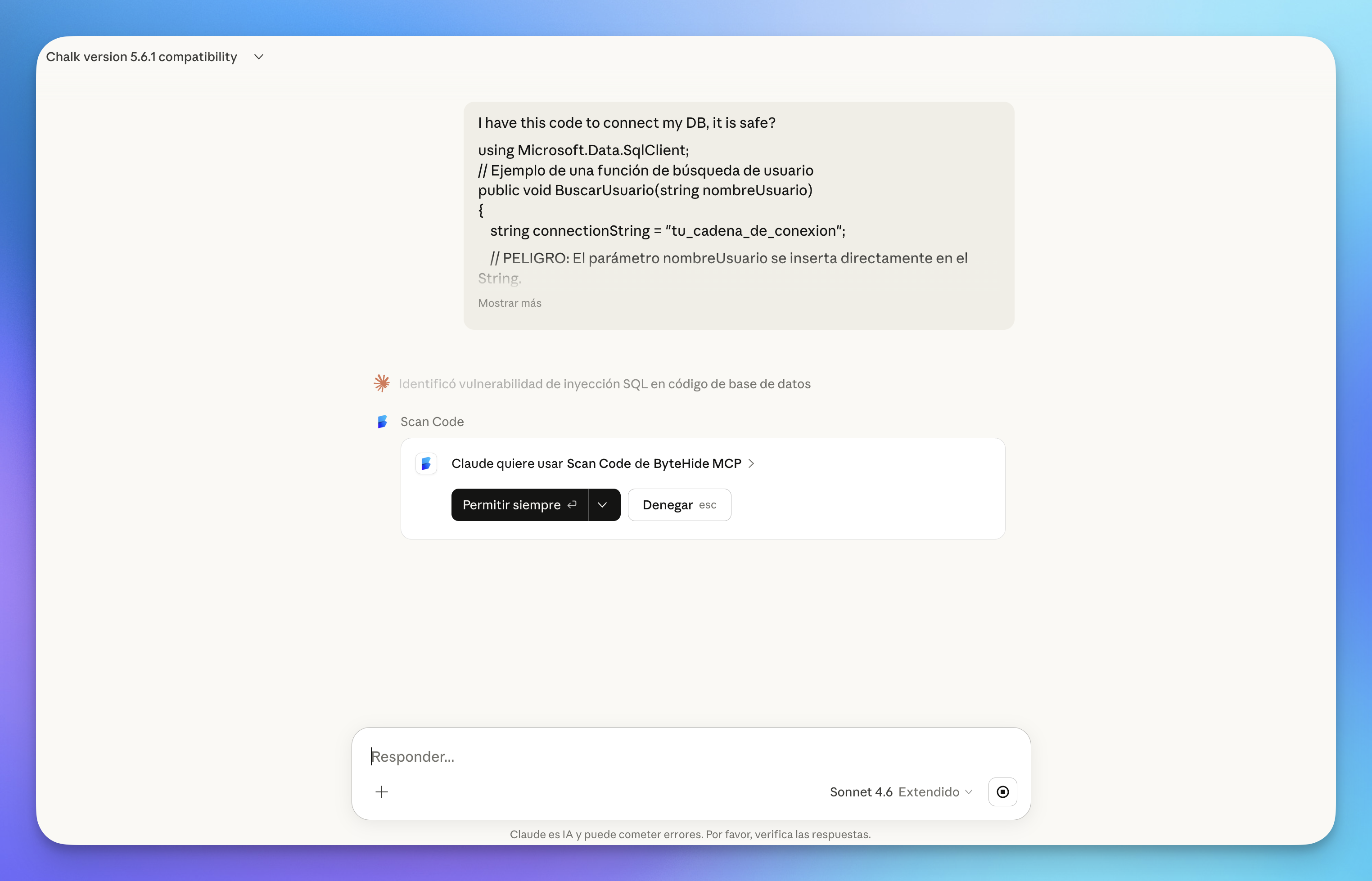 Click to expand
The tool returns the finding with severity, CWE reference, affected file, and a description of the issue:
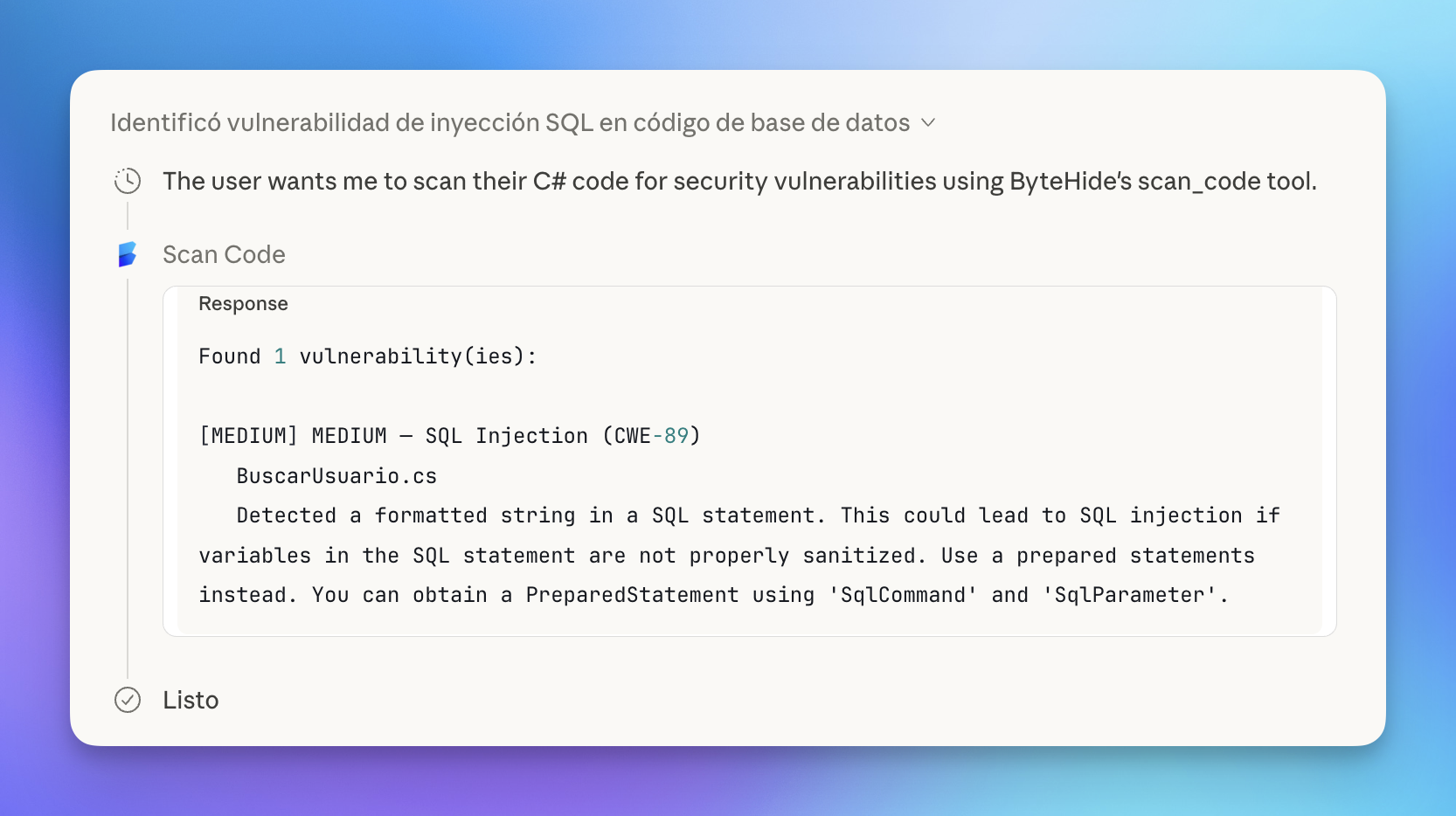 Click to expand
Claude then uses the scan results to explain the vulnerability in context — highlighting the dangerous line and demonstrating how an attacker could exploit it:
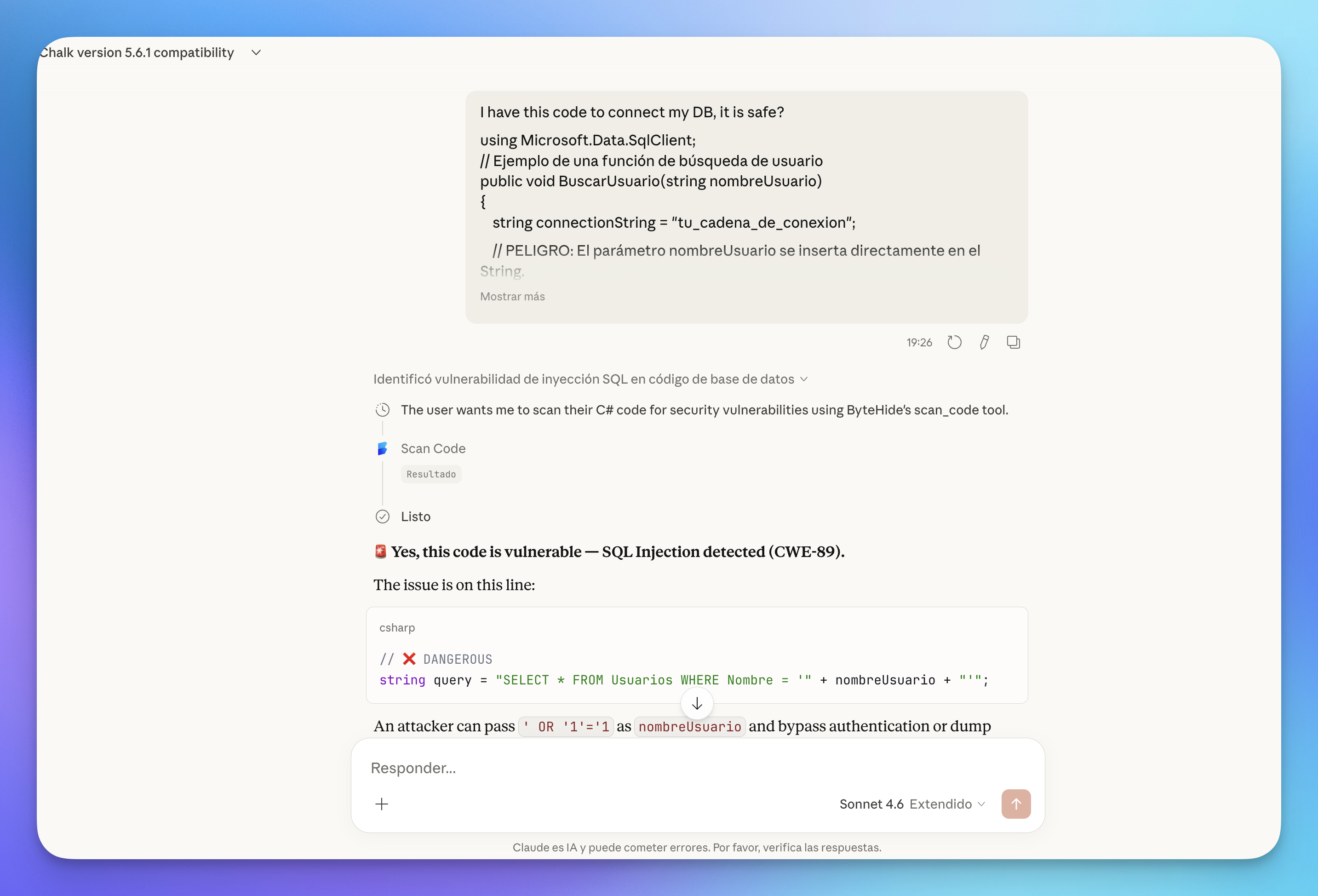 Click to expand
Git Context
For best results, always work within a git repository. The tool automatically detects your remote URL and branch to link findings to the correct project in the ByteHide dashboard.
All findings from MCP scans sync to your Radar dashboard, where you can track them alongside your regular scans, filter by severity or CWE, and generate autofixes:
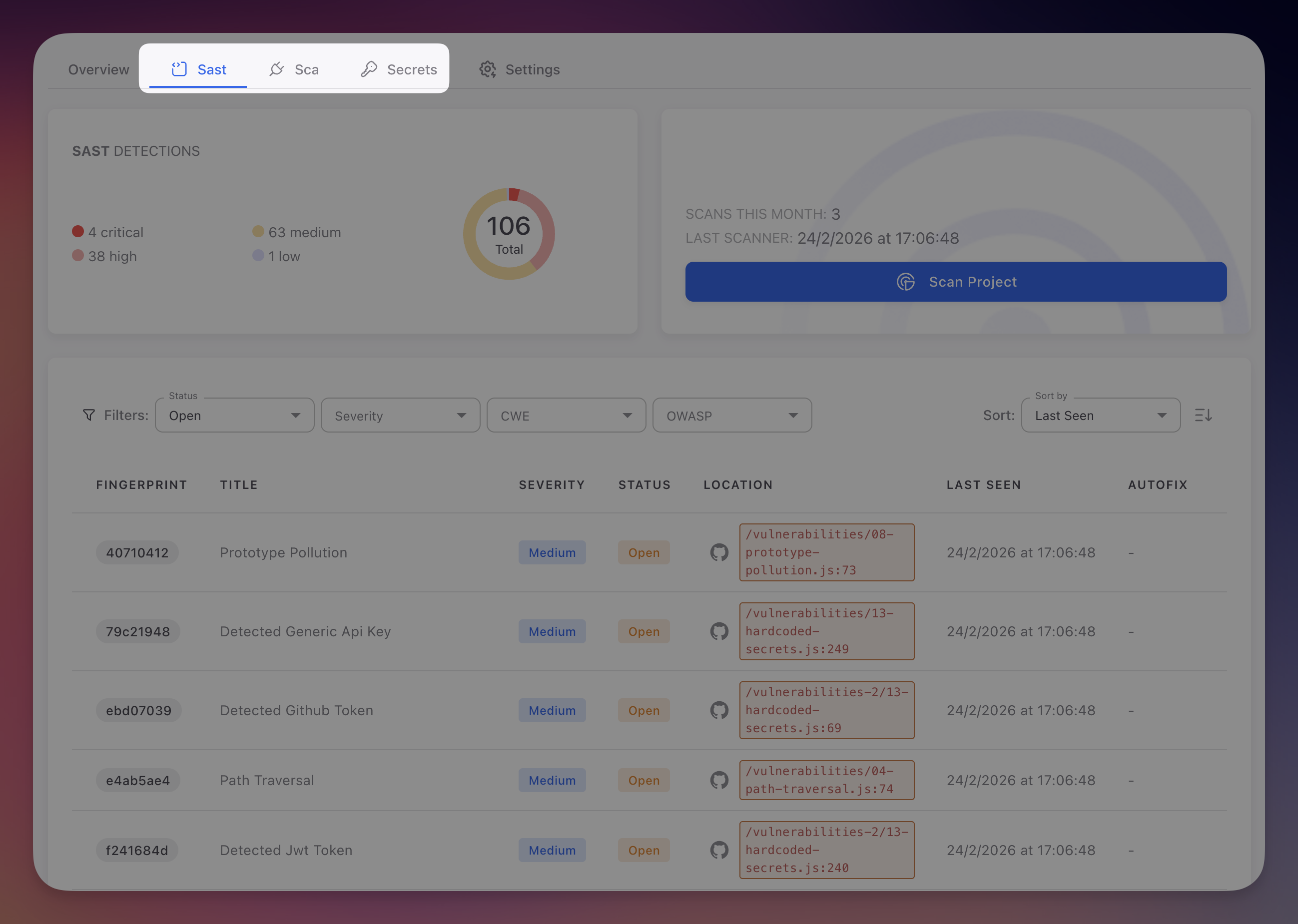 Click to expand
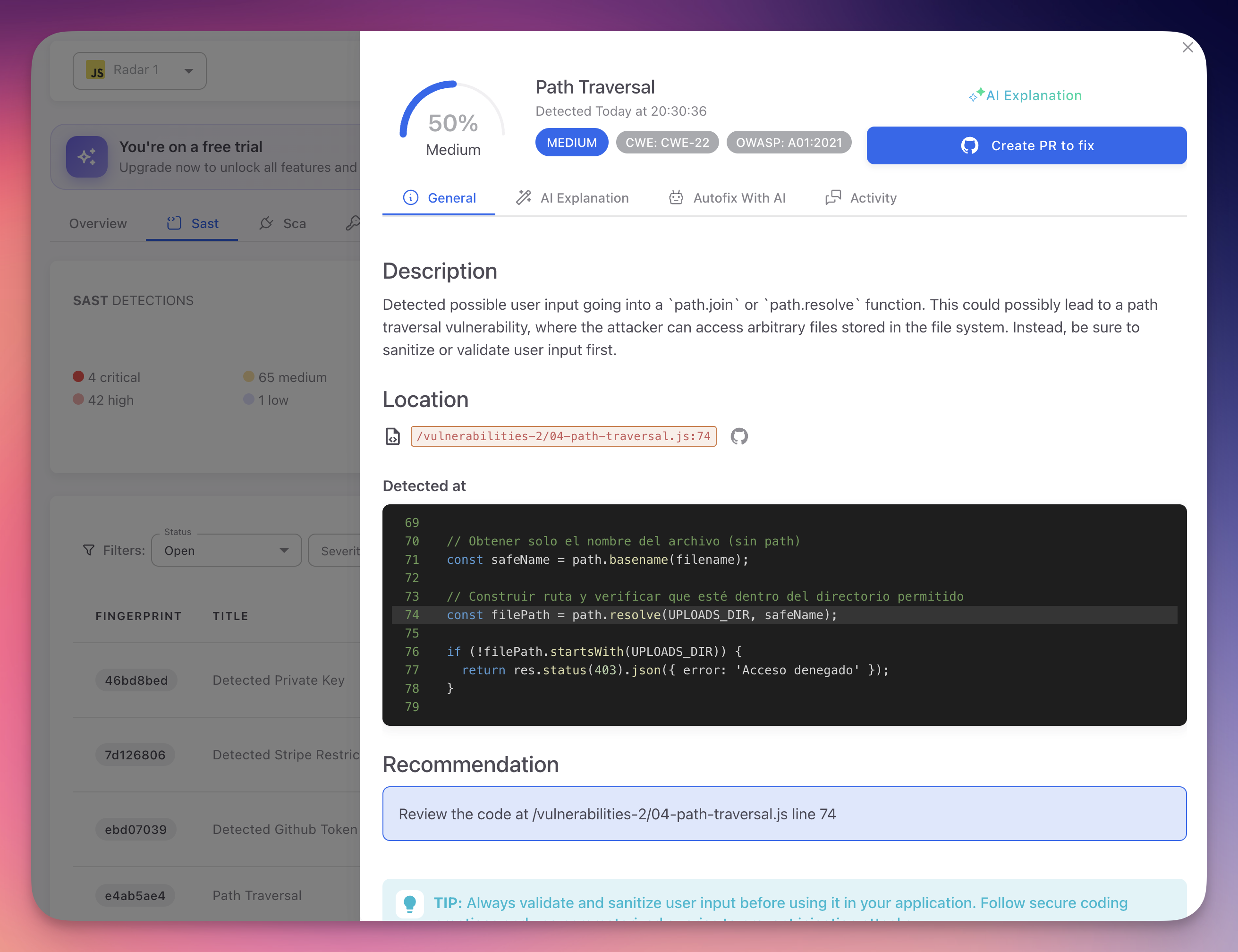
Click on any finding to see the full detail: affected code lines, CWE and OWASP references, AI-powered explanation, and a one-click option to create a fix PR:
 Click to expand
check_dependency
Check whether a specific package is safe to install. Returns known CVEs, severity, license information, and an upgrade recommendation if a safer version exists.
Parameters
| Parameter | Type | Required | Description |
|---|---|---|---|
package | string | Yes | Exact package name as published in the registry (e.g., lodash, express, flask) |
version | string | No | Specific version to check (e.g., 4.17.20). Checks the latest version if omitted |
ecosystem | string | No | Package registry: npm, pypi, maven, nuget, go, rubygems, cargo, packagist (default: npm) |
context | object | No | Git context (same fields as scan_code) |
Supported Ecosystems
| Ecosystem | Language | Example Package |
|---|---|---|
npm | JavaScript / TypeScript | express, lodash |
pypi | Python | flask, requests |
maven | Java | com.google.guava:guava |
nuget | C# | Newtonsoft.Json |
go | Go | github.com/gin-gonic/gin |
rubygems | Ruby | rails, nokogiri |
cargo | Rust | serde, tokio |
packagist | PHP | laravel/framework |
Example usage
Ask your AI agent:
- "Is lodash@4.17.20 safe to install?"
- "Check if the latest version of flask has any CVEs"
- "Before I install jsonwebtoken, check if it's secure"
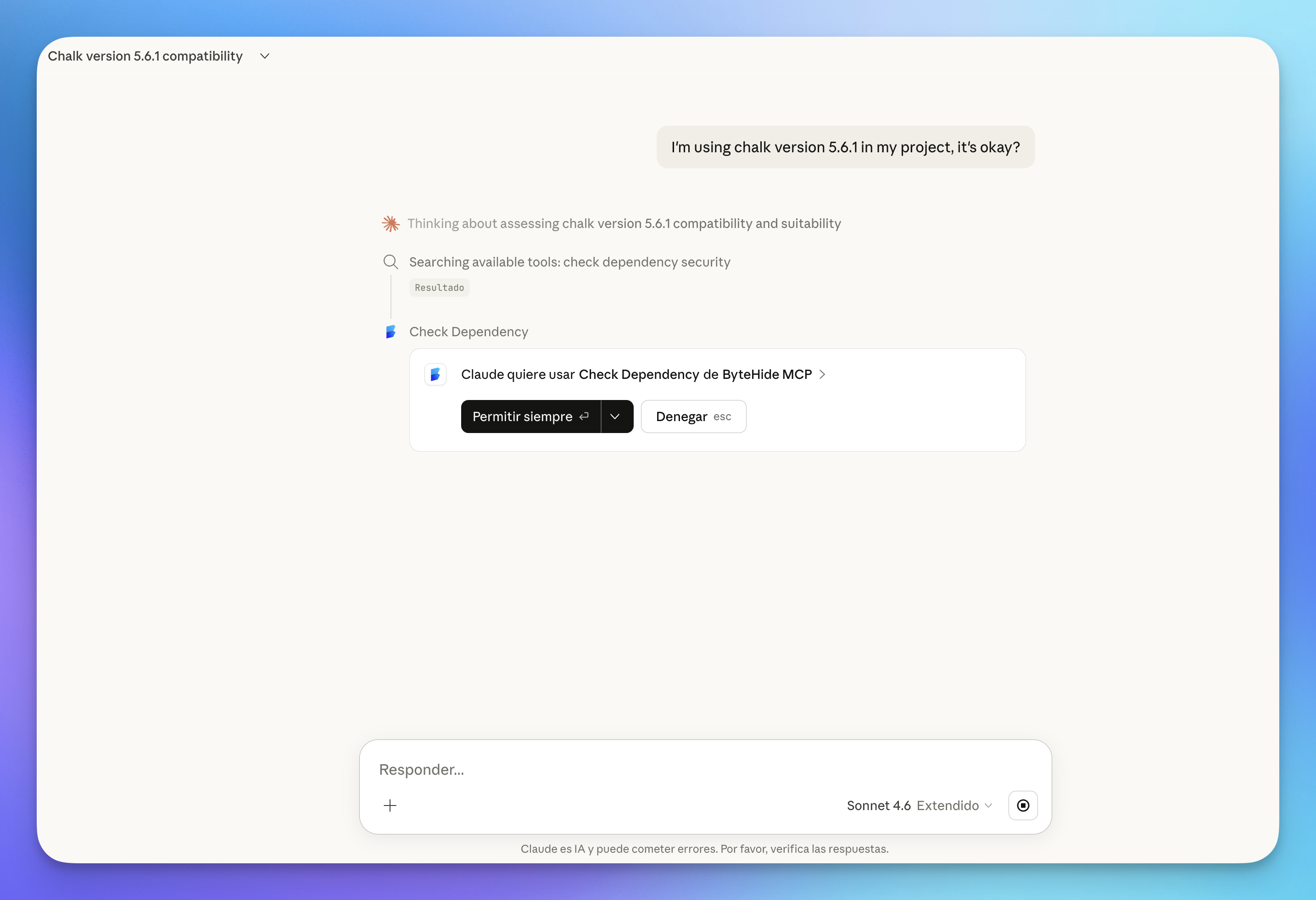
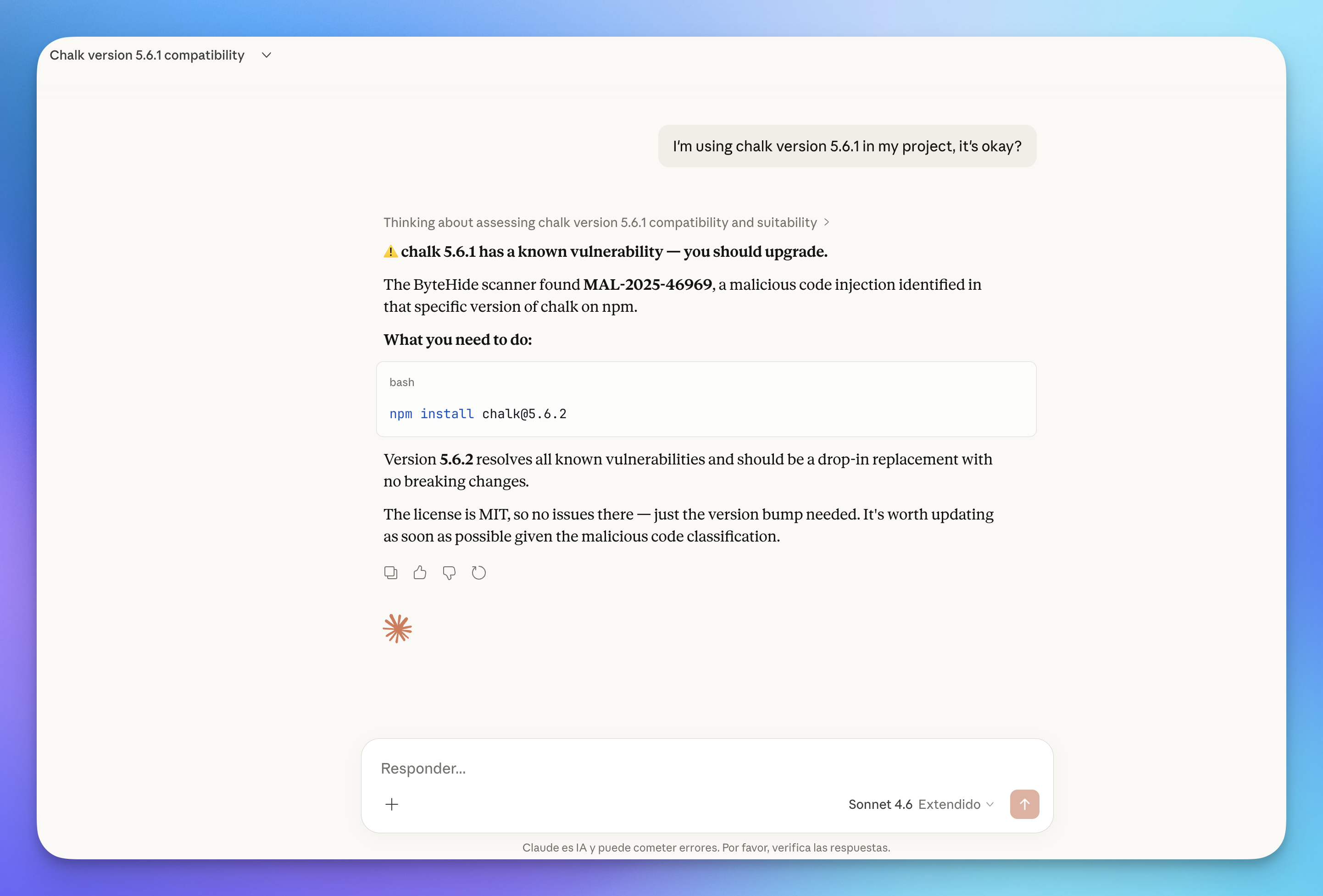
Here's an example on Claude.ai. The user asks about chalk 5.6.1 — Claude calls check_dependency and gets a clear answer:
 Click to expand
 Click to expand
scan_dependencies
Scan all dependencies in a manifest file at once for known vulnerabilities. Reads the entire file and returns a summary grouped by severity, with upgrade recommendations for each vulnerable package.
Parameters
| Parameter | Type | Required | Description |
|---|---|---|---|
content | string | Yes | The complete, unmodified content of the manifest file |
ecosystem | string | No | Package registry matching the manifest format (default: npm) |
include_dev | boolean | No | Include development dependencies in the scan (default: false) |
context | object | No | Git context (same fields as scan_code) |
Supported Manifest Files
| Ecosystem | File |
|---|---|
npm | package.json |
pypi | requirements.txt, Pipfile |
maven | pom.xml |
nuget | *.csproj |
go | go.mod |
rubygems | Gemfile |
cargo | Cargo.toml |
packagist | composer.json |
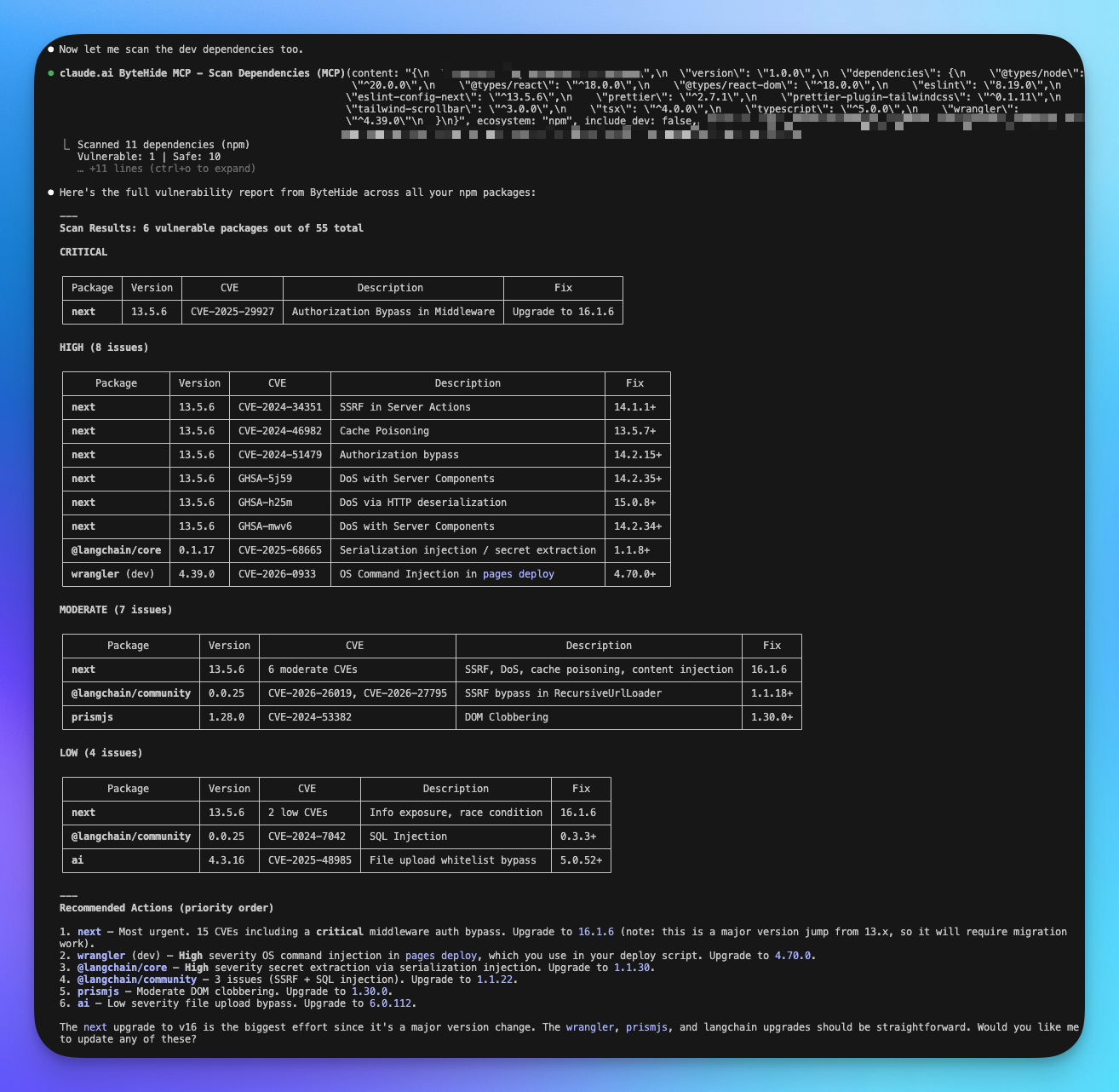
What it returns
- Total dependencies scanned
- Number of vulnerable vs safe packages
- For each vulnerable package: CVE identifiers, severity, affected versions, and recommended upgrade version
- Summary grouped by severity (Critical, High, Medium, Low)
Example usage
Ask your AI agent:
- "Audit my package.json for vulnerable dependencies"
- "Scan requirements.txt for known CVEs"
- "Check all dependencies in go.mod including dev dependencies"
Here's an example in Claude Code (CLI). The agent scans a package.json and returns a full vulnerability report grouped by severity, with CVE details and prioritized upgrade recommendations:
 Click to expand
list_projects
List all ByteHide projects in your organization. Useful for verifying your setup, finding project details, or exploring what's already being scanned.
Parameters
| Parameter | Type | Required | Description |
|---|---|---|---|
search | string | No | Filter projects by name (case-insensitive partial match) |
What it returns
For each project: project name and ID, programming language, connected ByteHide modules (Radar, Shield, Secrets, Monitor), assigned teams, and description (if set).
Example usage
Ask your AI agent:
- "List my ByteHide projects"
- "Show me all projects with 'api' in the name"
- "What projects do I have in ByteHide?"
audit_ai_environment
Scan your AI development environment configuration files for security risks. Detects prompt injection vectors, risky MCP server configurations, credential exposure, overpermissioning, and cross-file attack chains.
100% Local — No Data Sent
This tool runs entirely on your machine. Your configuration files (.env, .claude.md, .mcp.json, etc.) are never sent to ByteHide servers. All analysis happens locally within the AI agent using built-in security rules.
Parameters
| Parameter | Type | Required | Description |
|---|---|---|---|
files | array | Yes | AI config files found in the workspace. Each item has a path and content |
gitignore | string | No | Content of .gitignore, used to check if sensitive files are protected from commits |
Files to scan
| File | Purpose |
|---|---|
.claude.md, CLAUDE.md | Claude system prompts |
.cursorrules, .cursorignore | Cursor AI rules |
.github/copilot-instructions.md | GitHub Copilot instructions |
AGENTS.md | Agent configurations |
.mcp.json, .cursor/mcp.json | MCP server configurations |
.env, .env.local | Environment variables |
.vscode/settings.json | VS Code settings |
Dockerfile, docker-compose.yml | Container configurations |
.gitignore | Git ignore rules |
What it detects
Prompt Injection — Dangerous instructions in AI prompts that could lead to data exfiltration, unauthorized commands, or security bypass.
MCP Server Risks — Unencrypted connections, unauthenticated remote servers, auto-install without version pinning, dangerous tool categories, and overly broad permissions.
Credential Exposure — Hardcoded API keys, tokens, and passwords for services like AWS, GitHub, OpenAI, Stripe, database connections, and more.
Overpermissioning — dangerouslySkipPermissions, broad filesystem access, wildcard tool allowlists, privileged Docker containers, and --no-sandbox flags.
Git Protection — Checks whether sensitive files (.env, *.pem, *.key, credentials.json, .mcp.json) are properly listed in .gitignore.
What it returns
- Security Score (0–100): overall health of your AI environment
- Attack Chains: multi-step vulnerability paths (e.g., prompt injection leading to credential exfiltration)
- Individual Findings: categorized by type and severity
- Git Protection Status: which sensitive files are covered by
.gitignore
Example usage
Ask your AI agent:
- "Audit my AI development environment for security risks"
- "Check if my .env file is exposed in the git repo"
- "Are there any prompt injection risks in my Claude configuration?"
Automatic Project Creation
The tools scan_code, check_dependency, and scan_dependencies automatically create a project in your ByteHide dashboard when scanning a repository for the first time. The project name is derived from your git remote URL (e.g., github.com/your-org/your-repo becomes your-org/your-repo). If no git remote is available, the workspace folder name is used.
Next Steps
MCP Setup
Connect ByteHide MCP to Claude, Cursor, VS Code, and other AI agents.
MCP Overview
General overview of the ByteHide MCP integration.
CI/CD Integration
Automate Radar scans in your build pipeline.