SCA Triage and Remediation
SCA findings require a different remediation approach than SAST findings. Since the vulnerable code is in a third-party package, you cannot patch it directly. The primary path is upgrading to a version where the vulnerability has been fixed by the package maintainer.
Radar provides AI-generated AutoFix pull requests, detailed upgrade guidance, and dependency path tracing for transitive vulnerabilities.
AutoFix With AI
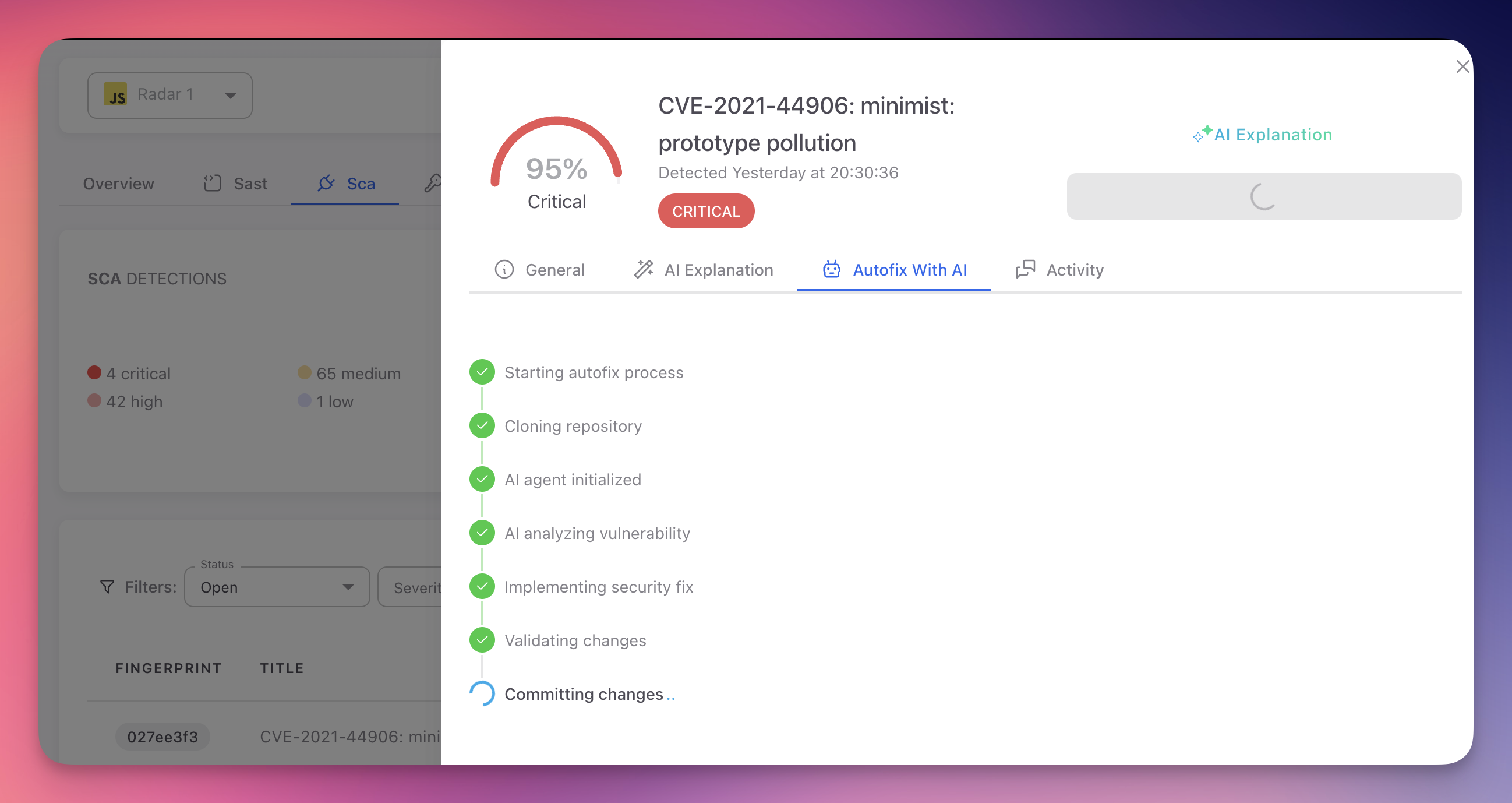
The fastest way to remediate an SCA finding is with AutoFix. From the finding detail panel, open the Autofix With AI tab and click "Create PR to fix". Radar's AI agent handles the entire process automatically:
 Click to expand
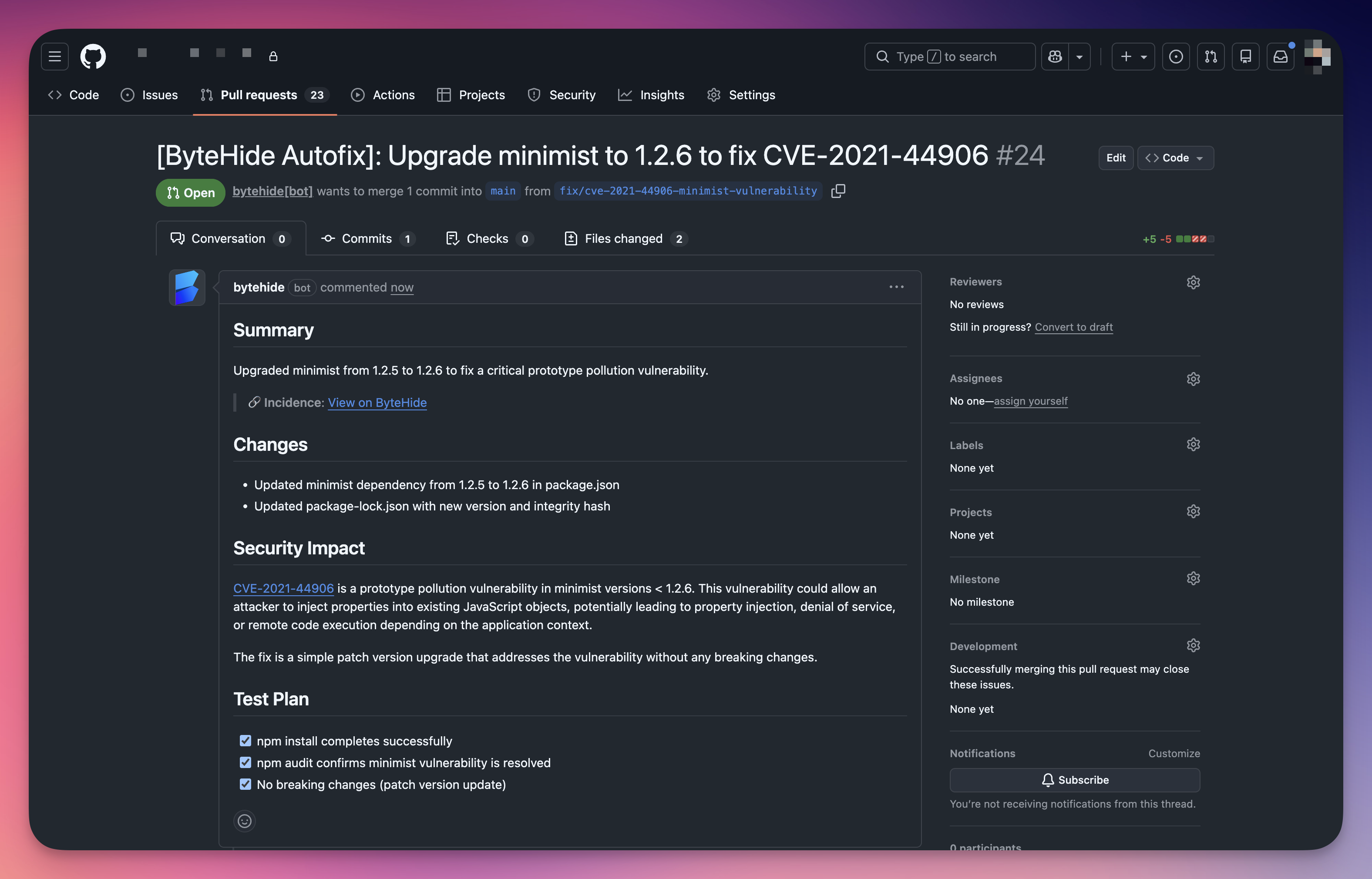
The AI agent clones your repository, analyzes the vulnerability, upgrades the dependency to the minimum safe version, updates the lock file, validates the changes, and creates a pull request with a detailed summary, changelog, security impact description, and test plan.
 Click to expand
Review the PR, run your CI pipeline, and merge. The finding automatically moves to Fixed on the next scan.
Remediation Options
| Option | When to Use |
|---|---|
| Upgrade the dependency | A patched version exists. Update the version in your manifest file and regenerate the lock file. Radar shows the recommended target version in the finding detail |
| AutoFix pull request | A patched version exists and you want Radar to generate the PR automatically. Includes the version change, CVE description, CVSS score, and a link back to the finding |
| Mark as Ignored | The vulnerable function is never called by your code, the vulnerability requires conditions that don't apply to your environment, or the risk has been accepted after security review. Provide a justification |
| Mark as False Positive | Rare for SCA. The detected version is incorrect, the CVE has been withdrawn, or the package is a fork not affected by the vulnerability |
Upgrade Considerations
| Upgrade Type | Risk | Guidance |
|---|---|---|
| Patch (1.2.3 → 1.2.4) | Minimal | Bug fixes and security patches only. Usually safe to apply immediately |
| Minor (1.2.3 → 1.3.0) | Low | New features alongside fixes. Review the changelog and run your test suite |
| Major (1.2.3 → 2.0.0) | Higher | May include breaking changes. Review the migration guide, identify breaking changes, update your code, and run the full test suite |
Testing After Upgrades
Always review the changelog and test your application after upgrading dependencies. AutoFix PRs include the version change, but you should run your test suite before merging. CI/CD pipelines are especially valuable here — they catch compatibility issues before the upgrade reaches production.
Status Workflow
| Status | Description |
|---|---|
| Open | Default for newly detected vulnerabilities. No action has been taken |
| Fixed | Applied automatically when the CVE is no longer detected in a subsequent scan (dependency upgraded, removed, or transitive dependency resolved). You do not need to mark findings as Fixed manually |
| Ignored | Set manually when the finding is acknowledged but intentionally not remediated. Requires justification. Excluded from the default view but accessible via the status filter |
| False Positive | Set manually when the finding is incorrect. Rarely used for SCA since CVE data comes from authoritative sources |
Dealing with Transitive Dependencies
Transitive dependencies (dependencies of your dependencies) present unique challenges because you do not directly control their versions. Radar's finding detail shows the full dependency path so you can identify which direct dependency introduces the risk.
Upgrade the parent dependency
The simplest approach. If a newer version of your direct dependency uses a patched transitive package, upgrading resolves the finding.
Use resolution overrides
When upgrading the parent is not possible, force a specific version of the transitive dependency:
npm / Yarn (overrides or resolutions in package.json):
{
  "overrides": {
    "vulnerable-package": ">=2.0.1"
  }
}
{
"overrides": {
"vulnerable-package": ">=2.0.1"
}
}Maven (dependencyManagement in pom.xml):
<dependencyManagement>
  <dependencies>
    <dependency>
      <groupId>org.example</groupId>
      <artifactId>vulnerable-package</artifactId>
      <version>2.0.1</version>
    </dependency>
  </dependencies>
</dependencyManagement><dependencyManagement>
<dependencies>
<dependency>
<groupId>org.example</groupId>
<artifactId>vulnerable-package</artifactId>
<version>2.0.1</version>
</dependency>
</dependencies>
</dependencyManagement>pip (pin directly in requirements.txt):
vulnerable-package>=2.0.1vulnerable-package>=2.0.1Go (replace directive in go.mod):
replace example.com/vulnerable-package v1.0.0 => example.com/vulnerable-package v2.0.1replace example.com/vulnerable-package v1.0.0 => example.com/vulnerable-package v2.0.1Replace the direct dependency
When the parent dependency is unmaintained or won't update its transitive dependencies, consider replacing it with an alternative package that provides similar functionality.
Override Caution
Resolution overrides may cause compatibility issues if the parent dependency relies on APIs specific to the older version. Always test thoroughly and document the reason for the override.
Prioritization
| Factor | Guidance |
|---|---|
| Severity | Start with Critical and High findings. These have the highest impact and are most likely to be actively exploited |
| Reachability | If your code never calls the affected function, practical risk is lower. Use the CVE description and your knowledge of how you use the package to assess whether the vulnerable code path is reachable |
| Exploitability | Use CVSS metrics (Attack Vector, Attack Complexity, Privileges Required, User Interaction) to assess real-world risk. Network-accessible with no auth is far riskier than local access with high privileges |
| Exposure | A vulnerable dependency in a public-facing web server carries more risk than the same vulnerability in an internal batch tool with no network exposure |
Next Steps
View SCA Findings
Navigate and filter the SCA findings table to identify vulnerabilities.
CVE Reference
CVE identifiers, CVSS scoring, and the vulnerability databases Radar uses.
Detect Vulnerable Dependencies
How Radar maps the full dependency tree to identify vulnerable packages.