AutoFix
AutoFix is Radar's AI-powered automated remediation engine. It analyzes the vulnerability in full context, generates a secure fix, validates it, and opens a pull request in your repository, all with a single click.
How It Works
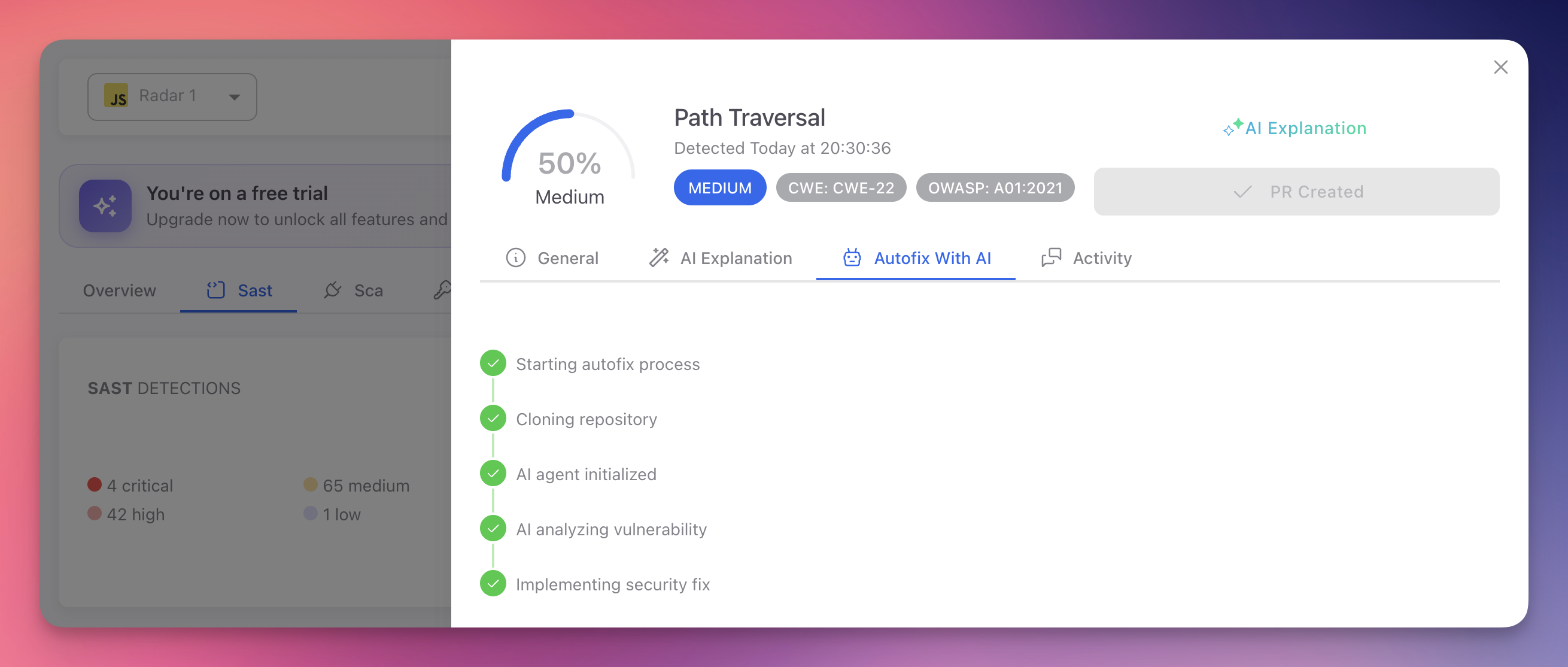
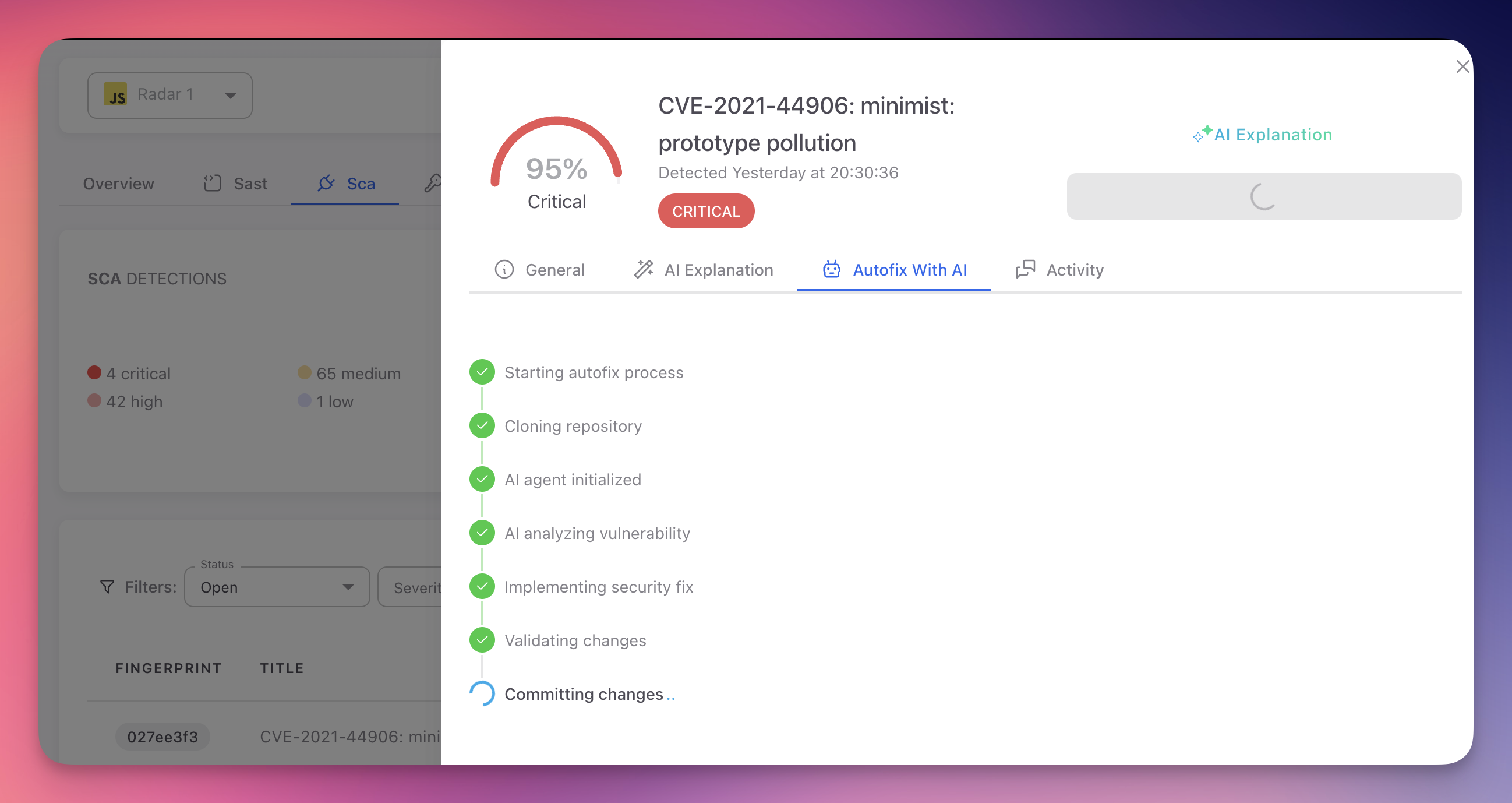
When you trigger an AutoFix, Radar's AI agent executes a multi-step pipeline designed to produce safe, production-ready fixes:
- Clone. The agent clones your repository into an isolated environment.
- Analyze. It examines the vulnerable code and its full surrounding context: imports, function signatures, data flow, endpoint definitions, middleware chains, and framework patterns.
- Generate. It produces a complete fix across as many files as necessary: source code, configuration, manifests, environment files, and entry points. The fix resolves the vulnerability without changing the application's intended behavior.
- Validate. The agent runs compilation checks, verifies syntax correctness, tests the fix, and confirms it does not introduce breaking changes.
- Commit. The fix is committed with a descriptive message explaining the change and its security impact.
- Pull Request. A PR is opened against your default branch with a detailed description including a summary, list of changes, security impact analysis, and a test plan checklist.
 Click to expand
Repository-Wide Fixes
AutoFix is not limited to the file where the vulnerability was detected. The AI agent operates on your entire repository and modifies every file necessary to produce a complete, functional fix.
For example, when a hardcoded secret is detected in a single file, the agent does not just remove it. It creates a .env file if one does not exist, adds the environment variable loading logic to the application entry point, updates .gitignore to exclude .env, replaces the hardcoded value with the environment variable reference, and verifies the application still works. That may involve changes across 4 or 5 files for a single finding.
The same applies to code vulnerabilities. If a path traversal vulnerability is found in one endpoint, the agent traces the pattern across the entire codebase, identifies all endpoints using the same insecure file access logic, and fixes them all in a single PR.
Complete Fixes, Not Partial Patches
AutoFix produces end-to-end remediation. It modifies, creates, or updates as many files as needed across your repository to make the fix fully functional. Every change is validated before the PR is created.
Deep Context Analysis
AutoFix does not apply generic patches. The AI agent performs deep analysis of your entire codebase before generating any fix:
| Analysis | What the Agent Examines |
|---|---|
| Code context | The vulnerable function, its callers, and all downstream consumers across the repository. Understands how data flows through the application end-to-end |
| Imports and dependencies | Which libraries and modules are available, their versions, and API surfaces. Identifies what needs to be imported or installed for the fix |
| Endpoint and route structure | For web vulnerabilities, maps the full request lifecycle: route definition, middleware, handler, and response. Finds all endpoints affected by the same pattern |
| Framework patterns | Recognizes Express, Fastify, ASP.NET, Spring, Django, Flask, and other frameworks to generate idiomatic fixes that follow your project's conventions |
| Cross-file impact | Traces references, shared utilities, and configuration files to identify every file that needs to change for a complete fix |
| Project configuration | Reads package.json, .gitignore, entry points, and configuration files to understand the project setup and add any missing infrastructure the fix requires |
This analysis ensures the fix integrates naturally with your existing architecture, modifies everything needed, and does not break adjacent functionality.
Validation and Safety Checks
Every AutoFix undergoes automated validation before a PR is created:
- Syntax validation confirms the modified code parses correctly
- Compilation checks verify the project builds successfully after the fix
- Behavioral analysis ensures the fix preserves the application's intended functionality
- Breaking change detection checks that existing APIs, interfaces, and contracts remain intact
If validation fails, the agent adjusts the fix and re-validates. Fixes that cannot pass validation are not submitted.
Safe by Design
AutoFix never pushes directly to your main branch. Every fix is delivered as a pull request on a dedicated branch, giving your team full control over the review and merge process.
Security and Privacy
AutoFix is built on a zero-knowledge architecture. Your source code is never stored, retained, or accessible to anyone outside your own account.
| Guarantee | Details |
|---|---|
| Isolated sandbox | Each AutoFix execution runs in a completely isolated, ephemeral sandbox environment. The repository is cloned into this sandbox and exists only for the duration of the fix |
| Automatic destruction | Once the fix is committed and the pull request is created, the entire sandbox is destroyed. All cloned code, metadata, intermediate files, and temporary artifacts are permanently deleted |
| Zero retention | No source code, file contents, repository structure, or metadata is stored after the process completes. The only record kept is that an AutoFix was executed and whether it succeeded |
| Zero access | ByteHide team members have no access to your repository contents during or after the AutoFix process. The entire pipeline is automated with no human intervention |
| Your account, your credentials | The repository clone and PR creation happen using your own GitHub connection and permissions. ByteHide acts on your behalf, never on its own |
Zero-Knowledge by Design
The AutoFix pipeline is engineered so that no one, including ByteHide, can access your source code. The sandbox is ephemeral, the process is fully automated, and everything is destroyed the moment the PR is created.
AutoFix by Finding Type
SAST Findings (Code Vulnerabilities)
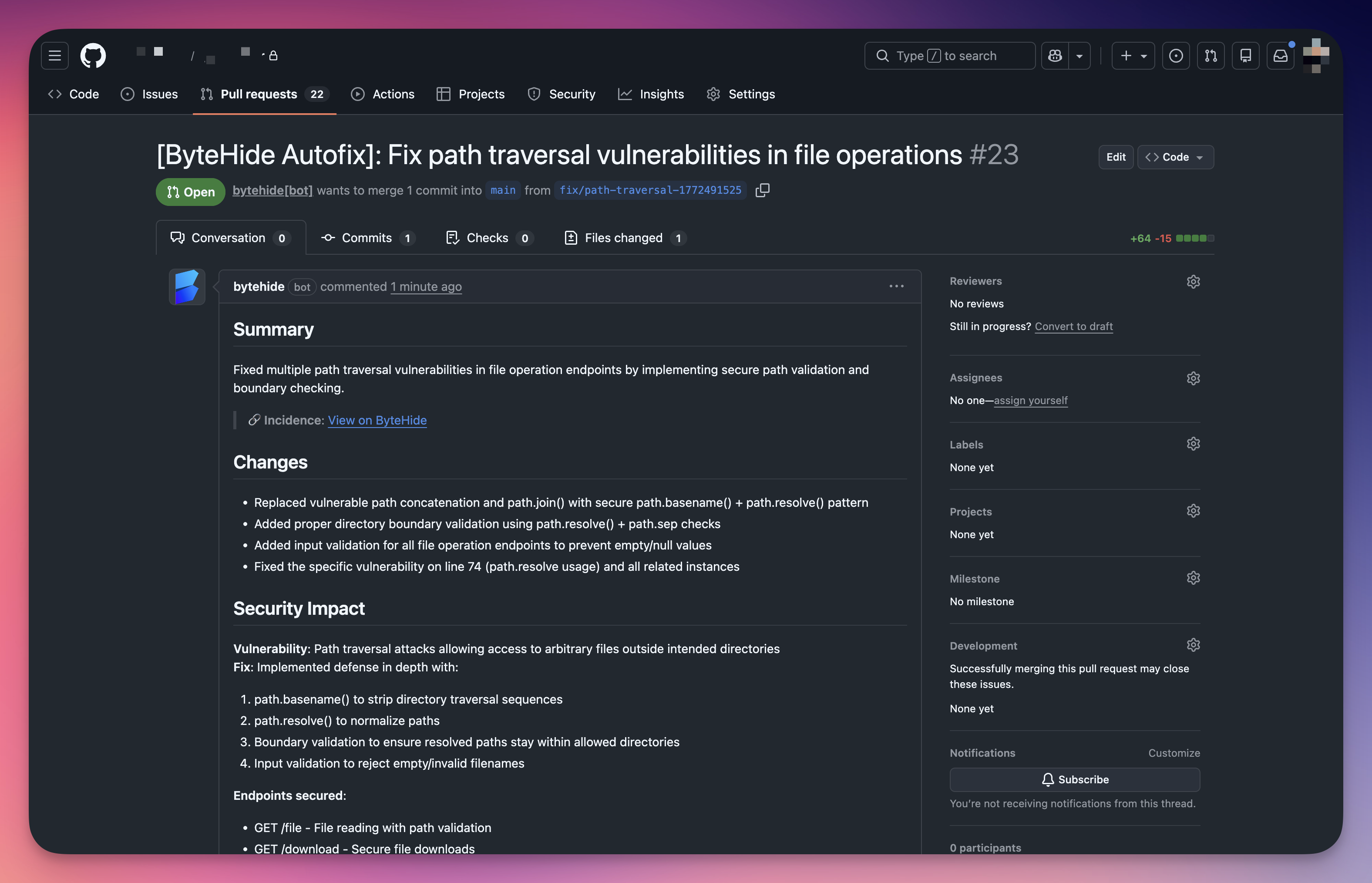
For static analysis findings, AutoFix generates code changes that resolve the vulnerable pattern while preserving application logic.
Click to expand
The agent analyzes the vulnerable code path end-to-end: variable origins, transformations, sink functions, and the security context. It then applies the minimal change needed to neutralize the vulnerability.
Examples of SAST fixes:
| Vulnerability | What AutoFix Does |
|---|---|
| SQL Injection | Replaces string concatenation with parameterized queries or prepared statements |
| Path Traversal | Adds path normalization, boundary validation, and input sanitization to file operations |
| XSS | Applies context-appropriate output encoding and input validation |
| Prototype Pollution | Implements allowlist validation for dynamic property access |
| Insecure Cryptography | Switches to strong algorithms (e.g., SHA-256 instead of MD5, AES-256 instead of DES) |
| Command Injection | Replaces shell execution with safe APIs or adds proper argument escaping |
 Click to expand
Each PR includes a Security Impact section explaining the vulnerability, attack vector, applied fix, and which endpoints or code paths are now secured.
SCA Findings (Vulnerable Dependencies)
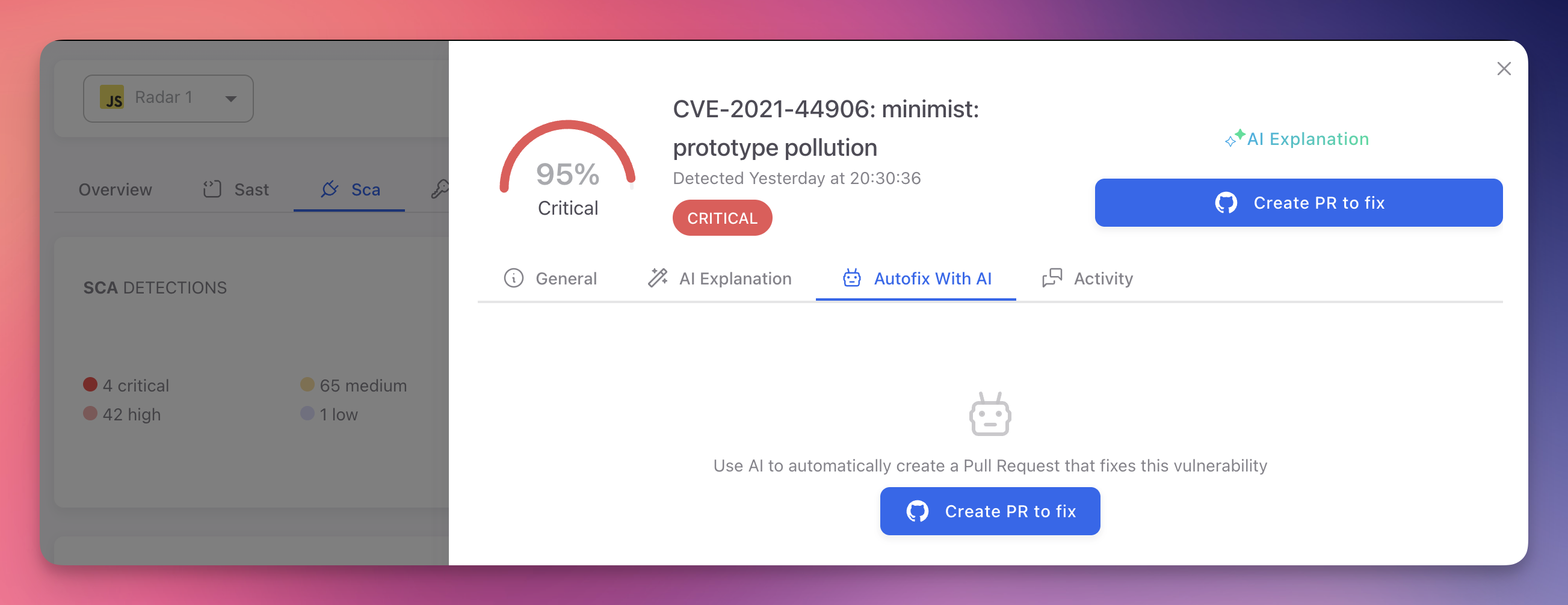
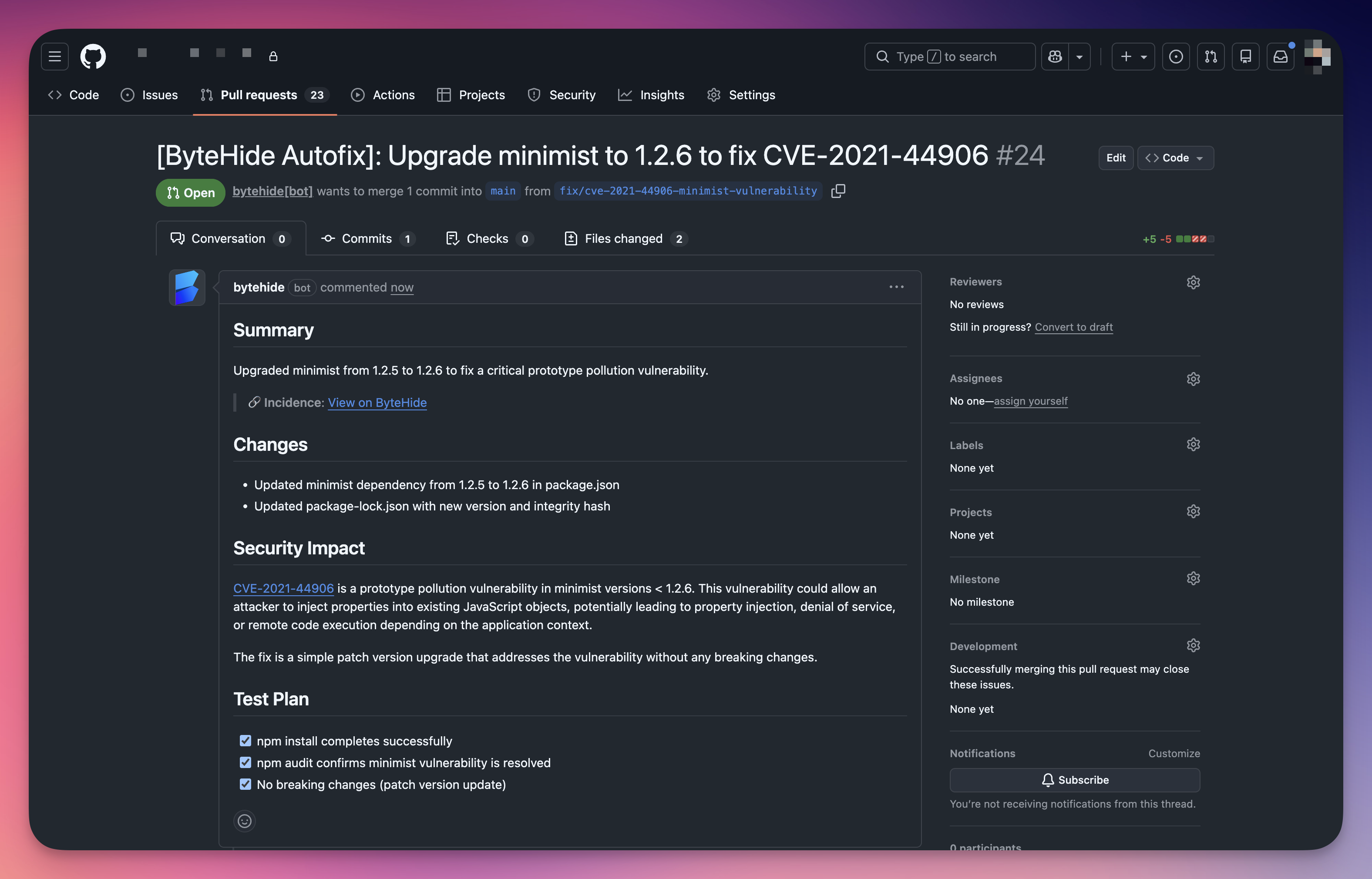
For software composition analysis findings, AutoFix updates the vulnerable dependency to the minimum safe version that resolves the CVE.
 Click to expand
Before updating, the AI agent performs additional analysis specific to dependency upgrades:
| Step | What the Agent Does |
|---|---|
| Read release notes | Reviews the changelog and release notes of the target version to understand all changes between the current and patched version |
| Identify breaking changes | Checks for API changes, deprecated methods, or behavioral differences that could affect your code |
| Search for impact | Scans your codebase for all usages of the affected library to identify code that may need adjustment |
| Update manifests | Modifies package.json, requirements.txt, .csproj, pom.xml, Gemfile, or equivalent manifest and lock files |
| Validate compatibility | Confirms the update does not introduce version conflicts with other dependencies |
 Click to expand
The resulting PR includes the specific CVE reference, the version change, and a test plan with verification steps.
 Click to expand
Secret Findings (Hardcoded Credentials)
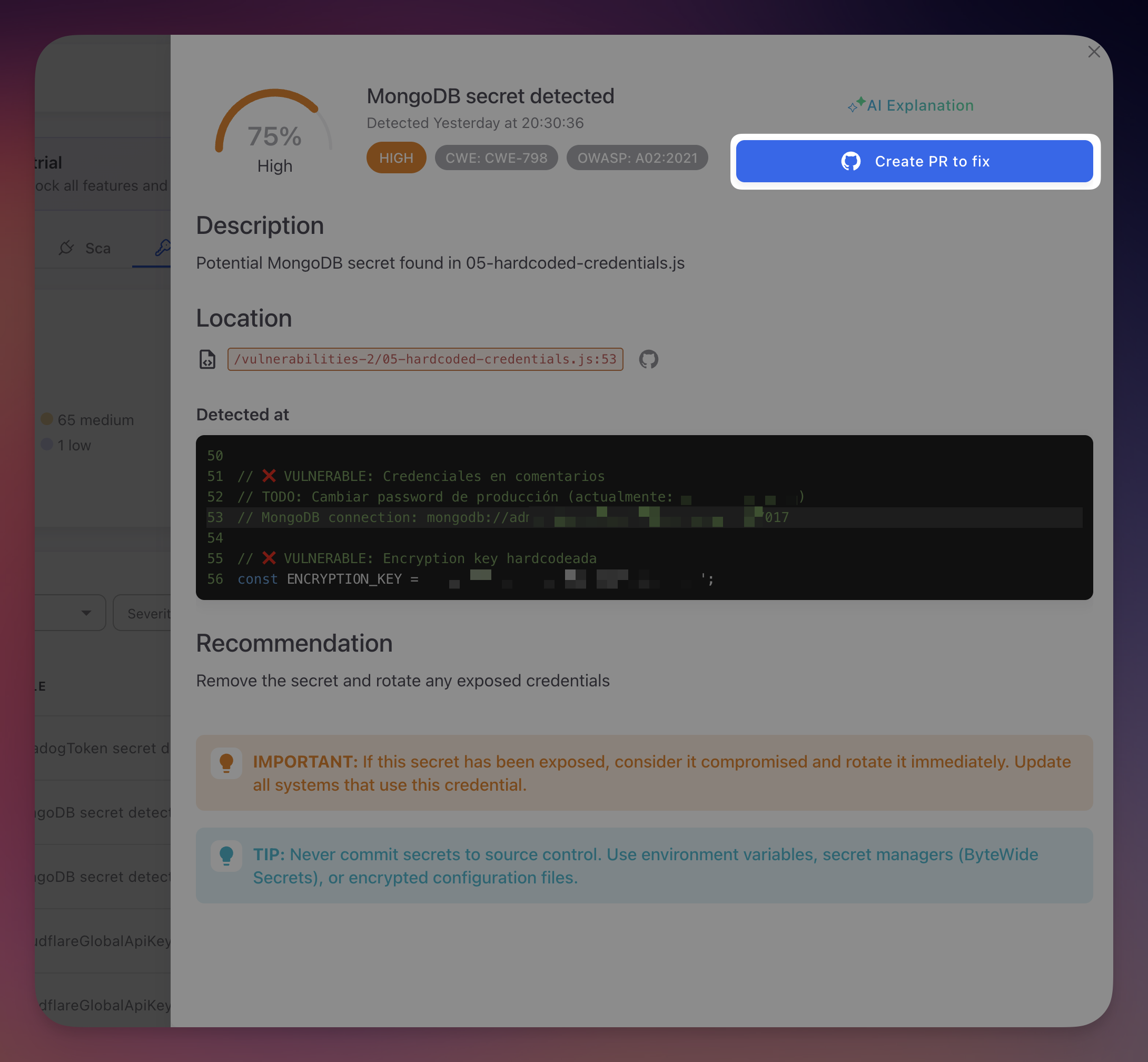
For detected secrets, AutoFix replaces the hardcoded credential with a secure reference. The AI agent offers two remediation strategies:
| Strategy | How It Works |
|---|---|
| Environment variable | Replaces the hardcoded value with an environment variable reference (e.g., process.env.STRIPE_KEY, os.environ.get('DB_PASSWORD')). Generates a .env.example with placeholder values and adds .env to .gitignore if not already present |
| ByteHide Secrets SDK | Replaces the hardcoded value with a call to the ByteHide Secrets SDK, referencing the secret by its vault key ID. The credential is automatically synced to the ByteHide Secrets vault, managed, and retrieved securely at runtime. Future credential rotations update the vault value only, with zero code changes required |
 Click to expand
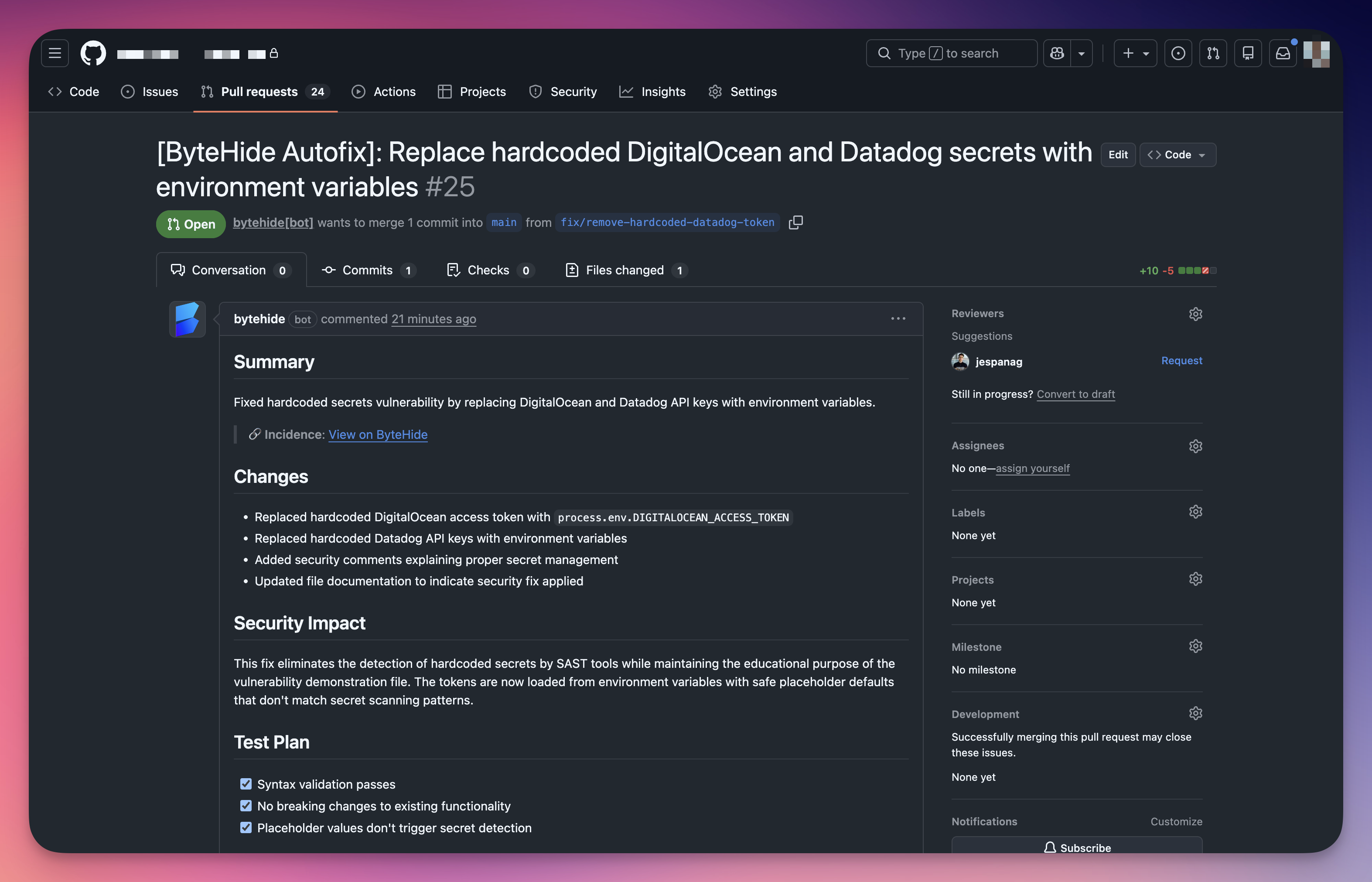
The agent performs a complete remediation across your repository, not just the file where the secret was found. Depending on your project, this may include:
- Removing the hardcoded value from the source file and replacing it with an environment variable or SDK call
- Creating a
.env.examplefile with placeholder values if one does not exist - Adding
.envto.gitignoreto prevent accidental commits of real credentials - Adding environment variable loading logic (e.g.,
require('dotenv').config()or equivalent) to the application entry point if not already present - Installing required packages by updating
package.json,requirements.txt, or equivalent manifest files - Updating multiple files when the same secret is referenced in different locations across the codebase
 Click to expand
Automatic Vault Sync
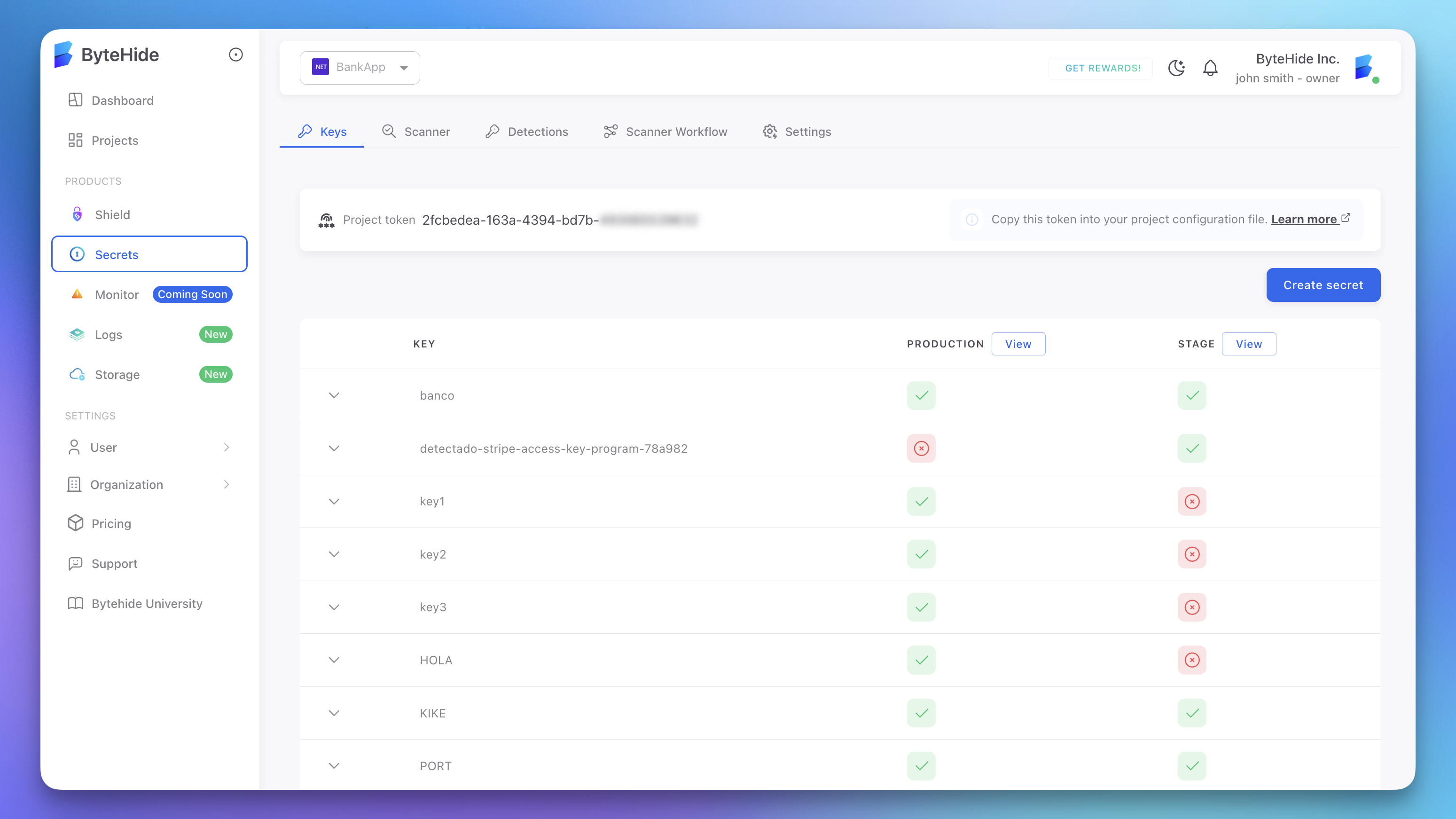
When using the ByteHide Secrets SDK strategy, Radar automatically detects the credential and syncs it to the ByteHide Secrets vault. The detected credential is stored with a unique key identifier and assigned to the appropriate environment, making it immediately available for secure retrieval.
 Click to expand
The vault stores each secret with per-environment values (Production, Stage, Development), access control, audit logging, and encryption at rest. Secrets synced from Radar appear in the vault alongside manually created secrets.
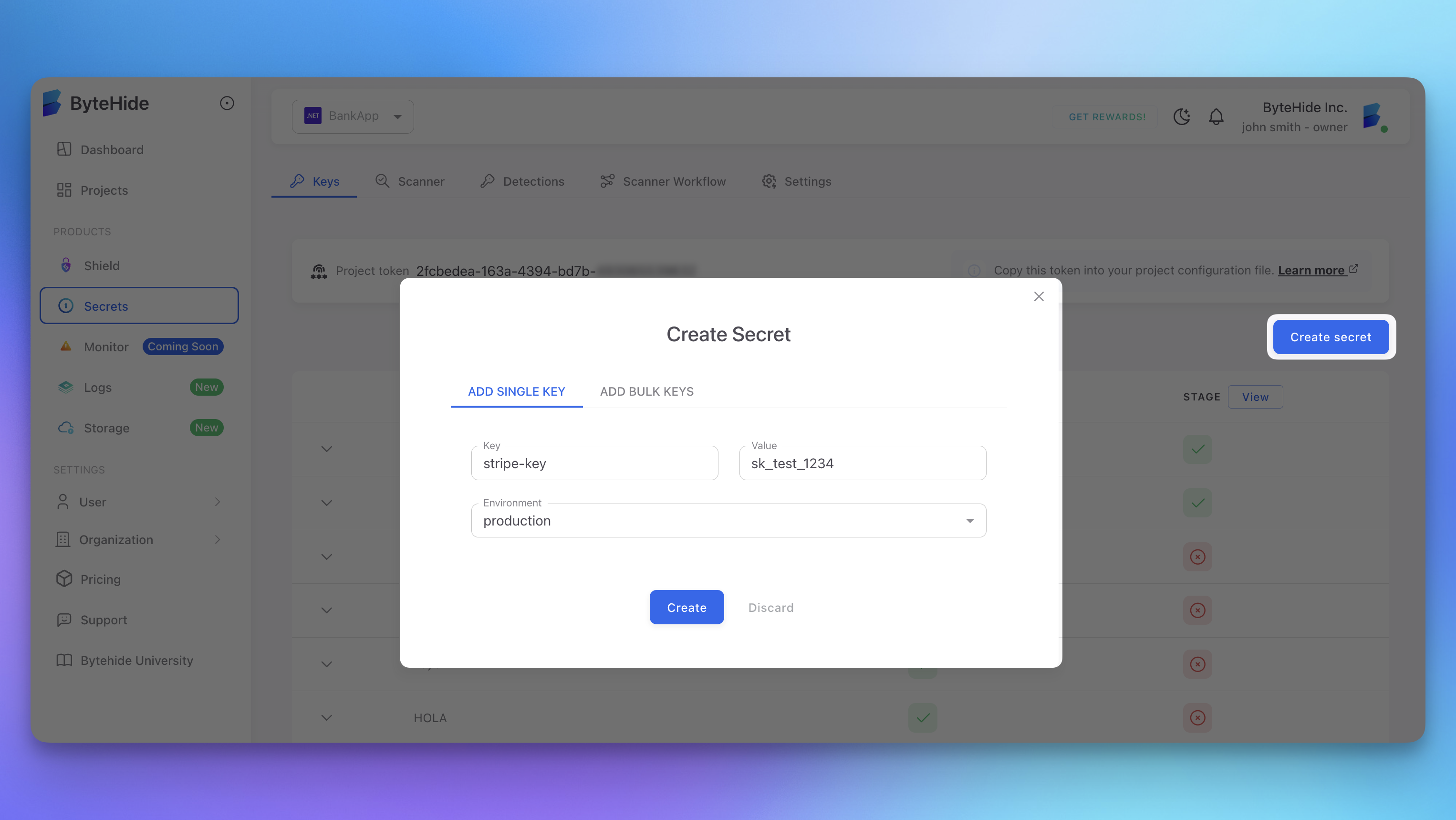 Click to expand
The full flow is automatic: Radar detects the hardcoded credential, syncs it to the vault, and generates a PR that replaces the hardcoded value with a secure SDK reference using the vault key ID. Future credential rotations update the vault value only, with zero code changes or redeployment needed.
End-to-End in Seconds
Detection, vault sync, and code fix happen in one step. Review, merge, and the risk is eliminated. See Secret Triage and Remediation for the full workflow.
Draft PRs and Manual Review Required
Not all fixes can be fully automated. When AutoFix determines that a fix requires human judgment or verification, it creates a Draft PR instead of a regular pull request.
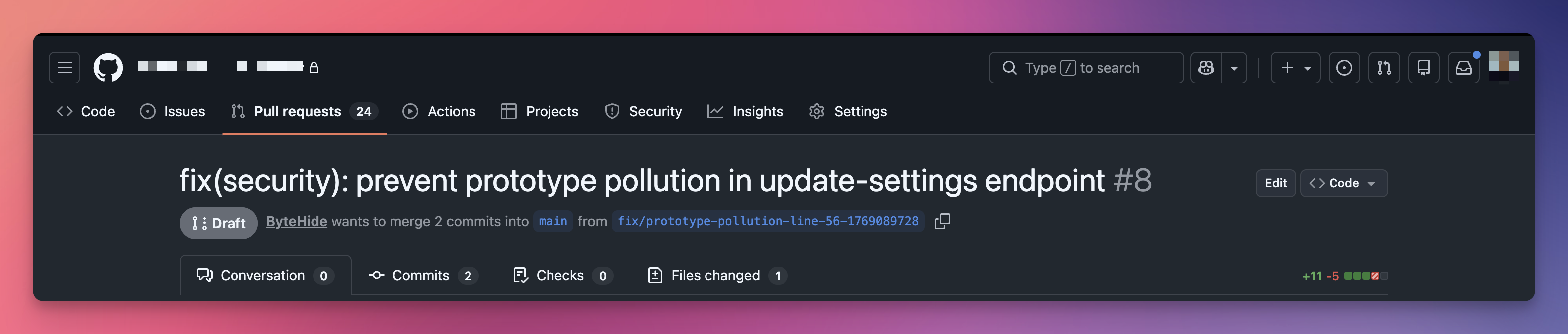 Click to expand
When Does AutoFix Create a Draft PR?
AutoFix creates a draft PR when the fix involves assumptions that need human verification:
- The fix adds an allowlist or configuration values that depend on business logic (e.g., which properties should be permitted)
- The fix modifies behavior in a way that may affect specific use cases the AI cannot fully verify
- The change touches shared code paths where the full impact requires domain knowledge
- The remediation requires adding or configuring something that varies per environment
What a Draft PR Includes
Draft PRs contain additional guidance to help your team complete the review:
Assumptions checklist. A list of assumptions the AI made, with checkboxes for the reviewer to verify each one. For example, whether an allowlist contains all required properties.
Verification tasks. A "Please Verify" section with specific items to check before merging, such as confirming no legitimate use cases are broken by the fix.
Security impact analysis. Detailed breakdown of the vulnerability, attack vector, risk, and how the fix addresses it.
Test plan with manual steps. Automated checks (syntax validation, no breaking changes) are pre-checked. Manual verification steps (functionality testing, edge cases) are left unchecked for the reviewer.
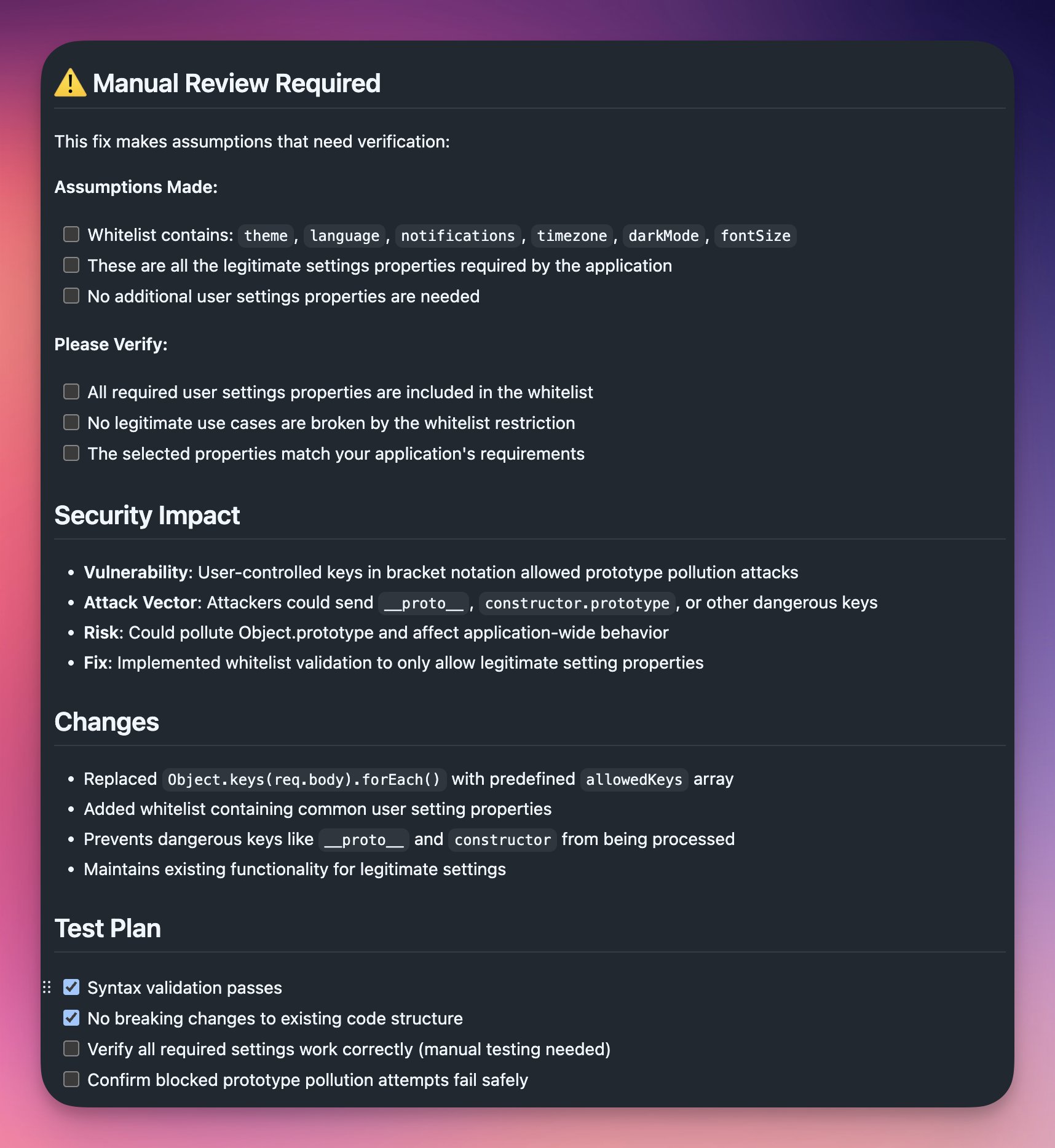 Click to expand
Inline Code Comments
In addition to the PR description, AutoFix adds review comments directly in the code diff at the lines that need attention. These comments use the // AUTOFIX REVIEW: prefix and explain exactly what the reviewer should verify.
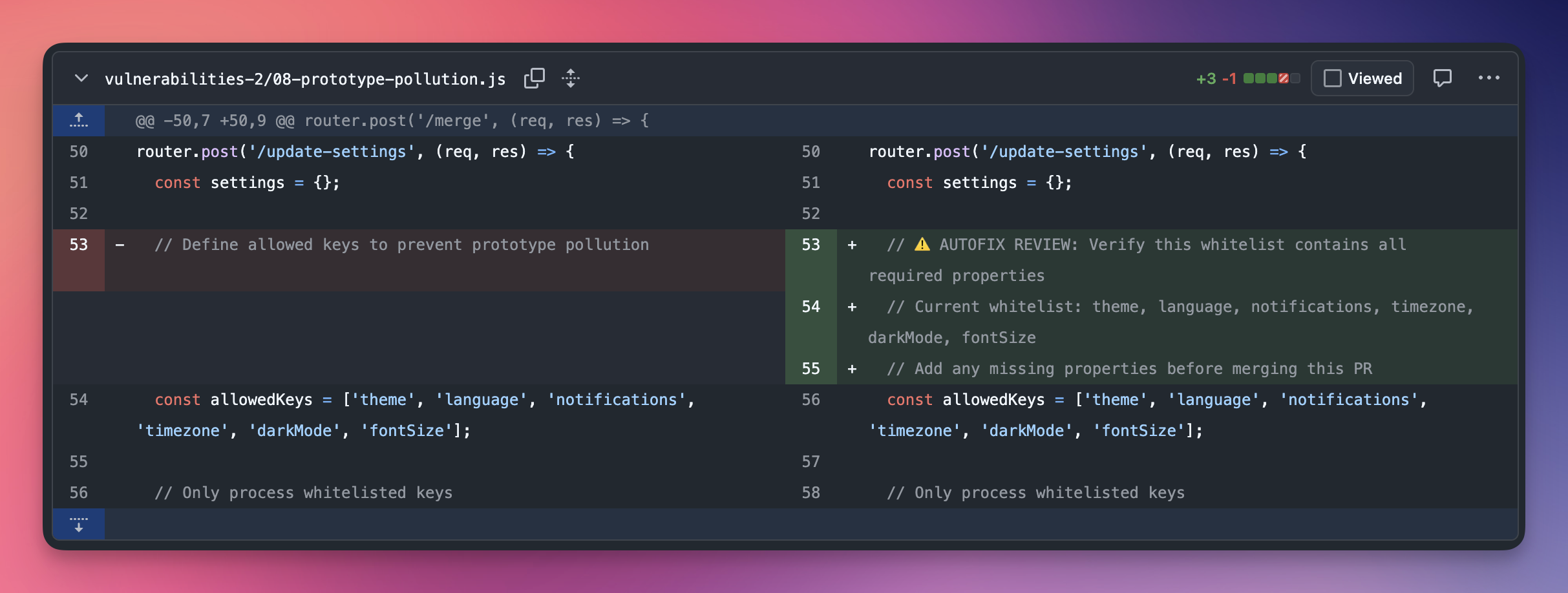 Click to expand
This makes it easy for reviewers to find the exact locations that need human judgment, without reading through the entire diff.
Prerequisites
Before using AutoFix, ensure:
- Connected GitHub repository: your Radar project must be linked via the ByteHide GitHub App
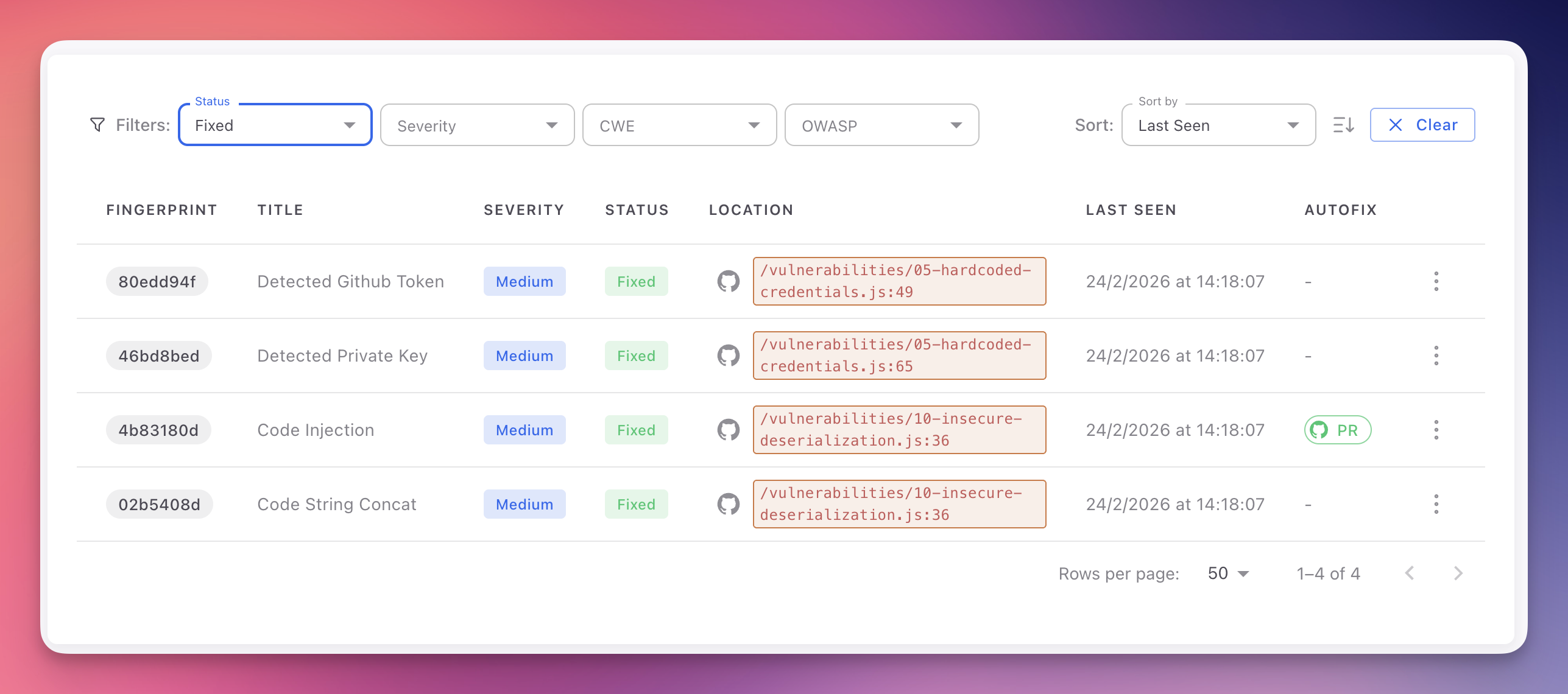
- AutoFix availability: the finding must show AutoFix available in the findings table (a dash means AutoFix is not available for that finding)
- Write access: the ByteHide GitHub integration must have write access to create branches and pull requests
Triggering an AutoFix
- Open any finding in your Radar project (SAST, SCA, or Secrets)
- Click "Create PR to fix" in the finding detail header, or navigate to the Autofix With AI tab
- The process typically takes 10 to 30 seconds depending on repository size and fix complexity
- A success notification confirms when the PR has been created, with a direct link to it on GitHub
The AutoFix column in the findings table indicates availability for each finding. A PR icon links directly to the generated pull request.
 Click to expand
Reviewing and Merging
Every generated pull request should be reviewed before merging:
- Read the PR description for the summary, security impact analysis, and test plan
- Review the code diff to ensure the fix is correct for your use case
- Check for AUTOFIX REVIEW comments in the diff and verify the flagged items
- Complete the test plan by running your test suite against the AutoFix branch
- For Draft PRs, verify all assumptions, complete the manual checklist items, and mark the PR as ready for review when satisfied
- Request team review if the change affects critical code paths
- Merge the PR once approved and all checks pass
- Verify the fix: on the next Radar scan, the finding status automatically changes to Fixed
Always Review Before Merging
AutoFix generates high-quality, validated fixes, but the final merge decision is always yours. AI-generated changes may need adjustments for codebases with custom abstractions, internal conventions, or unusual patterns. Draft PRs specifically highlight areas where human judgment is required.
Branch Naming and Multiple Fixes
Each finding creates a separate branch and pull request to keep changes isolated:
- Branch convention:
fix/{finding-fingerprint}orautofix/{finding-fingerprint} - Independent PRs allow you to review, test, and merge each fix individually
- No conflicts between AutoFix branches unless fixes modify the same lines
- Merge in any order based on your prioritization
After merging, you can safely delete the branch from GitHub.
Unmerged Pull Requests
If you decide not to merge a PR, close it on GitHub. The finding remains in Open status until resolved through other means. You can trigger a new AutoFix later if needed.
Limitations
- Business logic decisions may require domain knowledge the AI cannot infer from code alone (e.g., which properties belong in an allowlist). In these cases, AutoFix creates a Draft PR with guidance for the reviewer
- Custom internal frameworks with non-standard patterns may require manual adjustment of the generated fix
- Monorepo-scale changes affecting dozens of interconnected services may produce fixes that need additional verification across service boundaries
In these cases, the AI Explanation tab provides detailed guidance for crafting or refining a fix.
Next Steps
AI Explanation
How Radar's AI provides contextual vulnerability analysis and remediation advice.
Secret Triage and Remediation
The full workflow for rotating, revoking, and remediating detected secrets, including vault sync.
View SAST Findings
Navigate, filter, and understand the SAST findings table.