View Secret Findings
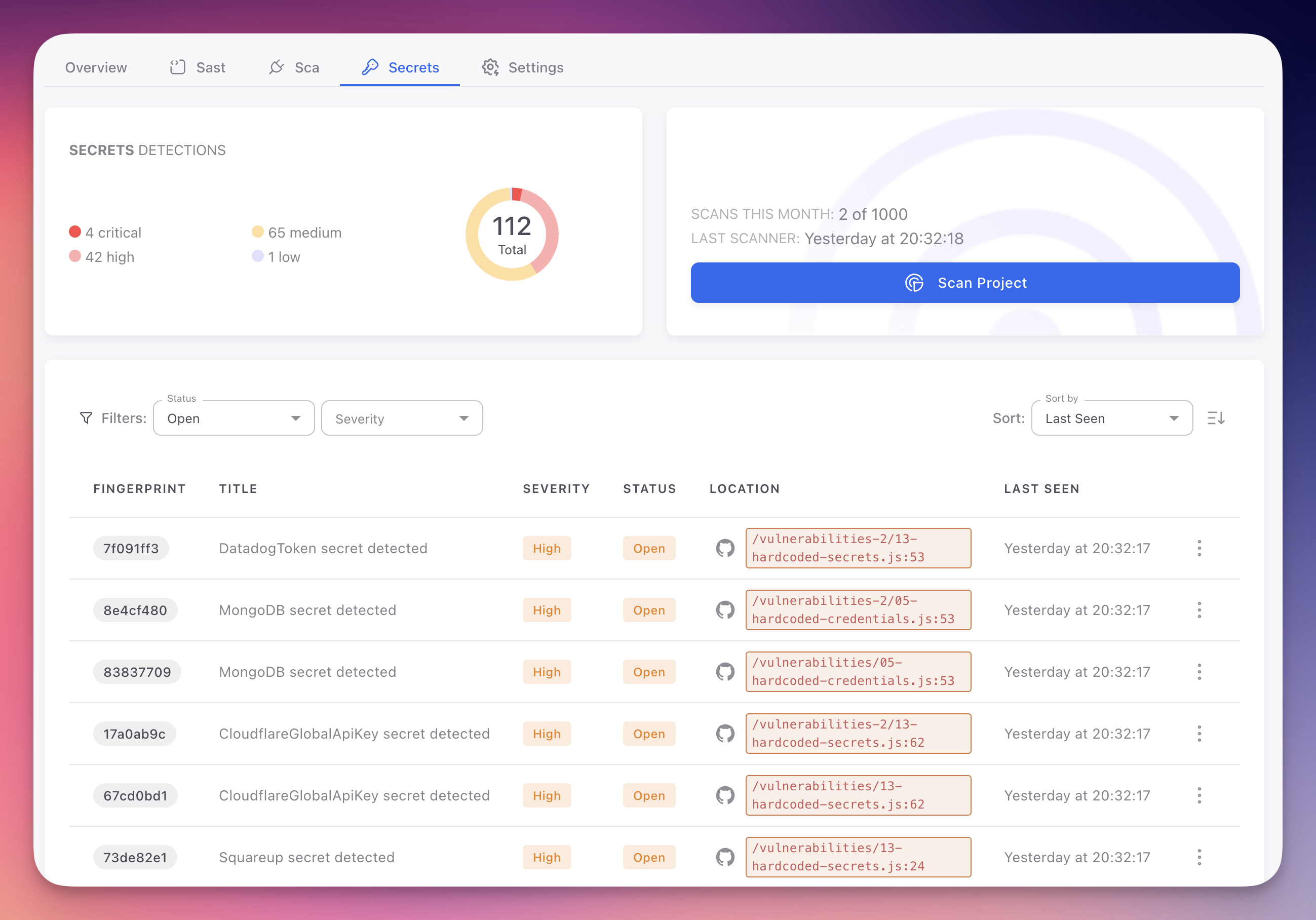
Secret findings appear in the Secrets tab of your Radar project. Each finding represents a detected credential or sensitive value in your codebase, with details on the secret type, severity, location, and remediation guidance.
Unlike SAST and SCA findings, secret remediation requires rotating and revoking credentials at the provider level, not just fixing code. The Secrets tab provides a dedicated view for this distinct workflow.
 Click to expand
Accessing Secret Findings
- Open your Radar project from the ByteHide dashboard
- Click the Secrets tab in the project navigation
- The findings table displays all detected secrets from the most recent scan
If no findings appear, either your code has no detected secrets or a scan has not yet completed. Use Scan Project to trigger a manual scan.
Findings Table Columns
| Column | Description |
|---|---|
| Fingerprint | Unique tracking ID. Remains consistent across scans for deduplication |
| Title | Secret type and context (e.g., "Hardcoded Stripe Secret Key detected"). Click to open the detail panel |
| Severity | Impact level based on credential type: Critical, High, Medium, or Low |
| Status | Open (needs remediation), Fixed (no longer detected), Ignored (accepted risk), False Positive (not an actual secret) |
| Location | File path and line number with a direct link to the file in your GitHub repository |
| Last Seen | Timestamp of the most recent scan that detected this secret |
| AutoFix | Whether automated remediation is available. Replaces hardcoded values with environment variable references or ByteHide Secrets SDK calls |
Filtering Findings
The Secrets tab provides Status and Severity filters:
- Status: Open (default view), Fixed, Ignored, False Positive
- Severity: Critical, High, Medium, Low
Simplified Filters
Secret findings use simpler filters than SAST findings. Since all hardcoded credentials map to CWE-798, there are no CWE or OWASP category filters. Severity and status are the primary dimensions.
Secret Severity Levels
| Level | Criteria | Examples |
|---|---|---|
| Critical | Admin or unrestricted access to production systems. Full system compromise, data breach, or significant financial impact | AWS root keys, RSA/SSH private keys, JWT signing secrets, database superuser credentials, Stripe live-mode secret keys |
| High | Significant access to production services or sensitive data. Data exposure, service disruption, or unauthorized actions | Limited database credentials, restricted cloud credentials, OAuth client secrets, CI/CD deployment tokens |
| Medium | Non-production environments, monitoring services, or limited blast radius | Staging credentials, Datadog/New Relic/Sentry keys, webhook URLs, rate-limited API keys |
| Low | Minimal risk, flagged for awareness and best practice compliance | Test API keys, expired tokens, public keys found alongside private key patterns, example credentials in docs |
Finding Detail
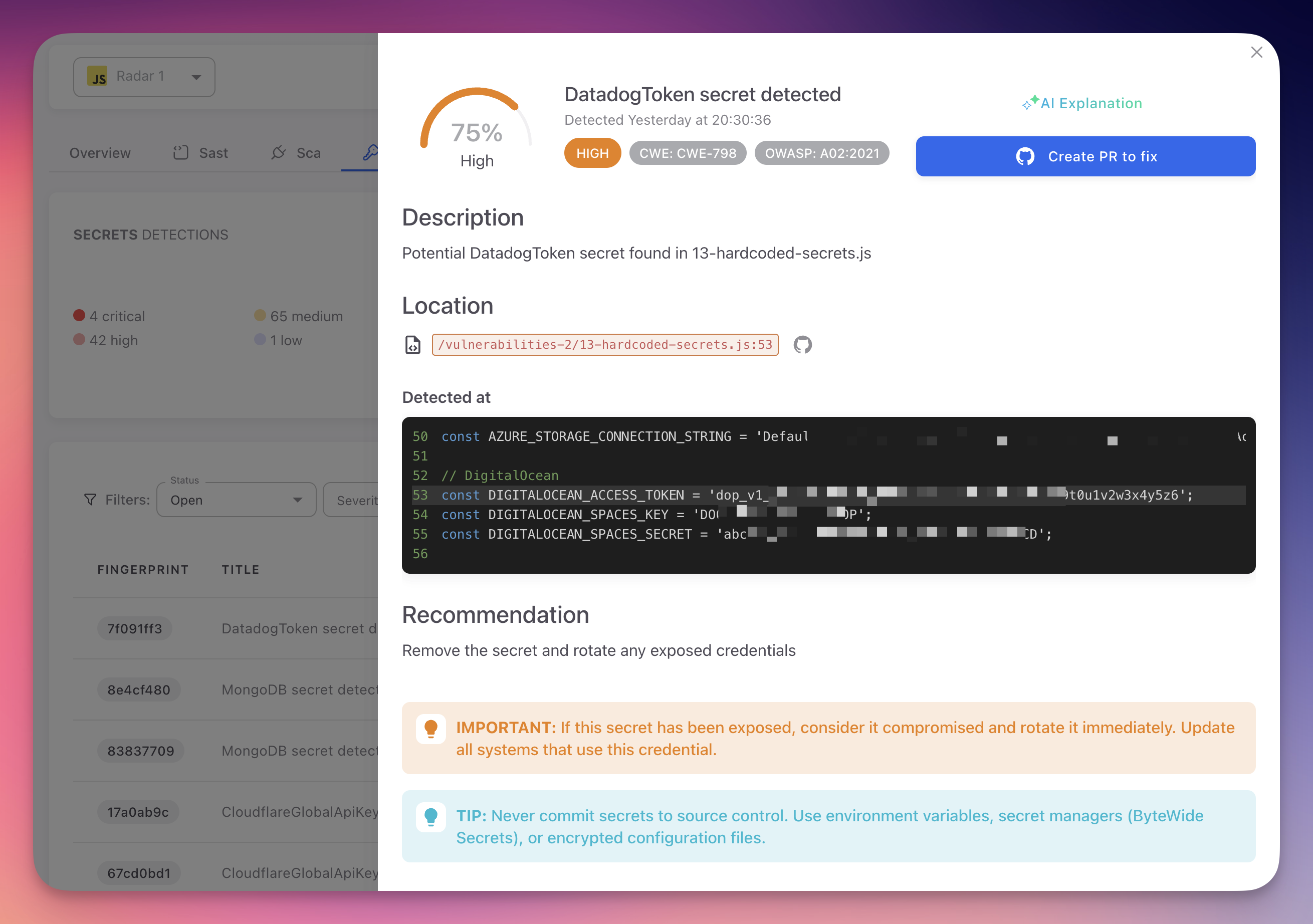
Click any finding to open the detail panel.
 Click to expand
| Tab | Content |
|---|---|
| General | Secret type, CWE-798 and OWASP A02:2021 classification, file location with line/column, code snippet (value partially masked), confidence score, and rotation recommendation |
| AI Explanation | Plain-language explanation of why the string was identified, access risks, step-by-step remediation instructions specific to the credential type, and links to provider documentation for rotation |
| Autofix With AI | Generate a pull request that replaces the hardcoded value with an environment variable reference or a ByteHide Secrets SDK call. See AutoFix |
| Activity | History of status changes, scans, and team actions on this finding |
Protect Secret Values
Never share or screenshot the full value of a detected secret. Radar partially masks credentials in the UI. Use the fingerprint identifier when referencing findings.
Bulk Actions
Select multiple findings using the checkboxes to apply status changes (Ignored, False Positive) with a shared justification. Bulk actions are logged in the project audit trail.
Next Steps
Triage and Remediation
The workflow for rotating, revoking, and remediating detected secrets.
Supported Secret Types
Complete list of credential types and patterns detected by Radar.
Custom Detection Rules
Define organization-specific patterns for internal credentials.