Secret Triage and Remediation
When a secret is detected in your codebase, simply removing it from the current code is not enough. The secret exists in Git history and must be considered compromised. This page covers the complete remediation workflow, from AutoFix to vault sync and prevention.
Secrets in Git History Are Compromised
Any secret committed to a Git repository, even for a single commit, must be considered compromised and rotated immediately. Removing the secret from code does NOT remove it from Git history.
AutoFix With AI
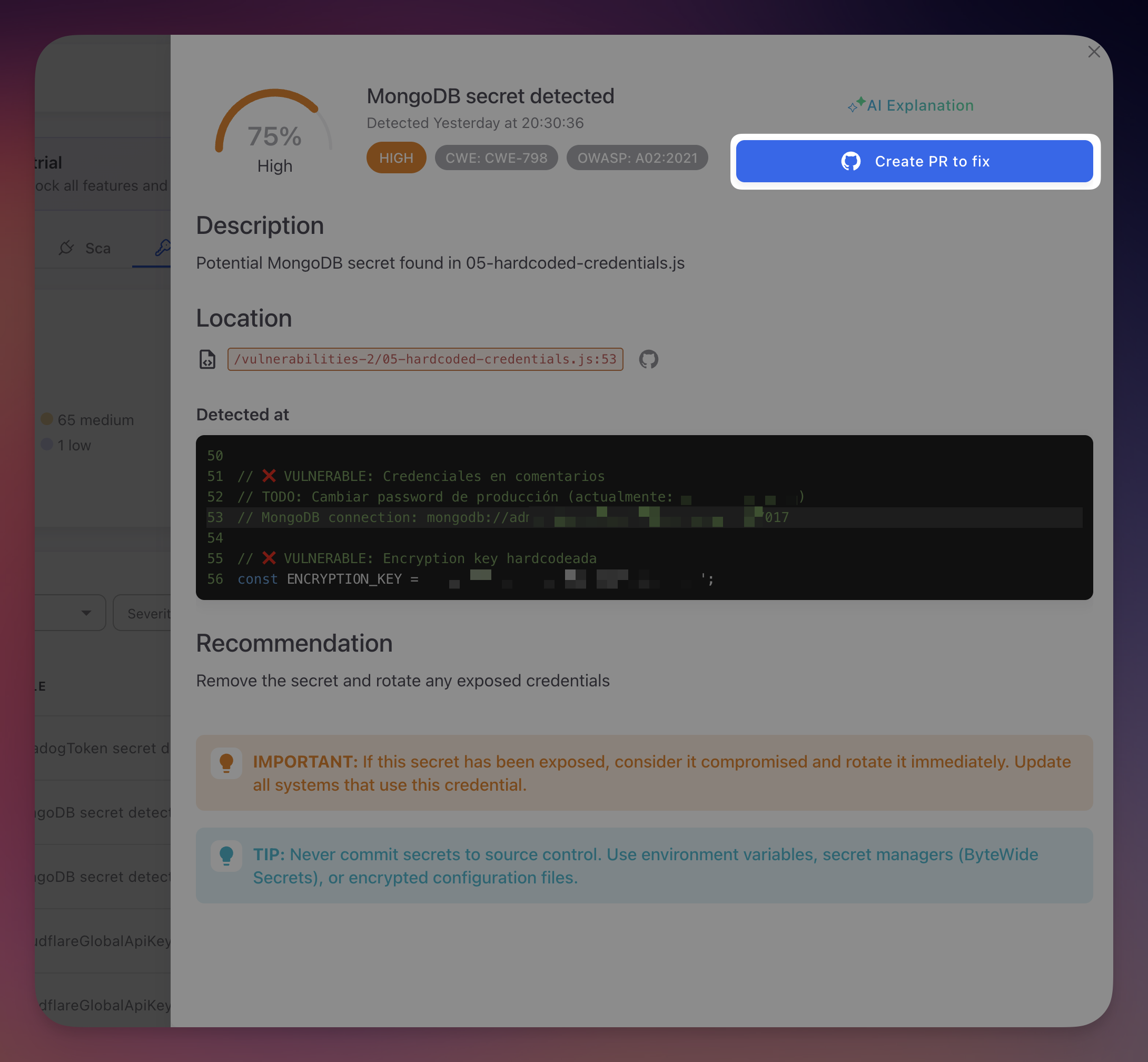 Click to expand
The fastest way to remediate a secret finding is with AutoFix. From the finding detail panel, click Create PR to fix. Radar's AI agent offers two remediation strategies:
| Strategy | How It Works |
|---|---|
| Environment variable | Replaces the hardcoded value with an environment variable reference (e.g., process.env.STRIPE_KEY). Generates a .env.example with placeholder values. Works with dotenv or any environment configuration |
| ByteHide Secrets SDK | Replaces the hardcoded value with a call to the ByteHide Secrets SDK, referencing the secret by its vault key ID. The credential is managed, rotated, and retrieved securely at runtime with zero code changes for future rotations |
The AI agent clones your repository, identifies the hardcoded credential, applies the chosen replacement strategy, validates the changes, and creates a pull request with a detailed summary.
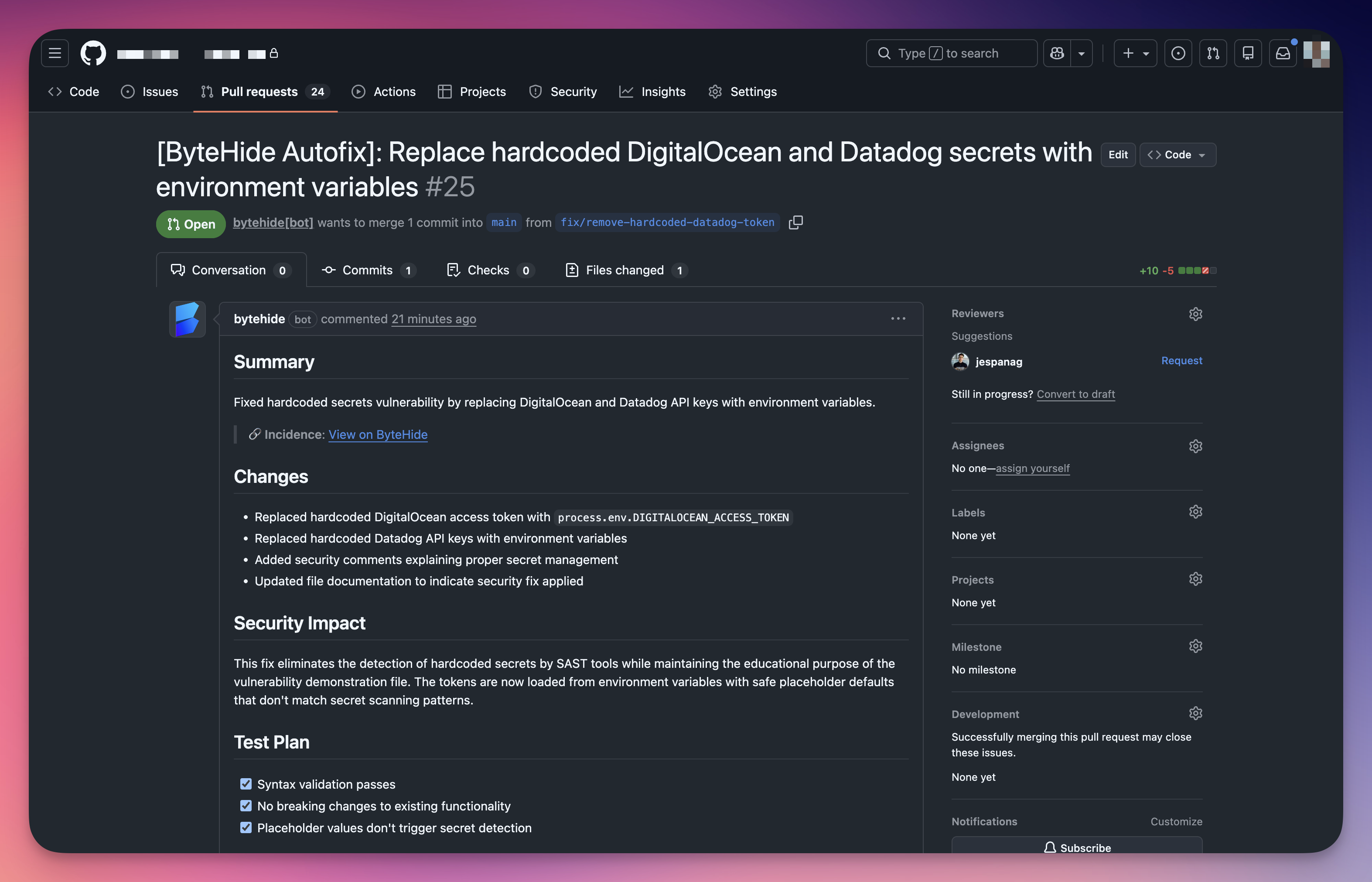 Click to expand
Review the PR, run your CI pipeline, and merge. The finding automatically moves to Fixed on the next scan.
Automatic Vault Sync
When Radar detects a hardcoded secret, it can automatically synchronize it to the ByteHide Secrets vault. The detected credential is stored with a unique key identifier and assigned to the appropriate environment, making it immediately available for secure retrieval.
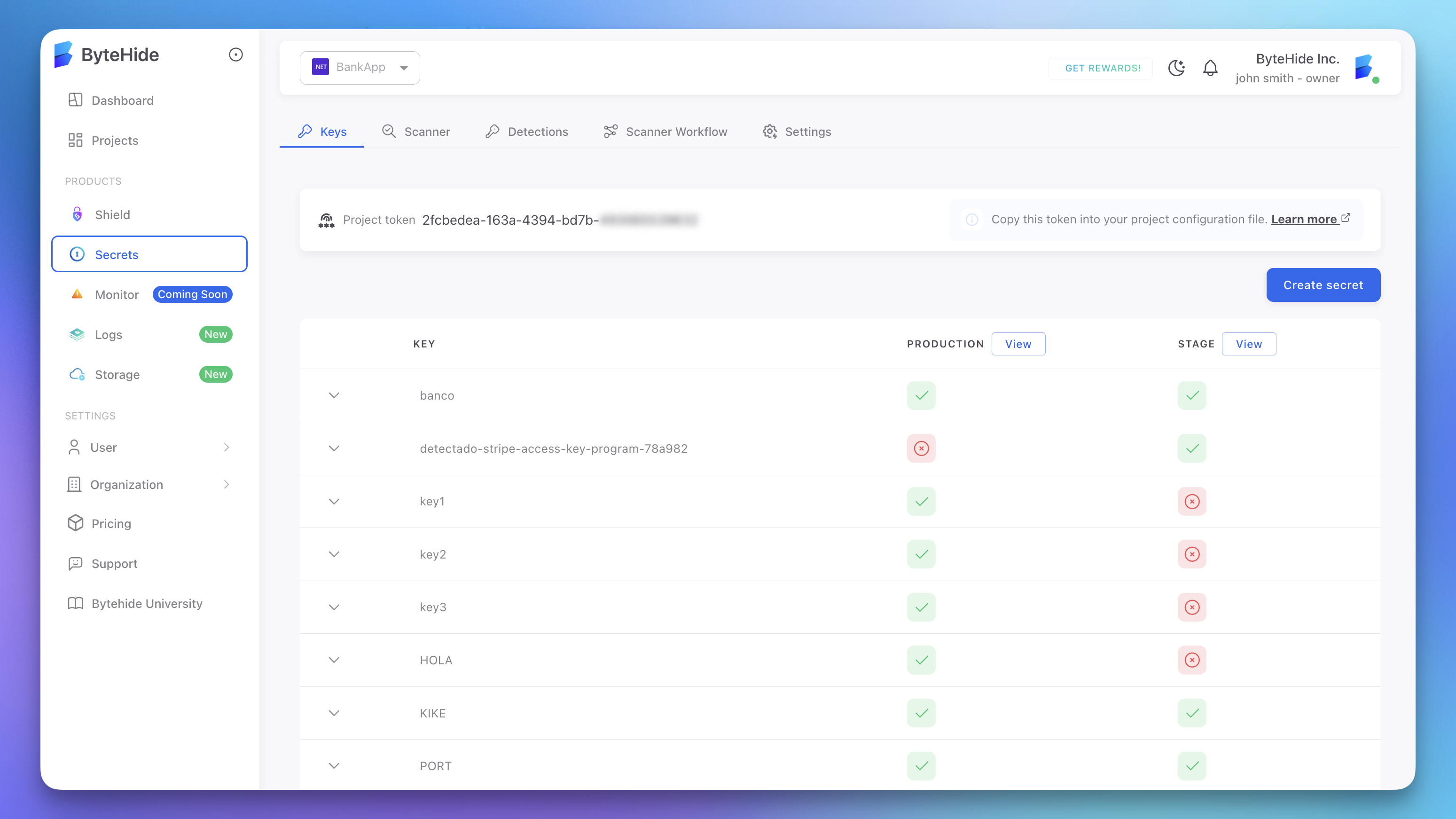 Click to expand
The vault stores each secret with per-environment values (Production, Stage, Development), access control, audit logging, and encryption at rest. Secrets synced from Radar appear in the vault alongside manually created secrets.
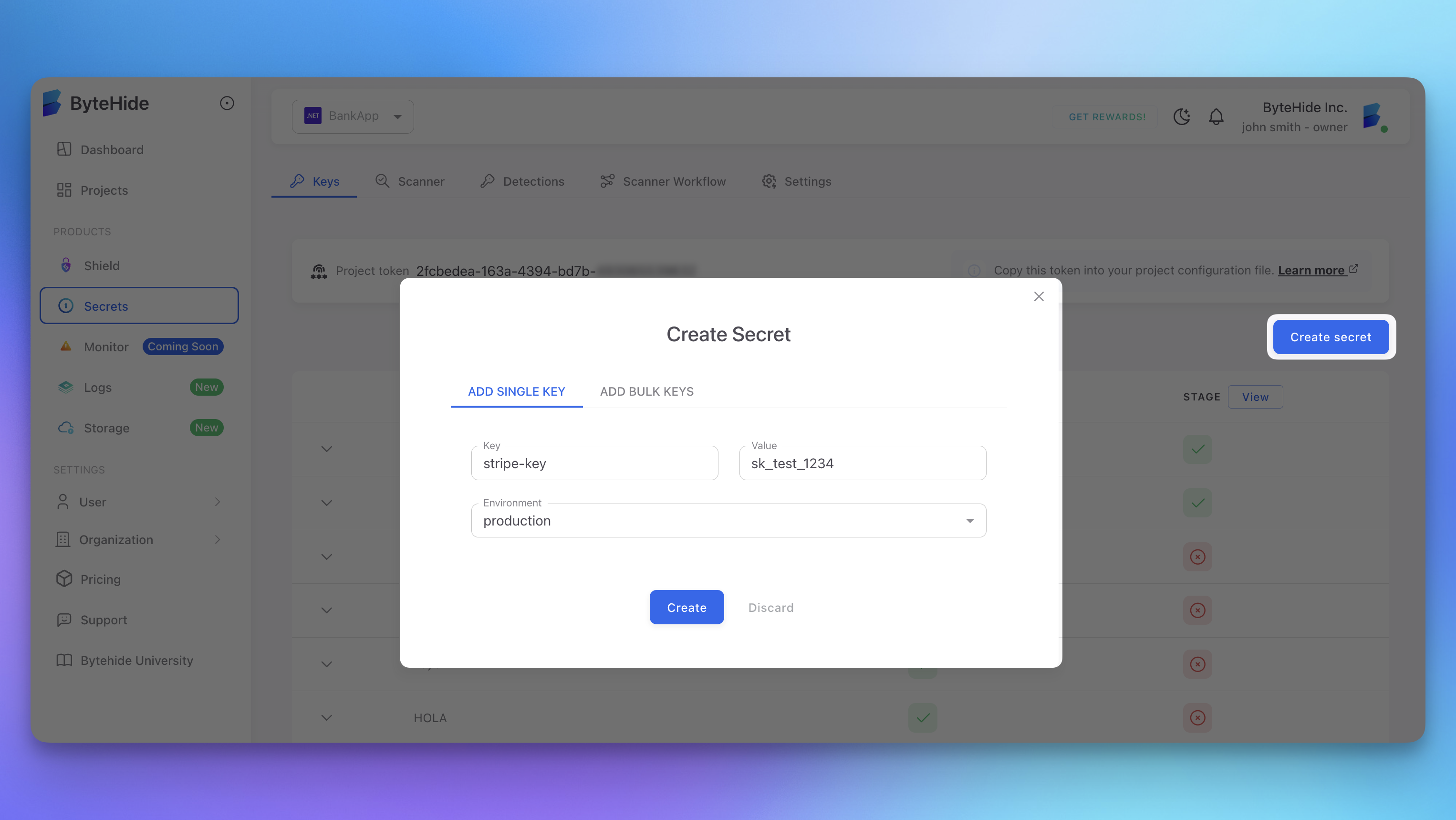 Click to expand
When combined with AutoFix using the ByteHide Secrets SDK strategy, the full flow is automatic: Radar detects the credential, syncs it to the vault, and generates a PR that replaces the hardcoded value with a secure SDK reference using the vault key ID. Future credential rotations update the vault value only, with no code changes or redeployment needed.
End-to-End in Seconds
Detection, vault sync, and code fix happen automatically. Radar detects the hardcoded credential, stores it securely in ByteHide Secrets, and generates a PR that replaces the hardcoded value with a secure SDK reference. Review, merge, and the risk is eliminated.
Manual Remediation Workflow
If you prefer to remediate manually, follow these steps in order. Rotate first, remove second.
Rotate the credential. Generate a new credential from the provider (AWS IAM, Stripe Dashboard, GitHub Settings, etc.) and configure your application to use it through environment variables or a secret manager.
Revoke the old credential. Disable or delete the compromised credential in the provider's dashboard. Automated scanners may have already captured it.
Remove from code. Replace the hardcoded value with an environment variable reference or secret manager call.
Audit for unauthorized access. Check the provider's access logs during the exposure window (CloudTrail for AWS, Events log for Stripe, Security Log for GitHub, connection logs for databases). Escalate to your security team if unauthorized access is detected.
Deploy with the new credential. Verify all services function correctly with the new credential.
Mark as Fixed. The finding moves to Fixed automatically on the next scan, or update manually with a remediation note.
Secret Storage Alternatives
| Method | Best For | Details |
|---|---|---|
| ByteHide Secrets | All platforms | Zero-knowledge vault with per-environment values, access control, audit logging, and automatic rotation. Native integration with Radar for automatic sync and SDK-based retrieval. See ByteHide Secrets documentation |
| Environment variables | All platforms | Set in shell or deployment environment, never committed to version control. Ensure .env files are in .gitignore |
| CI/CD platform secrets | Build and deployment | GitHub Actions secrets, GitLab CI/CD variables, CircleCI environment variables, Azure DevOps variable groups |
| Other secret managers | Production workloads | HashiCorp Vault, AWS Secrets Manager, Azure Key Vault, GCP Secret Manager |
Status Workflow
| Status | Description |
|---|---|
| Open | Default for new findings. Requires attention and remediation |
| Fixed | Secret no longer detected in current code. Applied automatically on next scan |
| Ignored | Accepted risk with documented reason (test credentials, sandbox environments, frequently rotated keys) |
| False Positive | Confirmed as not an actual secret (see below) |
Fixed Does Not Mean Safe
Fixed means the secret was removed from current code, but it remains in Git history. Always complete the full remediation workflow (rotate + revoke) regardless of finding status.
Handling False Positives
Common false positive scenarios:
| Scenario | Example |
|---|---|
| Test credentials | Stripe sk_test_ keys, sandbox API keys with restricted permissions |
| Documentation examples | Fake credential values in code samples and README files |
| Placeholder values | YOUR_API_KEY_HERE or replace-with-actual-key |
| Hash digests | SHA-256, MD5 values in lock files or integrity checks |
| Encoded non-secret data | Base64-encoded configuration or media content |
To mark a false positive: open the finding detail, change status to False Positive, and add a justification (e.g., "Test key with no production access", "SHA-256 hash digest"). Periodically review dismissed findings as credentials may be repurposed.
Preventing Future Leaks
| Strategy | How |
|---|---|
| Pre-commit hooks | Scan staged changes for secrets before commit. Configure pre-commit with Radar's CLI for immediate feedback |
| Gitignore configuration | Exclude .env, .env.local, .env.production, *.pem, *.key, *.p12, *.pfx, credentials.json, service-account.json, secrets.yaml |
| PR scanning | Radar's GitHub integration scans every pull request and posts findings directly in the review |
| Code review practices | Make secret detection a standard part of PR review. Train developers to check for hardcoded credentials |
| Developer education | Never hardcode secrets (even temporarily), use environment variables from the start, understand that Git history is permanent |
Next Steps
Supported Secret Types
Complete list of credential types and patterns detected by Radar.
View Secret Findings
Navigate, filter, and understand the secret findings table.
ByteHide Secrets
Zero-knowledge secret manager for secure credential storage and retrieval.