Android Configuration API
Monitor offers three configuration approaches: Gradle DSL (build-time), JSON file (local/offline), and Programmatic API (runtime). You can combine them for a hybrid approach.
Configuration Options Overview
| Option | Best For | Code Required | Offline Support |
|---|---|---|---|
| Gradle DSL | Android apps (recommended) | None | Plugin embeds config at build time |
| JSON File | Offline / auditable config | None | Yes |
| Programmatic API | Custom actions / dynamic logic | Yes | Yes |
Option A: Gradle DSL (Android)
The Gradle plugin handles initialization automatically via a generated ContentProvider. No code changes required for basic protection.
monitor {
    projectToken = "bh_xxxxxxxxxxxx"
    preset = "mobile"
}
monitor {
projectToken = "bh_xxxxxxxxxxxx"
preset = "mobile"
}For full DSL options including presets, individual protection flags, and behavior settings, see Gradle Setup.
Option B: JSON Configuration
Define protections locally in a JSON file. Ideal for offline environments or when you need version-controlled configuration.
Android: Place in src/main/assets/. Desktop/Server: Place in src/main/resources/ (classpath).
The SDK searches for config files in this order: monitor-config.json, bytehide-monitor-config.json, bytehide.monitor.json, monitor.config.json.
{
  "enabled": true,
  "projectToken": "bh_xxxxxxxxxxxx",
  "logging": {
    "level": "info",
    "console": true,
    "file": {
      "enabled": true,
      "path": "logs/bytehide-monitor.log",
      "maxSizeMB": 10,
      "maxFiles": 5
    }
  },
  "protections": [
    {
      "type": "DebuggerDetection",
      "enabled": true,
      "action": "close"
    },
    {
      "type": "JailbreakDetection",
      "enabled": true,
      "action": "close"
    },
    {
      "type": "ClockTampering",
      "enabled": true,
      "action": "log"
    }
  ]
}
{
"enabled": true,
"projectToken": "bh_xxxxxxxxxxxx",
"logging": {
"level": "info",
"console": true,
"file": {
"enabled": true,
"path": "logs/bytehide-monitor.log",
"maxSizeMB": 10,
"maxFiles": 5
}
},
"protections": [
{
"type": "DebuggerDetection",
"enabled": true,
"action": "close"
},
{
"type": "JailbreakDetection",
"enabled": true,
"action": "close"
},
{
"type": "ClockTampering",
"enabled": true,
"action": "log"
}
]
}Android with Gradle plugin
On Android with the Gradle plugin, the plugin generates and embeds an encrypted config automatically from the monitor {} DSL. You only need a manual JSON file if you're not using the plugin or want to override the embedded config during development.
See JSON Configuration for the full schema reference.
Option C: Programmatic Configuration
Configure Monitor directly in code for maximum control, custom actions, and dynamic logic.
Android (with Gradle plugin)
The plugin handles initialization automatically. You only need code for additional runtime configuration (custom actions, extra logging, etc.):
Kotlin
import android.app.Application
import com.bytehide.monitor.Monitor
import com.bytehide.monitor.core.action.ActionType
import com.bytehide.monitor.core.protection.ProtectionModuleType
import com.bytehide.monitor.core.logging.LogLevel
import android.util.Log

class MyApplication : Application() {
    override fun onCreate() {
        super.onCreate()

        // Monitor is already initialized by the ContentProvider.
        // Add custom behavior:
        Monitor.configure { config ->
            config.registerCustomAction("alert") { result ->
                Log.w("Security", "Threat: ${result.threatType}")
                Log.w("Security", "Details: ${result.description}")
                // Send to analytics, show dialog, notify backend, etc.
            }
        }
    }
}
import android.app.Application
import com.bytehide.monitor.Monitor
import com.bytehide.monitor.core.action.ActionType
import com.bytehide.monitor.core.protection.ProtectionModuleType
import com.bytehide.monitor.core.logging.LogLevel
import android.util.Log
class MyApplication : Application() {
override fun onCreate() {
super.onCreate()
// Monitor is already initialized by the ContentProvider.
// Add custom behavior:
Monitor.configure { config ->
config.registerCustomAction("alert") { result ->
Log.w("Security", "Threat: ${result.threatType}")
Log.w("Security", "Details: ${result.description}")
// Send to analytics, show dialog, notify backend, etc.
}
}
}
}Java
import android.app.Application;
import com.bytehide.monitor.Monitor;
import com.bytehide.monitor.core.action.ActionType;
import com.bytehide.monitor.core.protection.ProtectionModuleType;
import android.util.Log;

public class MyApplication extends Application {
    @Override
    public void onCreate() {
        super.onCreate();

        // Monitor is already initialized by the ContentProvider.
        // Add custom behavior:
        Monitor.configure(config -> {
            config.registerCustomAction("alert", result -> {
                Log.w("Security", "Threat: " + result.getThreatType());
                Log.w("Security", "Details: " + result.getDescription());
            });
        });
    }
}
import android.app.Application;
import com.bytehide.monitor.Monitor;
import com.bytehide.monitor.core.action.ActionType;
import com.bytehide.monitor.core.protection.ProtectionModuleType;
import android.util.Log;
public class MyApplication extends Application {
@Override
public void onCreate() {
super.onCreate();
// Monitor is already initialized by the ContentProvider.
// Add custom behavior:
Monitor.configure(config -> {
config.registerCustomAction("alert", result -> {
Log.w("Security", "Threat: " + result.getThreatType());
Log.w("Security", "Details: " + result.getDescription());
});
});
}
}Register your Application class in AndroidManifest.xml:
<application android:name=".MyApplication">
    <!-- your activities -->
</application><application android:name=".MyApplication">
<!-- your activities -->
</application>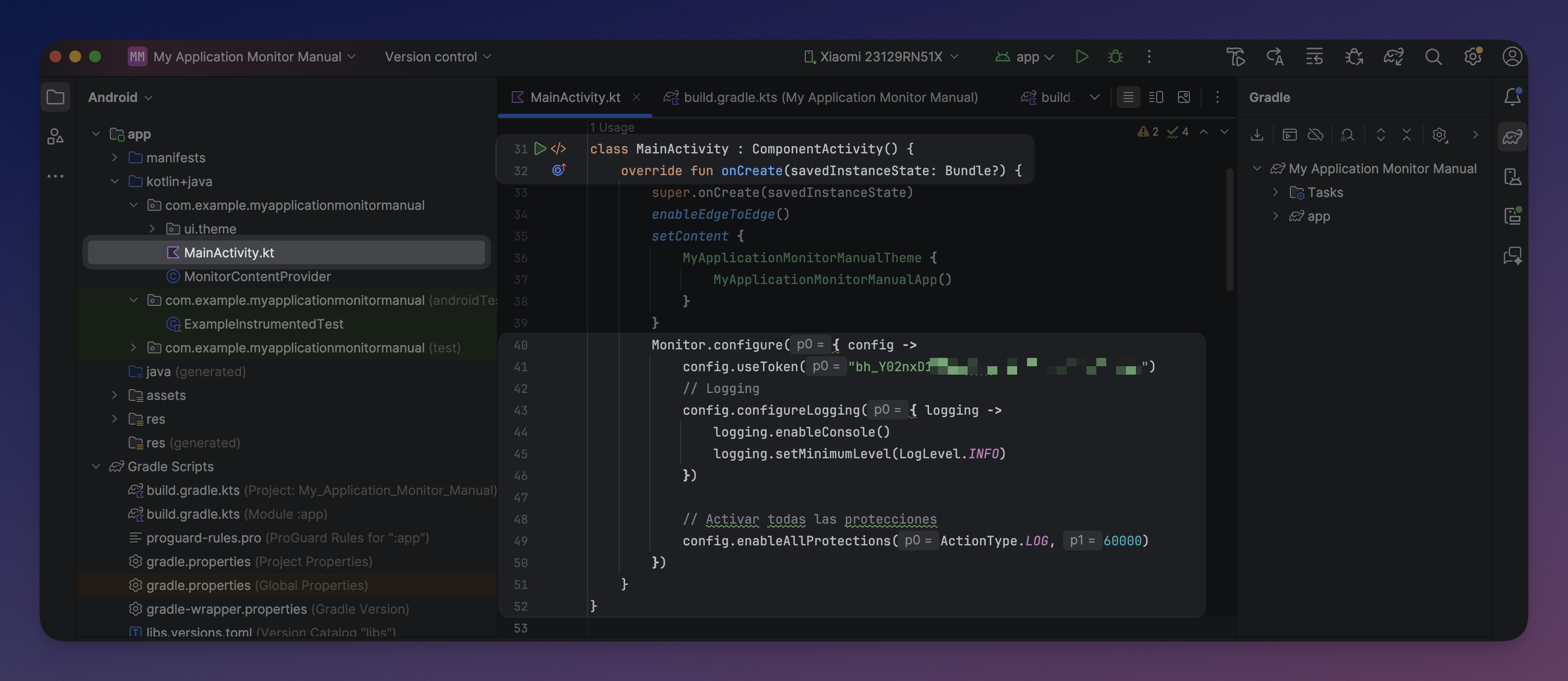 Click to expand
Java Desktop / Server (without Gradle plugin)
For non-Android (desktop, CLI, Spring Boot, etc.), you initialize Monitor entirely in code. No Gradle plugin is needed. Add the dependency directly:
Gradle:
dependencies {
    implementation("com.bytehide:monitor-core:1.0.1")
}
dependencies {
implementation("com.bytehide:monitor-core:1.0.1")
}Maven:
<dependency>
    <groupId>com.bytehide</groupId>
    <artifactId>monitor-core</artifactId>
    <version>1.0.1</version>
</dependency><dependency>
<groupId>com.bytehide</groupId>
<artifactId>monitor-core</artifactId>
<version>1.0.1</version>
</dependency>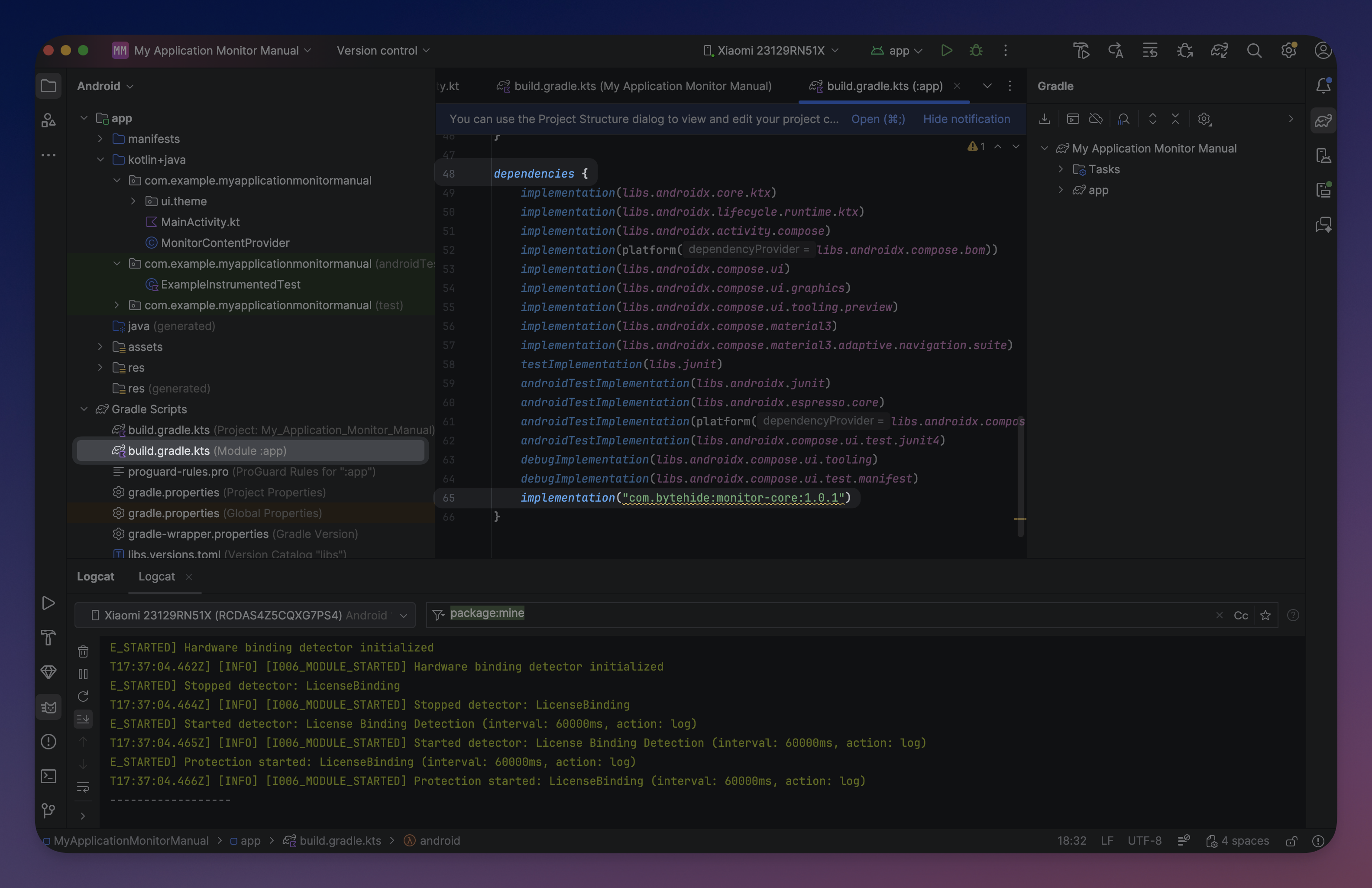 Click to expand
Minimal setup
import com.bytehide.monitor.Monitor;
import com.bytehide.monitor.core.action.ActionType;

public class MyApp {
    public static void main(String[] args) {
        Monitor.configure(config -> {
            config.useToken("bh_xxxxxxxxxxxx");
            config.enableAllProtections(ActionType.LOG, 60000);
        });

        // Your application code...
    }
}
import com.bytehide.monitor.Monitor;
import com.bytehide.monitor.core.action.ActionType;
public class MyApp {
public static void main(String[] args) {
Monitor.configure(config -> {
config.useToken("bh_xxxxxxxxxxxx");
config.enableAllProtections(ActionType.LOG, 60000);
});
// Your application code...
}
}Async vs Sync initialization
// Async (recommended) - returns immediately, initializes in background
Monitor.configure(config -> { ... });        // alias for configureAsync()
Monitor.configureAsync(config -> { ... });   // returns CompletableFuture<Void>

// Sync (blocking) - blocks until fully initialized
Monitor.configureSync(config -> { ... });    // blocks current thread
// Async (recommended) - returns immediately, initializes in background
Monitor.configure(config -> { ... }); // alias for configureAsync()
Monitor.configureAsync(config -> { ... }); // returns CompletableFuture<Void>
// Sync (blocking) - blocks until fully initialized
Monitor.configureSync(config -> { ... }); // blocks current threadAlways use async on Android
On Android, always use configure() (async) to avoid ANR errors. Use configureSync() only in Desktop/Server applications where blocking is acceptable.
Full Desktop example
import com.bytehide.monitor.Monitor;
import com.bytehide.monitor.core.action.ActionType;
import com.bytehide.monitor.core.protection.ProtectionModuleType;
import com.bytehide.monitor.core.logging.LogLevel;

public class DesktopApp {
    public static void main(String[] args) {
        Monitor.configure(config -> {
            config.useToken(System.getenv("BYTEHIDE_MONITOR_TOKEN"));

            // Logging
            config.configureLogging(log -> {
                log.enableConsole();
                log.setMinimumLevel(LogLevel.INFO);
            });

            // Custom action
            config.registerCustomAction("alert", result -> {
                System.err.println("[SECURITY] " + result.getThreatType()
                    + ": " + result.getDescription());
            });

            // Protections
            config.addProtection(ProtectionModuleType.DEBUGGER_DETECTION, ActionType.CLOSE, 10000);
            config.addProtection(ProtectionModuleType.VIRTUAL_MACHINE_DETECTION, "alert", 60000);
            config.addProtection(ProtectionModuleType.MEMORY_DUMP_DETECTION, ActionType.LOG, 30000);
            config.addProtection(ProtectionModuleType.PROCESS_INJECTION, ActionType.LOG, 30000);
            config.addProtection(ProtectionModuleType.CLOCK_TAMPERING, ActionType.LOG, 60000);
        });

        System.out.println("Application running with RASP protection.");
    }
}
import com.bytehide.monitor.Monitor;
import com.bytehide.monitor.core.action.ActionType;
import com.bytehide.monitor.core.protection.ProtectionModuleType;
import com.bytehide.monitor.core.logging.LogLevel;
public class DesktopApp {
public static void main(String[] args) {
Monitor.configure(config -> {
config.useToken(System.getenv("BYTEHIDE_MONITOR_TOKEN"));
// Logging
config.configureLogging(log -> {
log.enableConsole();
log.setMinimumLevel(LogLevel.INFO);
});
// Custom action
config.registerCustomAction("alert", result -> {
System.err.println("[SECURITY] " + result.getThreatType()
+ ": " + result.getDescription());
});
// Protections
config.addProtection(ProtectionModuleType.DEBUGGER_DETECTION, ActionType.CLOSE, 10000);
config.addProtection(ProtectionModuleType.VIRTUAL_MACHINE_DETECTION, "alert", 60000);
config.addProtection(ProtectionModuleType.MEMORY_DUMP_DETECTION, ActionType.LOG, 30000);
config.addProtection(ProtectionModuleType.PROCESS_INJECTION, ActionType.LOG, 30000);
config.addProtection(ProtectionModuleType.CLOCK_TAMPERING, ActionType.LOG, 60000);
});
System.out.println("Application running with RASP protection.");
}
}Spring Boot example
import org.springframework.boot.SpringApplication;
import org.springframework.boot.autoconfigure.SpringBootApplication;
import com.bytehide.monitor.Monitor;
import com.bytehide.monitor.core.action.ActionType;
import com.bytehide.monitor.core.protection.ProtectionModuleType;

@SpringBootApplication
public class Application {
    public static void main(String[] args) {
        // Initialize Monitor before Spring Boot
        Monitor.configureSync(config -> {
            config.useToken(System.getenv("BYTEHIDE_MONITOR_TOKEN"));

            config.addProtection(ProtectionModuleType.DEBUGGER_DETECTION, ActionType.LOG, 30000);
            config.addProtection(ProtectionModuleType.CONTAINER_DETECTION, ActionType.LOG, 60000);
            config.addProtection(ProtectionModuleType.CLOUD_METADATA, ActionType.LOG, 60000);
            config.addProtection(ProtectionModuleType.NETWORK_TAMPERING, ActionType.LOG, 60000);
        });

        SpringApplication.run(Application.class, args);
    }
}
import org.springframework.boot.SpringApplication;
import org.springframework.boot.autoconfigure.SpringBootApplication;
import com.bytehide.monitor.Monitor;
import com.bytehide.monitor.core.action.ActionType;
import com.bytehide.monitor.core.protection.ProtectionModuleType;
@SpringBootApplication
public class Application {
public static void main(String[] args) {
// Initialize Monitor before Spring Boot
Monitor.configureSync(config -> {
config.useToken(System.getenv("BYTEHIDE_MONITOR_TOKEN"));
config.addProtection(ProtectionModuleType.DEBUGGER_DETECTION, ActionType.LOG, 30000);
config.addProtection(ProtectionModuleType.CONTAINER_DETECTION, ActionType.LOG, 60000);
config.addProtection(ProtectionModuleType.CLOUD_METADATA, ActionType.LOG, 60000);
config.addProtection(ProtectionModuleType.NETWORK_TAMPERING, ActionType.LOG, 60000);
});
SpringApplication.run(Application.class, args);
}
}Java API Reference
useToken(String token)
Sets the API token for backend communication.
config.useToken("bh_xxxxxxxxxxxx");
// Or from environment:
config.useToken(System.getenv("BYTEHIDE_MONITOR_TOKEN"));config.useToken("bh_xxxxxxxxxxxx");
// Or from environment:
config.useToken(System.getenv("BYTEHIDE_MONITOR_TOKEN"));enableAllProtections(ActionType action, int intervalMs)
Enables all available protection modules with the same action and interval.
config.enableAllProtections(ActionType.LOG, 60000);config.enableAllProtections(ActionType.LOG, 60000);addProtection(ProtectionModuleType module, ActionType action, int intervalMs)
Adds a specific protection module with a built-in action.
config.addProtection(ProtectionModuleType.DEBUGGER_DETECTION, ActionType.CLOSE, 10000);config.addProtection(ProtectionModuleType.DEBUGGER_DETECTION, ActionType.CLOSE, 10000);addProtection(ProtectionModuleType module, String customActionName, int intervalMs)
Adds a specific protection module with a custom action (must be registered first).
config.addProtection(ProtectionModuleType.DEBUGGER_DETECTION, "notify", 10000);config.addProtection(ProtectionModuleType.DEBUGGER_DETECTION, "notify", 10000);registerCustomAction(String name, IActionHandler handler)
Registers a named custom action handler.
config.registerCustomAction("notify", result -> {
    System.err.println("Threat: " + result.getDescription());
    System.err.println("Confidence: " + result.getConfidence());
});config.registerCustomAction("notify", result -> {
System.err.println("Threat: " + result.getDescription());
System.err.println("Confidence: " + result.getConfidence());
});configureLogging(LoggingConfigurator configurator)
Configures logging sinks and levels.
config.configureLogging(log -> {
    log.enableConsole();
    log.enableFileLogging("monitor.log");
    log.setMinimumLevel(LogLevel.INFO);
    log.addSink(customSink);  // Forward to SLF4J, Log4j, etc.
});config.configureLogging(log -> {
log.enableConsole();
log.enableFileLogging("monitor.log");
log.setMinimumLevel(LogLevel.INFO);
log.addSink(customSink); // Forward to SLF4J, Log4j, etc.
});Protection Modules
| Module | Enum Constant | Recommended For |
|---|---|---|
| Debugger Detection | DEBUGGER_DETECTION | All |
| Clock Tampering | CLOCK_TAMPERING | All |
| Jailbreak / Root | JAILBREAK_DETECTION | Mobile, Desktop |
| Virtual Machine | VIRTUAL_MACHINE_DETECTION | Desktop |
| Emulator | EMULATOR_DETECTION | Mobile, Desktop |
| Memory Dump | MEMORY_DUMP_DETECTION | Desktop |
| Process Injection | PROCESS_INJECTION | Desktop, Mobile |
| Network Tampering | NETWORK_TAMPERING | All |
| License Binding | LICENSE_BINDING | All |
| Tampering Detection | TAMPERING_DETECTION | Mobile, Desktop |
| Container Detection | CONTAINER_DETECTION | Server |
| Remote Desktop | REMOTE_DESKTOP | Desktop |
| Cloud Metadata | CLOUD_METADATA | Server |
Available Action Types
| Type | Enum / DSL String | Behavior |
|---|---|---|
| None | ActionType.NONE / "none" | Detect only, no response |
| Log | ActionType.LOG / "log" | Log the threat (default) |
| Close | ActionType.CLOSE / "close" | Terminate the application (System.exit(1)) |
| Erase | ActionType.ERASE / "erase" | Wipe temp data and terminate |
| Custom | ActionType.CUSTOM / "custom" | Execute your registered handler |
Custom Action Example
config.registerCustomAction("myAction") { threat ->
    // 1. Log the incident
    analytics.trackSecurityThreat(threat.threatType, threat.description)

    // 2. Notify the user
    showSecurityWarning(threat.description)

    // 3. Alert the backend
    securityApi.reportThreat(threat)

    // 4. Take action based on confidence
    when (threat.confidence) {
        in 0.8..1.0 -> exitProcess(1)          // High: close app
        in 0.5..0.8 -> disableSensitiveFeatures() // Medium: limit
        else -> Log.i("Security", "Possible threat: ${threat.description}")
    }
}config.registerCustomAction("myAction") { threat ->
// 1. Log the incident
analytics.trackSecurityThreat(threat.threatType, threat.description)
// 2. Notify the user
showSecurityWarning(threat.description)
// 3. Alert the backend
securityApi.reportThreat(threat)
// 4. Take action based on confidence
when (threat.confidence) {
in 0.8..1.0 -> exitProcess(1) // High: close app
in 0.5..0.8 -> disableSensitiveFeatures() // Medium: limit
else -> Log.i("Security", "Possible threat: ${threat.description}")
}
}Detection Result
When using custom actions, the DetectionResult object provides:
| Method | Return Type | Description |
|---|---|---|
getThreatType() | ProtectionModuleType | Which module triggered |
getDescription() | String | Human-readable description |
getConfidence() | float | Confidence score (0.0 - 1.0) |
Utility Methods
Monitor.isInitialized();   // true if Monitor has been configured
Monitor.getMachineId();     // SHA-256 hash of hardware identifiers
Monitor.getSessionId();     // Current session UUID (null if no session)
Monitor.shutdown(); // Explicit shutdown (auto-registered via JVM hook)Monitor.isInitialized(); // true if Monitor has been configured
Monitor.getMachineId(); // SHA-256 hash of hardware identifiers
Monitor.getSessionId(); // Current session UUID (null if no session)
Monitor.shutdown(); // Explicit shutdown (auto-registered via JVM hook)Configuration Loading Order
When multiple configuration sources are present, they are applied in this priority order:
- Embedded encrypted configuration (injected by the Gradle plugin at build time)
- Plain JSON file in assets/resources (for development / offline)
- Programmatic configuration via
Monitor.configure(overrides the above)
Cloud protection modules
The Java SDK currently supports on-premise protection modules (mobile and desktop). Cloud protection modules (SQL Injection, XSS, Path Traversal, etc.) for web API monitoring will be available soon.