Understand how Monitor actions work
Monitor actions define how your application responds when a protection module detects a threat. Each module can be assigned its own action, so you can log low-confidence detections, block confirmed attacks, and terminate the application for critical threats.
Action Types
SDK Actions
These actions are available in JSON configuration and the Configuration API. They execute inside the application at the point where the threat is detected.
| Action | Behavior | Use Case |
|---|---|---|
| Close | Terminates the application immediately | Critical threats on desktop/mobile (debugger attached, tampering detected) |
| Log | Records the incident and continues execution | Non-critical threats, monitoring, analytics |
| Block | Blocks the request and returns HTTP 403 | Web/API attacks (SQL injection, XSS, path traversal) |
| Erase | Securely deletes sensitive data, then terminates | Financial or healthcare applications on compromised devices |
| Custom | Executes your own async handler | SIEM integration, Slack alerts, custom escalation workflows |
| None | Detects the threat but takes no action | Development, testing, shadow mode before enforcing |
Cloud Dashboard Actions
These actions are available when configuring Workflow Rules in the Cloud Dashboard. They extend the SDK actions with network-level responses.
| Action | Behavior | Use Case |
|---|---|---|
| Log incident | Records the incident with full forensic context | Audit trail, compliance, analytics |
| Block | Blocks the specific request or operation | Stop the attack in progress |
| Block session | Invalidates the attacker's entire session | Prevent the attacker from continuing with a different payload |
| Block IP | Blocks all traffic from the source IP address | Stop repeated attacks from the same origin |
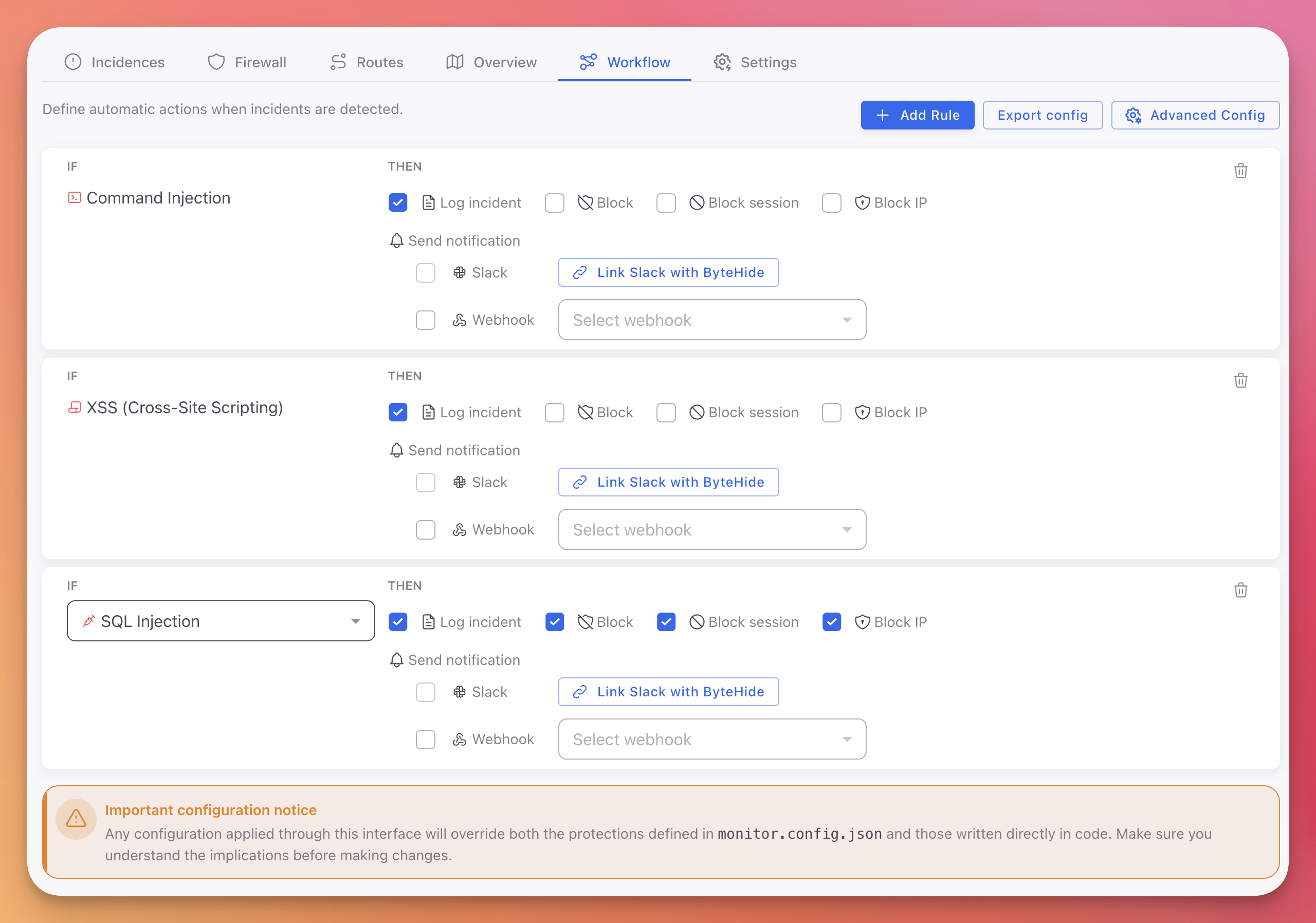 Click to expand
You can combine multiple actions in a single Workflow rule. For example, a SQL Injection rule can Log the incident, Block the request, and Block the IP simultaneously.
Action Selection Guide
By Threat Severity
| Threat Severity | Development | Staging | Production |
|---|---|---|---|
| Critical (Debugger, Tampering) | None / Log | Close | Close |
| High (Jailbreak, Memory Dump) | Log | Close | Close / Erase |
| Medium (VM, Emulator) | None | Log | Log / Close |
| Low (Clock Tampering, Cloud Metadata) | None | Log | Log |
By Application Type
| Application Type | Recommended Actions |
|---|---|
| Desktop (Console, WPF, WinForms) | Close, Log, Erase, Custom |
| Mobile (MAUI, Xamarin, Android, iOS) | Close, Log, Custom |
| Web / API (ASP.NET, Node.js) | Block, Log, Custom |
| IoT / On-Premise | Close, Log, Custom |
Common Scenarios
| Scenario | Action | Why |
|---|---|---|
| SQL Injection on a public API | Block | Stop the attack, keep the application running for other users |
| Debugger attached in production | Close | Immediate shutdown to prevent reverse engineering |
| VM detected on desktop app | Log | Track for analytics without disrupting legitimate users on VMs |
| Jailbreak on a banking app | Close | Regulatory requirement, compromised device cannot be trusted |
| Tampering detected with sensitive data | Erase | Delete credentials and keys before shutting down |
| New protection in shadow mode | None | Observe detections before enforcing in production |
| Any threat on a monitored API | Log + Block + Block IP | Full Cloud Dashboard workflow: record, stop, and ban the source |
Configuring Actions
Actions can be assigned per protection module from any configuration source:
- Cloud Dashboard: Assign actions in Workflow rules with the IF/THEN editor. Supports all cloud actions including Block session and Block IP.
- JSON Configuration: Set the
actionfield per protection in your configuration file. - Configuration API: Pass the action type when registering protections in code.
{
  "protections": [
    { "type": "DebuggerDetection", "enabled": true, "action": "close", "intervalMs": 10000 },
    { "type": "VirtualMachineDetection", "enabled": true, "action": "log", "intervalMs": 60000 },
    { "type": "JailbreakDetection", "enabled": true, "action": "close", "intervalMs": 60000 }
  ]
}
{
"protections": [
{ "type": "DebuggerDetection", "enabled": true, "action": "close", "intervalMs": 10000 },
{ "type": "VirtualMachineDetection", "enabled": true, "action": "log", "intervalMs": 60000 },
{ "type": "JailbreakDetection", "enabled": true, "action": "close", "intervalMs": 60000 }
]
}See JSON Configuration for the full schema reference.
Next Steps
Protection Modules
All available protection modules and what they detect
Custom Actions
Create custom response handlers for enterprise workflows
Cloud Configuration
Configure Workflow rules with Block session and Block IP actions
JSON Configuration
Full schema reference for per-module action configuration