Runtime Correlation
ByteHide AI connects what Radar finds in your code with what Monitor sees in production. A vulnerability is not just "medium severity" — it's "medium severity, actively exploited, last attack 2 hours ago".
Why Runtime Context Matters
Static analysis tells you a vulnerability exists. Runtime correlation tells you if anyone is actually attacking it.
| Without Runtime Correlation | With Runtime Correlation |
|---|---|
| 200 findings ordered by CVSS score | 200 findings ordered by real-world risk |
| All High findings look equally important | Actively exploited findings go to the top |
| A Critical SSRF on an internal endpoint wastes your team's time | That SSRF is deprioritized — no external traffic reaches it |
| No way to know if a vulnerable dependency is loaded in production | Monitor confirms which apps are running the vulnerable code |
How It Works
When both Radar (SAST/SCA/Secrets) and Monitor (RASP) are active on the same project, they share data automatically through the ByteHide platform. No additional configuration is needed.
Escalation: theoretical to actively exploited
- Radar flags a SQL injection in
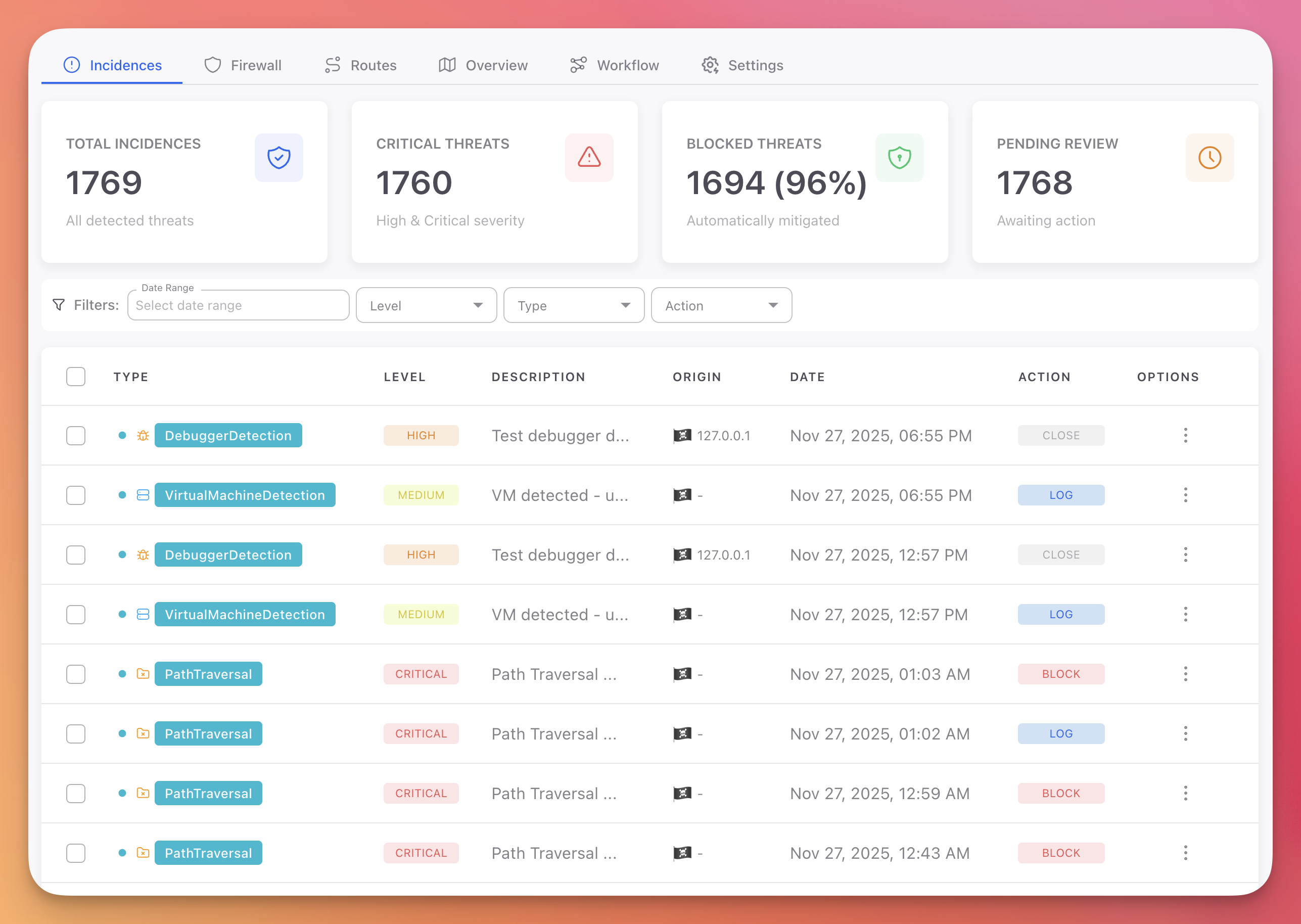
/api/users— assigns it Medium severity - Monitor detects 47 SQL injection attempts targeting that exact endpoint this week
 Click to expand
- Radar receives the runtime signal and escalates the finding to Critical
- The finding shows a "Runtime Confirmed" indicator with a link to the Monitor incidents
De-escalation: flagged but unreachable
- Radar flags an SSRF with Critical severity (CVSS 9.1)
- Monitor confirms the endpoint is internal-only, behind authentication, unreachable from external traffic
- Radar adjusts the priority to Medium — your team stops wasting time on it
Attack detail and AI analysis
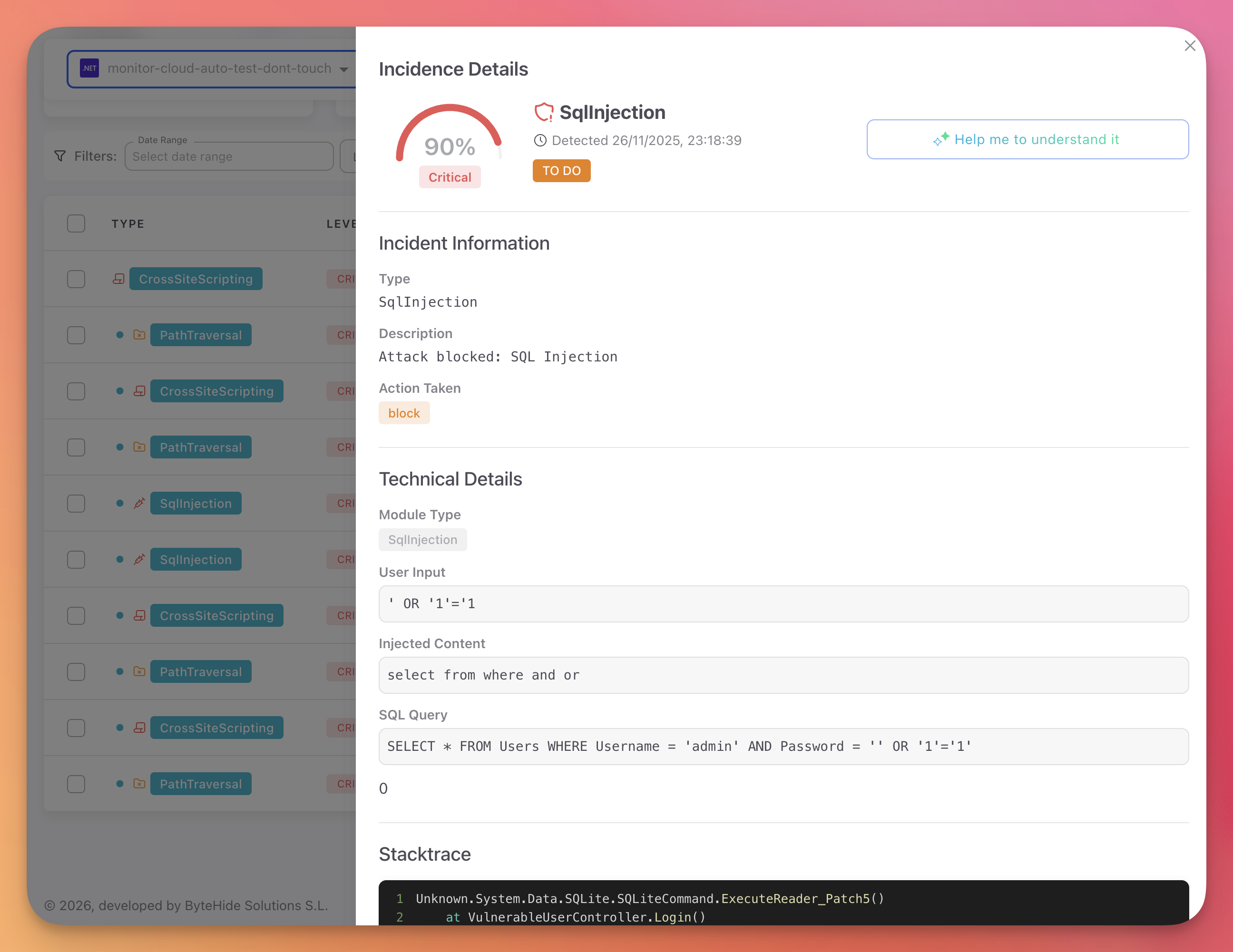
When Monitor detects an attack, it captures the full context: payload, injected content, SQL query, stacktrace, and origin. You get the exact data you need to understand the attack.
 Click to expand
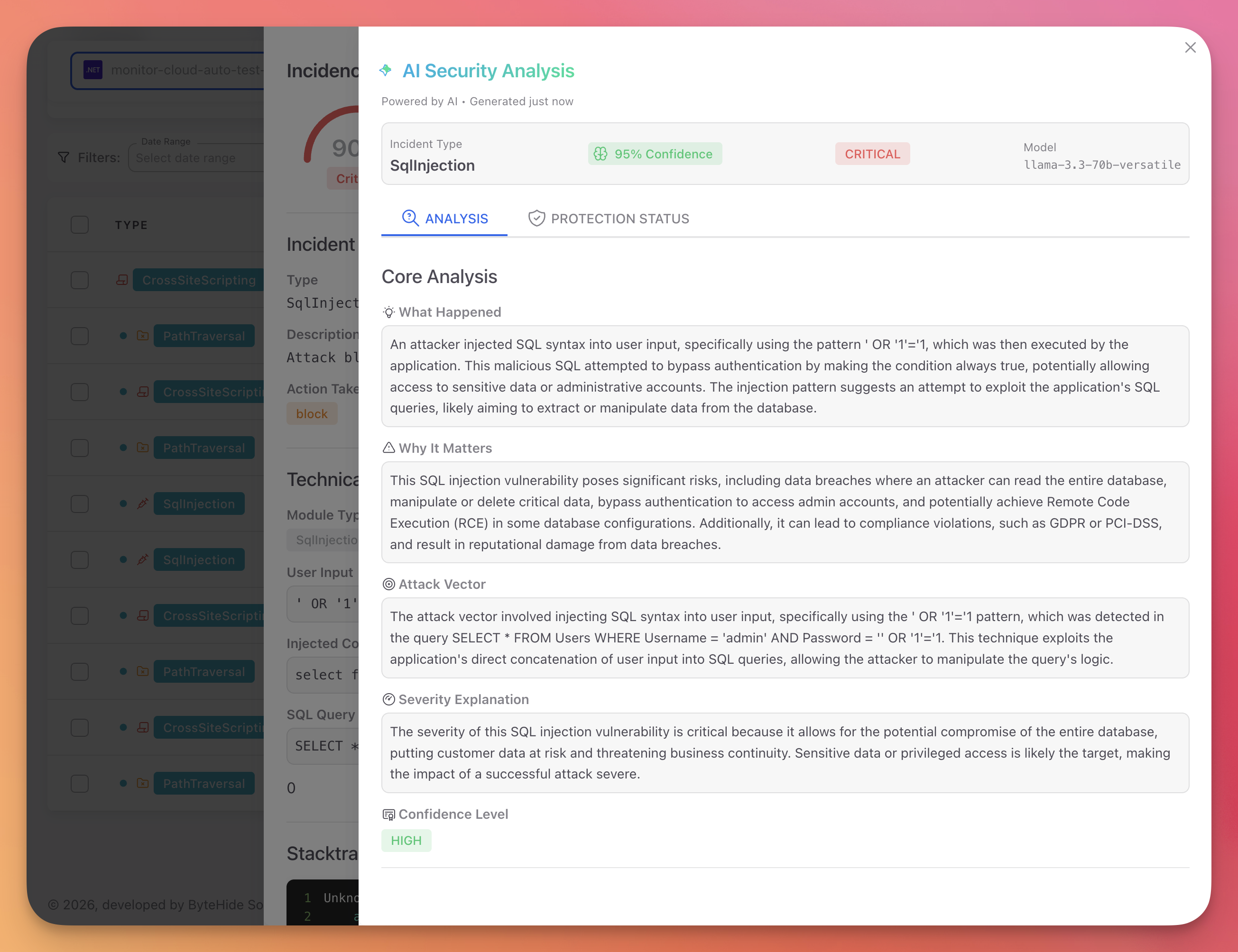
Monitor also provides an AI-powered analysis that explains what happened, why it matters, the attack vector, and the severity — all in plain language.
 Click to expand
MCP: Runtime Context in Your AI Conversation
When you use ByteHide through MCP, runtime correlation enriches the responses your AI agent gives you. Instead of just reporting a static finding, the AI can tell you:
- "This dependency has a known vulnerability and it's running in your production environment"
- "The last attack targeting this endpoint was today at 11:00"
- "This vulnerability is actively being exploited — 47 attempts this week"
- "Monitor is currently blocking attacks against this while you prepare the fix"
This turns security conversations from theoretical ("this could be vulnerable") into actionable ("this is under attack right now, here's what to do").
Example: dependency check with runtime context
When you ask your AI agent to check a dependency, the MCP doesn't just report the CVE — it cross-references with Monitor to tell you if that vulnerable dependency is loaded in a running application:
You: Is express@4.17.1 safe?

Claude: express@4.17.1 has 3 known CVEs (1 Critical, 2 High).

        ⚠️ Runtime alert: This exact version is currently running in
        your "api-gateway" production environment. Monitor detected
        2 exploit attempts targeting CVE-2024-43796 in the last 24h.

        Recommended: upgrade to express@4.21.0
You: Is express@4.17.1 safe?
Claude: express@4.17.1 has 3 known CVEs (1 Critical, 2 High).
⚠️ Runtime alert: This exact version is currently running in
your "api-gateway" production environment. Monitor detected
2 exploit attempts targeting CVE-2024-43796 in the last 24h.
Recommended: upgrade to express@4.21.0Example: code scan with runtime enrichment
When you scan code for vulnerabilities, findings that match active attacks in Monitor get flagged immediately:
You: Scan this file for vulnerabilities

Claude: Found 3 vulnerabilities:

        🔴 SQL Injection (CWE-89) — line 47 [RUNTIME CONFIRMED]
           47 exploit attempts this week targeting /api/users
           Monitor is blocking attacks. Fix urgently.

        🟡 XSS (CWE-79) — line 112
           No runtime activity observed

        🟡 Path Traversal (CWE-22) — line 89
           Endpoint is internal-only (Monitor confirms unreachable)
You: Scan this file for vulnerabilities
Claude: Found 3 vulnerabilities:
🔴 SQL Injection (CWE-89) — line 47 [RUNTIME CONFIRMED]
47 exploit attempts this week targeting /api/users
Monitor is blocking attacks. Fix urgently.
🟡 XSS (CWE-79) — line 112
No runtime activity observed
🟡 Path Traversal (CWE-22) — line 89
Endpoint is internal-only (Monitor confirms unreachable)The AI agent prioritizes the SQL injection first because it's the one under active attack — not because it has the highest CVSS score.
AI-Assisted Security During Development
Runtime correlation is not only for triage. When your AI coding agent has access to ByteHide MCP, security becomes part of the development conversation in real time:
- While writing code — the AI can scan what you're writing for vulnerabilities before you even commit
- Before installing dependencies — check if a package is safe and whether similar vulnerable versions are already running in production
- During code review — the AI can audit the diff for security issues and flag anything that matches known attack patterns from Monitor
- When debugging — if Monitor detected an attack, the AI can explain the incident, show you the vulnerable code, and suggest the fix
The MCP tools are available throughout the conversation. You don't switch to a separate security tool — the AI proactively uses ByteHide as part of its workflow.
Impact on Prioritization
Without runtime correlation, priority is based on severity score alone:
| Finding | CVSS | Priority |
|---|---|---|
SQL Injection in /api/users | 8.6 | High |
XSS in /admin/reports | 6.1 | Medium |
Path Traversal in /api/files | 7.5 | High |
SSRF in /internal/webhook | 9.1 | Critical |
With runtime correlation from Monitor:
| Finding | CVSS | Runtime Signal | Adjusted Priority |
|---|---|---|---|
SQL Injection in /api/users | 8.6 | 47 exploit attempts this week | Critical (actively exploited) |
XSS in /admin/reports | 6.1 | No attempts observed | Medium (unchanged) |
Path Traversal in /api/files | 7.5 | Endpoint is internal only | Low (unreachable) |
SSRF in /internal/webhook | 9.1 | Endpoint is internal only | Medium (deprioritized) |
The SSRF had the highest CVSS score, but runtime data shows it's unreachable. The SQL injection had a lower score, but it's actively under attack. Runtime correlation ensures your team fixes the right thing first.
False Positive Reduction
Runtime correlation reduces false positives by up to 90% through three mechanisms:
| Mechanism | How It Works |
|---|---|
| Reachability confirmation | Monitor observes actual traffic and confirms which code paths are reachable. Findings in unreachable code are deprioritized |
| Exploit validation | When Monitor detects a real attack matching a Radar finding, the finding is confirmed as a true positive |
| Context enrichment | Monitor provides deployment context (internal vs. external, authentication, network segmentation) that eliminates findings that are valid in code but not exploitable in context |
Setup
Runtime correlation activates automatically when both products are connected:
- Create a Radar project and connect your repository
- Set up Monitor on the same application
- Both products share data through the ByteHide platform automatically
No additional configuration is needed. When Monitor detects an attack that matches a Radar finding, the correlation appears in both dashboards within seconds — and becomes available to your AI agent through MCP.
Next Steps
MCP Setup
Connect ByteHide MCP to your AI agent to get runtime-enriched security insights.
MCP Overview
All MCP tools available and how they work.
Radar Runtime Correlation
In-depth technical reference for Radar + Monitor correlation.