Gradle Setup
This guide covers the complete Gradle setup for Shield, including repository configuration, plugin application, and protection configuration.
Requirements
| Requirement | Minimum | Recommended |
|---|---|---|
| Android Gradle Plugin | 7.0 | 8.0+ |
| Java | 11 | 17 |
| Kotlin (if used) | 1.8 | 1.9+ |
| Gradle | 7.4 | 8.0+ |
| minSdk | 21 | — |
Step 1: Configure Repositories
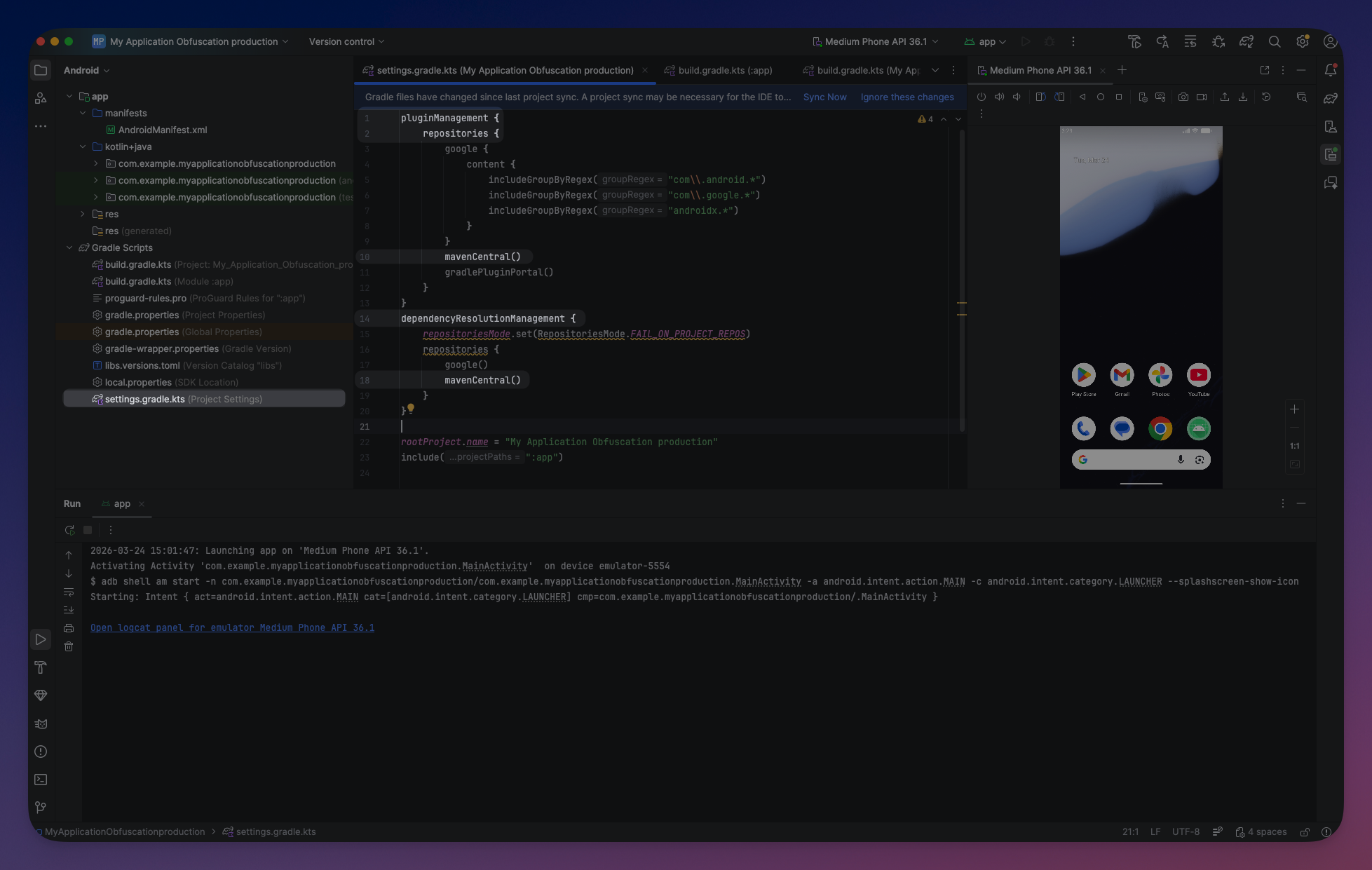
Shield is published on Maven Central. Add the standard repositories to your settings.gradle.kts if you don't have them already:
Kotlin DSL
// settings.gradle.kts
pluginManagement {
    repositories {
        google()
        mavenCentral()
        gradlePluginPortal()
    }
}

dependencyResolutionManagement {
    repositoriesMode.set(RepositoriesMode.FAIL_ON_PROJECT_REPOS)
    repositories {
        google()
        mavenCentral()
    }
}
// settings.gradle.kts
pluginManagement {
repositories {
google()
mavenCentral()
gradlePluginPortal()
}
}
dependencyResolutionManagement {
repositoriesMode.set(RepositoriesMode.FAIL_ON_PROJECT_REPOS)
repositories {
google()
mavenCentral()
}
}Groovy DSL
// settings.gradle
pluginManagement {
    repositories {
        google()
        mavenCentral()
        gradlePluginPortal()
    }
}

dependencyResolutionManagement {
    repositoriesMode.set(RepositoriesMode.FAIL_ON_PROJECT_REPOS)
    repositories {
        google()
        mavenCentral()
    }
}
// settings.gradle
pluginManagement {
repositories {
google()
mavenCentral()
gradlePluginPortal()
}
}
dependencyResolutionManagement {
repositoriesMode.set(RepositoriesMode.FAIL_ON_PROJECT_REPOS)
repositories {
google()
mavenCentral()
}
} Click to expand
Step 2: Apply the Plugin
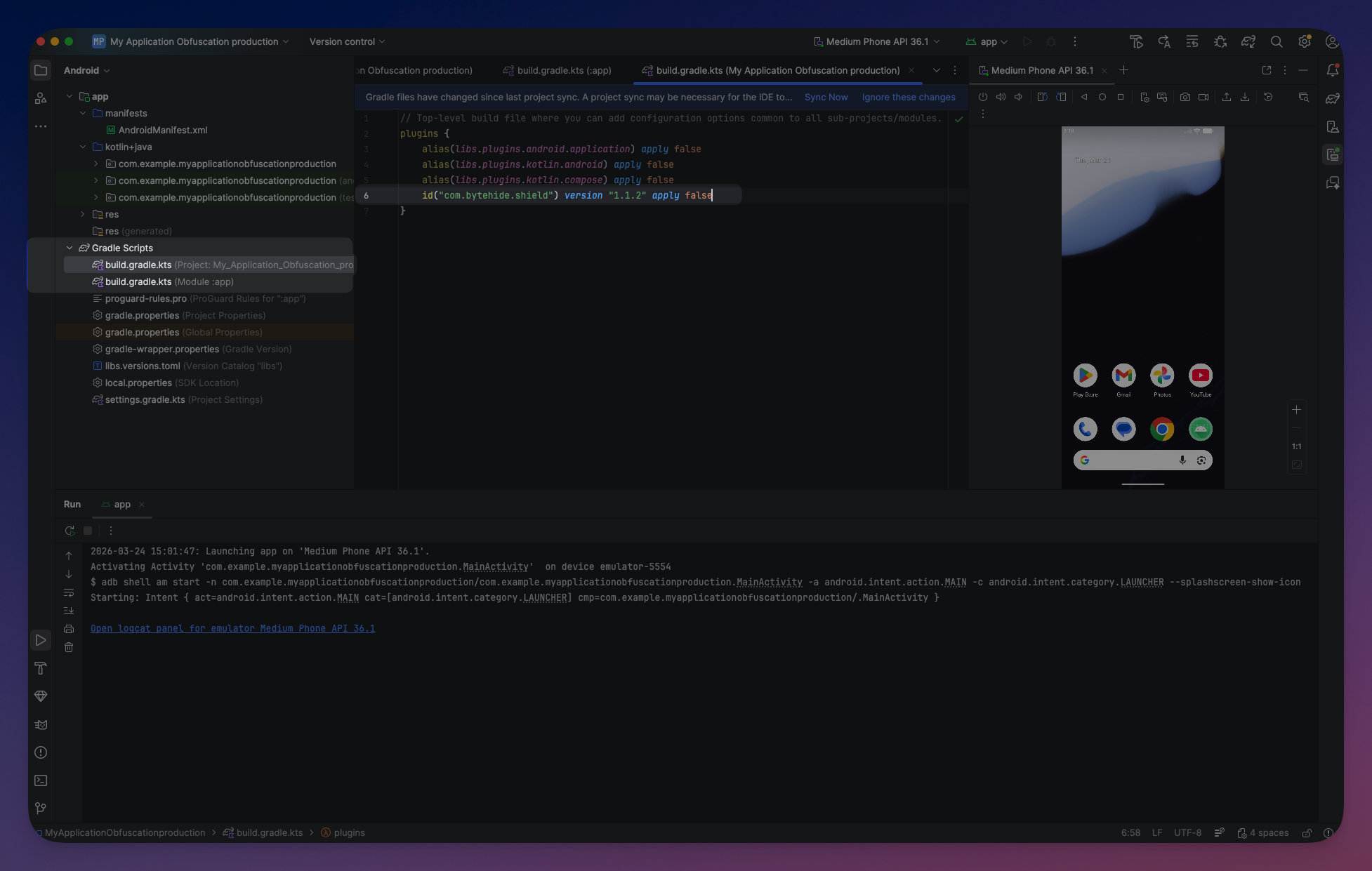
Add the Shield plugin to your app module's build file:
Kotlin DSL
// app/build.gradle.kts
plugins {
    id("com.android.application")
    id("org.jetbrains.kotlin.android")
    id("com.bytehide.shield") version "1.1.5"
}
// app/build.gradle.kts
plugins {
id("com.android.application")
id("org.jetbrains.kotlin.android")
id("com.bytehide.shield") version "1.1.5"
}Groovy DSL
// app/build.gradle
plugins {
    id 'com.android.application'
    id 'org.jetbrains.kotlin.android'
    id 'com.bytehide.shield' version '1.1.5'
}
// app/build.gradle
plugins {
id 'com.android.application'
id 'org.jetbrains.kotlin.android'
id 'com.bytehide.shield' version '1.1.5'
}Shield supports both com.android.application and com.android.library modules. Apply the plugin to any module that contains code you want to protect.
 Click to expand
Step 3: Configure Shield
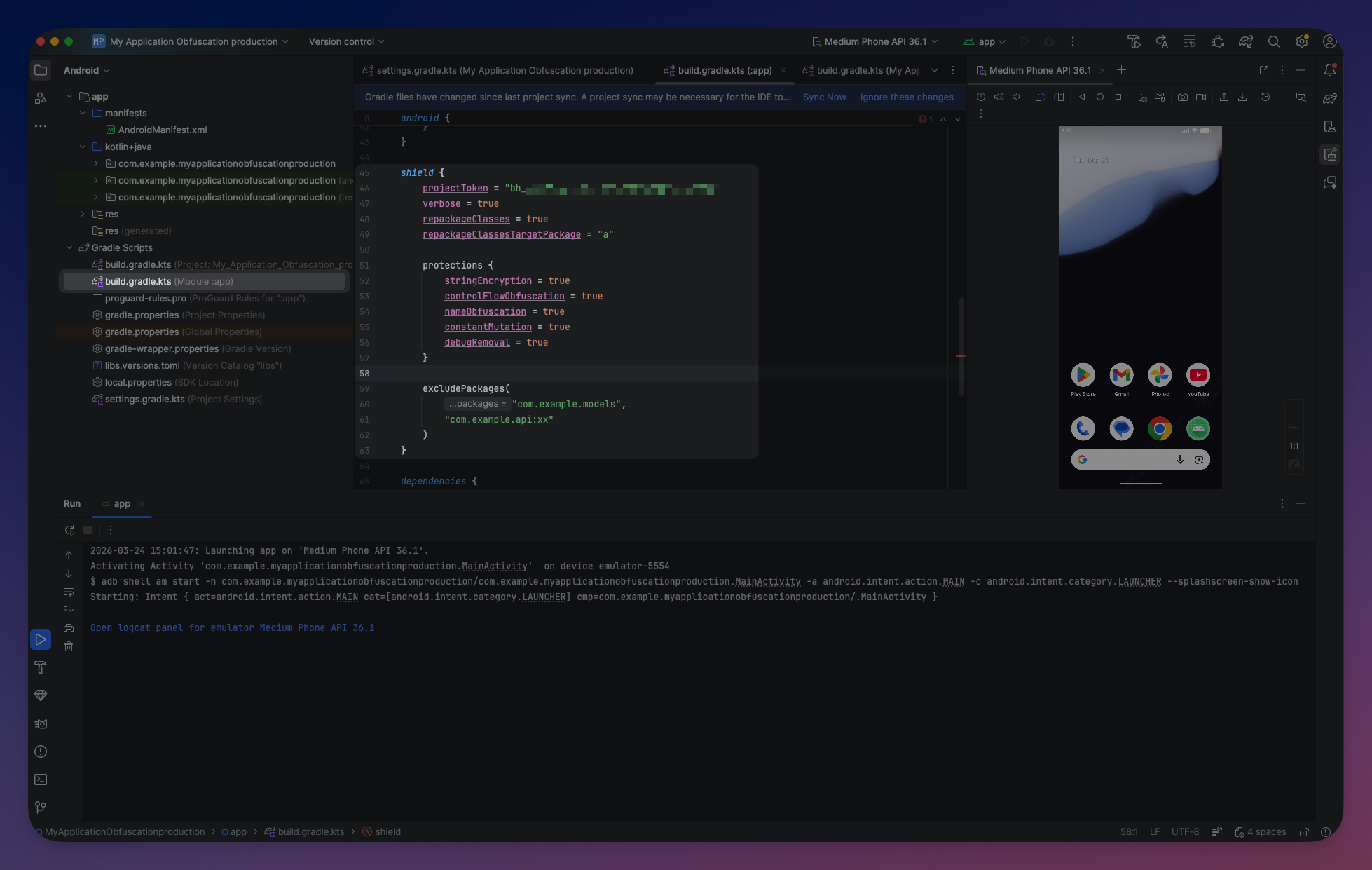
Add the shield block with your project token and desired protections. The simplest way to get started is using a preset:
Kotlin DSL
shield {
    projectToken = "your-project-token"
    preset("mobile")
}
shield {
projectToken = "your-project-token"
preset("mobile")
}Groovy DSL
shield {
    projectToken = "your-project-token"
    preset "mobile"
}
shield {
projectToken = "your-project-token"
preset "mobile"
}Presets
Presets configure all protections at once. You can override individual protections after applying a preset:
mobile— Designed for most Android applications. Enables string encryption, constant mutation, debug removal, and anti-debug. Leaves name obfuscation off (safe for apps using reflection/serialization).server— For backend JVM applications. Enables string encryption, constant mutation, debug removal, and name obfuscation. Leaves runtime protections off since servers are not exposed to reverse engineering.aggressive— Maximum protection. Enables all 7 DSL protections plusrepackageClasses. Use for security-critical applications (fintech, healthcare, DRM).
shield {
    projectToken = "your-project-token"
    preset("mobile")

    // Override individual protections after preset
    protections {
        controlFlowObfuscation = true
    }
}
shield {
projectToken = "your-project-token"
preset("mobile")
// Override individual protections after preset
protections {
controlFlowObfuscation = true
}
}Manual Configuration
For full control, configure each protection individually:
shield {
    projectToken = "your-project-token"
    verbose = true

    protections {
        stringEncryption = true
        constantMutation = true
        debugRemoval = true
        nameObfuscation = false
        controlFlowObfuscation = false
        antiDebug = true
        antiTamper = false
    }

    excludePackages("com.example.api", "com.example.models")
}
shield {
projectToken = "your-project-token"
verbose = true
protections {
stringEncryption = true
constantMutation = true
debugRemoval = true
nameObfuscation = false
controlFlowObfuscation = false
antiDebug = true
antiTamper = false
}
excludePackages("com.example.api", "com.example.models")
} Click to expand
Step 4: Build
Run a release build:
./gradlew assembleRelease./gradlew assembleReleaseShield runs automatically during the build and protects the release variant. If verbose = true, you will see Shield's output in the build log confirming protections were applied.
What Gets Obfuscated
By default, Shield only processes your project's own compiled source code. Dependency JARs (third-party libraries) are not obfuscated and are loaded only for reference resolution. This prevents issues when dependencies contain pre-obfuscated code or fragile bytecode that breaks when transformed.
If you need to obfuscate a specific dependency (e.g., an internal company library distributed as a JAR), use includePackages():
shield {
    projectToken = "your-token"
    preset("mobile")

    // Also obfuscate this dependency
    includePackages("com.mycompany.internal-lib")
}
shield {
projectToken = "your-token"
preset("mobile")
// Also obfuscate this dependency
includePackages("com.mycompany.internal-lib")
}Without includePackages, only your project's source code is obfuscated. This is the safe default for most projects.
AGP Compatibility
Shield automatically detects your Android Gradle Plugin version and uses the appropriate integration:
| AGP Version | Integration Method | Notes |
|---|---|---|
| 8.0+ | Artifacts API | Recommended. Modern API with better performance |
| 7.0–7.4 | Transform API | Legacy API. Functional but deprecated by Google |
| < 7.0 | Not supported | Upgrade your AGP version |
No configuration is required — Shield detects the AGP version and uses the correct integration automatically.
Token Resolution
The project token is resolved in priority order:
Gradle DSL (highest priority):
Kotlinshield { projectToken = "explicit-token" }shield { projectToken = "explicit-token" }Environment variable (fallback):
Bashexport BYTEHIDE_PROJECT_TOKEN="your-token"export BYTEHIDE_PROJECT_TOKEN="your-token"
For CI/CD, set the environment variable in your pipeline secrets. See CI/CD Integration for examples.
Auto-Excluded Packages
Shield automatically excludes known library and framework packages. You do not need to manually exclude these:
| Category | Packages |
|---|---|
| Java SDK | java, javax, sun, jdk |
| Kotlin | kotlin, kotlinx |
| Android | android, androidx, com.android, dalvik |
| ByteHide | com.bytehide.monitor, com.bytehide.runtime |
| Serialization | com.fasterxml.jackson, com.google.gson |
| HTTP | okhttp3, com.squareup.okhttp, okio, retrofit2, com.squareup.retrofit2 |
com.google.firebase, com.google.gms, com.google.protobuf, com.google.crypto | |
| DI | dagger, javax.inject |
| Reactive | io.reactivex |
| Crypto | org.bouncycastle |
| Logging | org.slf4j, org.apache.log4j |
Gradle plugin vs CLI
With the Gradle plugin, dependency JARs are not processed by default (see What Gets Obfuscated), so these auto-exclusions are only relevant when using the CLI where all input JARs are treated as program classes.
You only need to add exclusions for your own packages that use reflection or serialization. See Excluded Packages for details.
Verify Installation
After configuring Shield, run a build to verify:
./gradlew assembleRelease./gradlew assembleRelease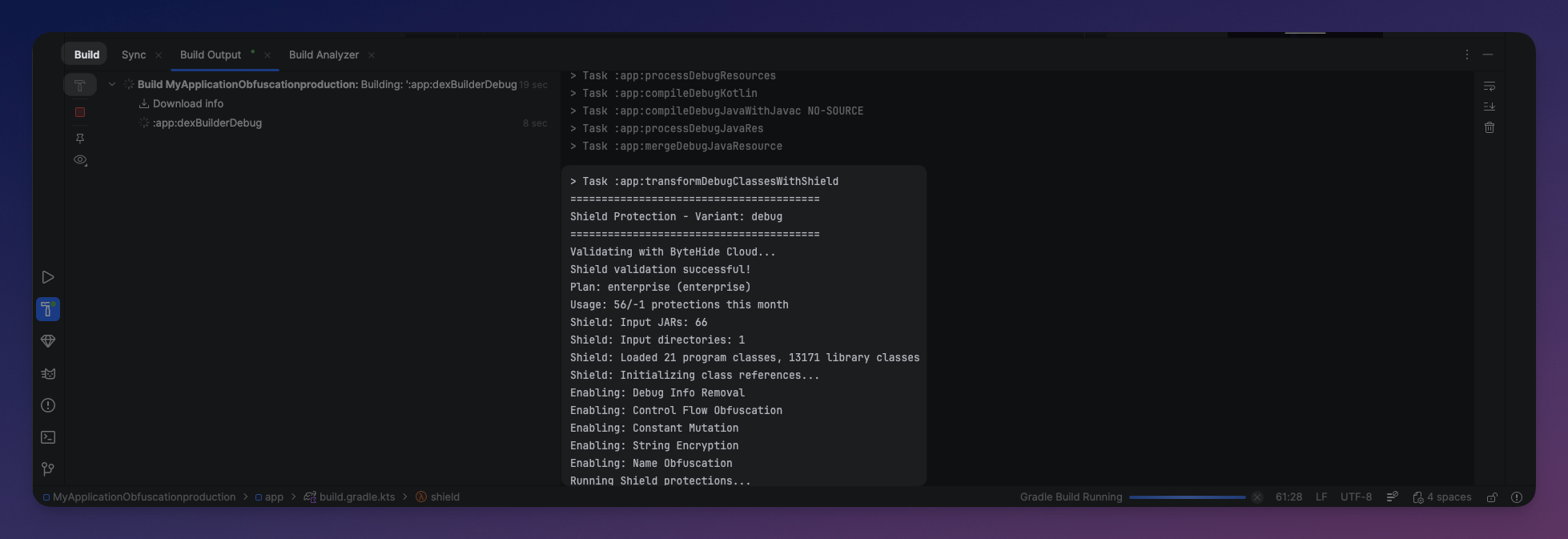 Click to expand
Related
- Project Token — How to obtain and configure your token
- Gradle DSL Reference — Complete configuration reference
- R8 & ProGuard Compatibility — Using Shield alongside R8