Gradle DSL Reference
Complete reference for the Shield Gradle plugin configuration DSL.
Shield Block
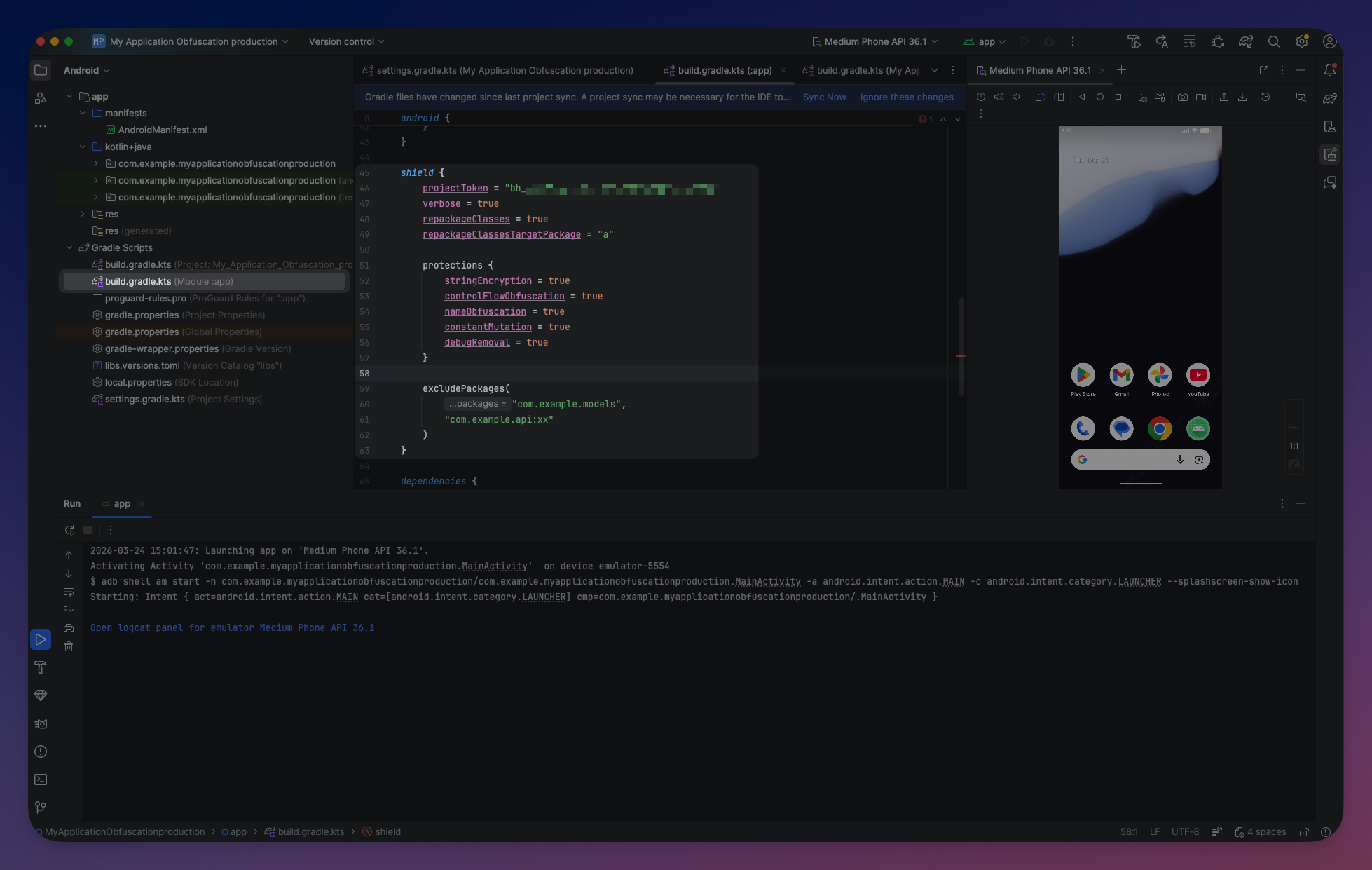
The shield block is the top-level configuration for the plugin:
shield {
    projectToken = "your-token"
    preset("mobile")
    verbose = true

    protections {
        // Protection flags
    }

    excludePackages("com.example.api", "com.example.models")
    includePackages("com.mycompany.internal-lib")

    repackageClasses = true
    repackageClassesTargetPackage = "a"

    variant("release") {
        // Variant-specific overrides
    }

    all {
        // Applied to all variants
    }
}
shield {
projectToken = "your-token"
preset("mobile")
verbose = true
protections {
// Protection flags
}
excludePackages("com.example.api", "com.example.models")
includePackages("com.mycompany.internal-lib")
repackageClasses = true
repackageClassesTargetPackage = "a"
variant("release") {
// Variant-specific overrides
}
all {
// Applied to all variants
}
}Top-Level Properties
| Property | Type | Default | Description |
|---|---|---|---|
projectToken | String | null | Required. Your ByteHide project token. Also resolved from BYTEHIDE_PROJECT_TOKEN env var |
verbose | Boolean | false | Prints detailed protection output during the build |
repackageClasses | Boolean | false | Move all classes into a single flat package |
repackageClassesTargetPackage | String | "a" | Target package name when repackageClasses is enabled |
Presets
Presets configure all protections at once. Individual overrides can be applied after:
shield {
    projectToken = "your-token"
    preset("mobile")

    // Override individual protections after preset
    protections {
        antiDebug = false
    }
}
shield {
projectToken = "your-token"
preset("mobile")
// Override individual protections after preset
protections {
antiDebug = false
}
}mobile— Enables string encryption, constant mutation, debug removal, and anti-debug. Safe baseline for most Android apps. Leaves name obfuscation off to avoid issues with reflection and serialization.server— Enables string encryption, constant mutation, debug removal, and name obfuscation. Designed for backend JVM applications where runtime protections are not needed.aggressive— Enables all 7 DSL protections plusrepackageClasses. Maximum protection for security-critical applications (fintech, healthcare, DRM).
 Click to expand
Protections Block
The protections block controls which protections are applied:
shield {
    protections {
        stringEncryption = true
        constantMutation = true
        debugRemoval = true
        nameObfuscation = true
        controlFlowObfuscation = true
        antiDebug = true
        antiTamper = true
    }
}
shield {
protections {
stringEncryption = true
constantMutation = true
debugRemoval = true
nameObfuscation = true
controlFlowObfuscation = true
antiDebug = true
antiTamper = true
}
}Protection Properties
| Property | Type | Default | Description |
|---|---|---|---|
stringEncryption | Boolean | false | XOR-encrypts string literals in bytecode. Decrypted at runtime |
constantMutation | Boolean | false | Replaces numeric constants (int, long, float, double) with arithmetic expressions |
debugRemoval | Boolean | false | Strips LineNumberTable, LocalVariableTable, and SourceFile attributes |
nameObfuscation | Boolean | false | Renames classes, methods, and fields. Disable when R8 minifyEnabled is true |
controlFlowObfuscation | Boolean | false | Inserts opaque predicates, bogus branches, and switch dispatchers |
antiDebug | Boolean | false | Detects JDWP debuggers and instrumentation tools at runtime |
antiTamper | Boolean | false | SHA-256 integrity validation at runtime |
All protections default to false unless a preset is applied. See Protections for detailed documentation on each.
CLI/JSON-only protections
Two additional protections are available exclusively via CLI/JSON config: Reference Proxy (ReferenceProxy) redirects method and field calls through generated proxy methods, and Resource Protection (ResourceProtection) encrypts embedded resources. These are not exposed in the Gradle DSL.
Advanced Protection Options
These options are available via JSON config or CLI for more granular control:
String Encryption
| Option | Type | Default | Description |
|---|---|---|---|
stringEncryptionMode | String | "DYNAMIC" | BASIC uses a single encryption algorithm. DYNAMIC randomly selects a different algorithm per string for stronger protection |
stringEncryptionMinLength | Int | 3 | Minimum string length to encrypt. Shorter strings are left as-is |
Name Obfuscation
| Option | Type | Default | Description |
|---|---|---|---|
renameMode | String | "LETTERS" | Naming strategy for obfuscated identifiers |
aggressiveOverloading | Boolean | false | Allow methods with different return types to share names |
allowAccessModification | Boolean | false | Widen access modifiers for more aggressive optimizations |
Rename modes:
| Mode | Example Output | Description |
|---|---|---|
LETTERS | a, b, aa, ab | Simple alphabetic names (ProGuard-style) |
UNICODE | \u200b\u200c\u200d | Invisible/confusing Unicode characters |
ASCII | Il1, O0o | Confusing ASCII characters that look similar |
SEQUENTIAL | a, b, ..., z, aa | Sequential short names |
DECODABLE | a1x, b2y | Short names that can be reversed with a mapping file |
FAKE | getContext, onCreate | Realistic-looking fake names to mislead reverse engineers |
Control Flow Obfuscation
| Option | Type | Default | Description |
|---|---|---|---|
controlFlowConfig.intensity | Int | 5 | Percentage of methods to obfuscate (1-10). 1-3 = light, 4-7 = medium, 8-10 = heavy |
controlFlowConfig.depth | Int | 10 | Number of opaque predicates per method (1-18) |
controlFlowConfig.mode | String | "MIXED" | SWITCH, JUMP, or MIXED |
Predefined intensity levels:
| Level | Intensity | Depth | Mode |
|---|---|---|---|
light | 2 | 4 | JUMP |
medium | 5 | 10 | MIXED |
heavy | 9 | 16 | SWITCH |
maximum | 10 | 18 | SWITCH |
General Advanced Options
These options are available via JSON config or CLI:
| Option | Type | Default | Description |
|---|---|---|---|
mappingFile | String | null | Output mapping file for deobfuscation of renamed identifiers |
excludedClasses | String[] | [] | Specific classes to exclude from protection |
excludedMethods | String[] | [] | Specific methods to exclude from protection |
keepRules | Object[] | [] | ProGuard-compatible keep rules for preserving names |
adaptClassStrings | Boolean | false | Adapt Class.forName("...") strings when renaming classes |
Scope: User Code Only
By default, Shield only processes your project's own compiled source code. Dependency JARs are passed through without modification and loaded into the library pool for reference resolution only. This prevents issues with pre-obfuscated or fragile bytecode in third-party libraries.
Including Dependencies
If you need to obfuscate a specific dependency (e.g., an internal company library), use includePackages():
shield {
    projectToken = "your-token"
    preset("mobile")
    includePackages("com.mycompany.internal-lib", "com.mycompany.shared")
}
shield {
projectToken = "your-token"
preset("mobile")
includePackages("com.mycompany.internal-lib", "com.mycompany.shared")
}Per-variant:
shield {
    variant("release") {
        projectToken = "your-token"
        preset("aggressive")
        includePackages("com.mycompany.internal-lib")
    }
}
shield {
variant("release") {
projectToken = "your-token"
preset("aggressive")
includePackages("com.mycompany.internal-lib")
}
}Without includePackages, only your project's source code is obfuscated.
Exclusions
Global Exclusion
Exclude packages from all protections using the excludePackages method:
shield {
    excludePackages("com.example.models", "com.example.api")
}
shield {
excludePackages("com.example.models", "com.example.api")
}Per-Protection Exclusion
Append :Protection1,Protection2 to a package name to exclude it only from specific protections:
shield {
    excludePackages(
        "com.example.models",                                  // exclude from ALL
        "com.example.networking:ControlFlowMatrix",            // exclude only from ControlFlow
        "com.example.legacy:StringEncryption,ConstantMutation" // exclude from two protections
    )
}
shield {
excludePackages(
"com.example.models", // exclude from ALL
"com.example.networking:ControlFlowMatrix", // exclude only from ControlFlow
"com.example.legacy:StringEncryption,ConstantMutation" // exclude from two protections
)
}Protection names for per-protection syntax: StringEncryption, ConstantMutation, DebugInfoRemoval, NameObfuscation, ControlFlowMatrix, AntiDebug, AntiTamper, ReferenceProxy, ResourceProtection.
See Excluded Packages for the full exclusion guide.
Class Repackaging
Moves all obfuscated classes into a single flat package, eliminating the original package structure:
Before:  com/example/api/UserService.class
         com/example/models/User.class

After:   a/xR.class
         a/kP.class
Before: com/example/api/UserService.class
com/example/models/User.class
After: a/xR.class
a/kP.classshield {
repackageClasses = true
repackageClassesTargetPackage = "a" // default
}shield {
repackageClasses = true
repackageClassesTargetPackage = "a" // default
}Excluded packages keep their original structure. Classes with keepNames keep their original name and package. Access modifiers are automatically widened to public when repackaging to prevent IllegalAccessError.
Variant Configuration
Shield supports per-variant configuration. This lets you apply different protection settings to debug and release builds:
shield {
    projectToken = "your-token"

    variant("debug") {
        verbose = true
        protections {
            stringEncryption = false
            debugRemoval = false
        }
    }

    variant("release") {
        preset("aggressive")
    }
}
shield {
projectToken = "your-token"
variant("debug") {
verbose = true
protections {
stringEncryption = false
debugRemoval = false
}
}
variant("release") {
preset("aggressive")
}
}The variant name matches Android build variants. Shield matches in this order: exact match ("freeRelease"), build type match ("release" matches freeRelease, paidRelease), then top-level DSL as wildcard.
See Variant Configuration for detailed usage.
all { } Block
The all block applies configuration to every variant:
shield {
    all {
        projectToken = "your-token"
        preset("mobile")
    }
}
shield {
all {
projectToken = "your-token"
preset("mobile")
}
}Keep Rules
Keep rules prevent renaming but allow other protections. They are defined in JSON config:
{
  "keepRules": [
    {
      "classPattern": "com/example/api/**",
      "memberPattern": "*",
      "keepNames": true
    }
  ]
}
{
"keepRules": [
{
"classPattern": "com/example/api/**",
"memberPattern": "*",
"keepNames": true
}
]
}| Pattern | Matches |
|---|---|
com/example/api/** | All classes in com.example.api and subpackages |
com/example/models/User | Exact class |
* (memberPattern) | All members |
getId (memberPattern) | Specific method/field |
Shield also respects standard ProGuard keep rules from your proguard-rules.pro file. See R8 & ProGuard Compatibility for details.
Complete Example
A production-ready configuration:
// app/build.gradle.kts
plugins {
    id("com.android.application")
    id("org.jetbrains.kotlin.android")
    id("com.bytehide.shield") version "1.1.5"
}

android {
    compileSdk = 34
    defaultConfig {
        minSdk = 21
        targetSdk = 34
    }
    buildTypes {
        release {
            isMinifyEnabled = true
            isShrinkResources = true
            proguardFiles(getDefaultProguardFile("proguard-android-optimize.txt"), "proguard-rules.pro")
        }
    }
}

shield {
    projectToken = System.getenv("BYTEHIDE_PROJECT_TOKEN")

    variant("release") {
        preset("mobile")

        protections {
            controlFlowObfuscation = true
            nameObfuscation = false  // R8 handles renaming
        }

        excludePackages(
            "com.example.models",
            "com.example.ui:ControlFlowMatrix"
        )
    }

    verbose = false
}
// app/build.gradle.kts
plugins {
id("com.android.application")
id("org.jetbrains.kotlin.android")
id("com.bytehide.shield") version "1.1.5"
}
android {
compileSdk = 34
defaultConfig {
minSdk = 21
targetSdk = 34
}
buildTypes {
release {
isMinifyEnabled = true
isShrinkResources = true
proguardFiles(getDefaultProguardFile("proguard-android-optimize.txt"), "proguard-rules.pro")
}
}
}
shield {
projectToken = System.getenv("BYTEHIDE_PROJECT_TOKEN")
variant("release") {
preset("mobile")
protections {
controlFlowObfuscation = true
nameObfuscation = false // R8 handles renaming
}
excludePackages(
"com.example.models",
"com.example.ui:ControlFlowMatrix"
)
}
verbose = false
}Click to expand
Related
- Variant Configuration — Debug vs release settings
- Excluded Packages — Controlling which packages Shield processes
- R8 & ProGuard Compatibility — ProGuard backward compatibility and R8 integration